The Elo Cloud family
EloERP Cloud
Start Free Trial
HR & Payroll

HR and payroll software,
attendance to payslips.

Attendance, leave, salary components, income tax and statutory deductions, loans, payslips and salary payments in one HRM system. Every payroll run posts to your accounts automatically, so no one types a salary journal by hand.

Attendance · Payroll · Payslips · Pakistan statutory built in · Read the step-by-step guide →

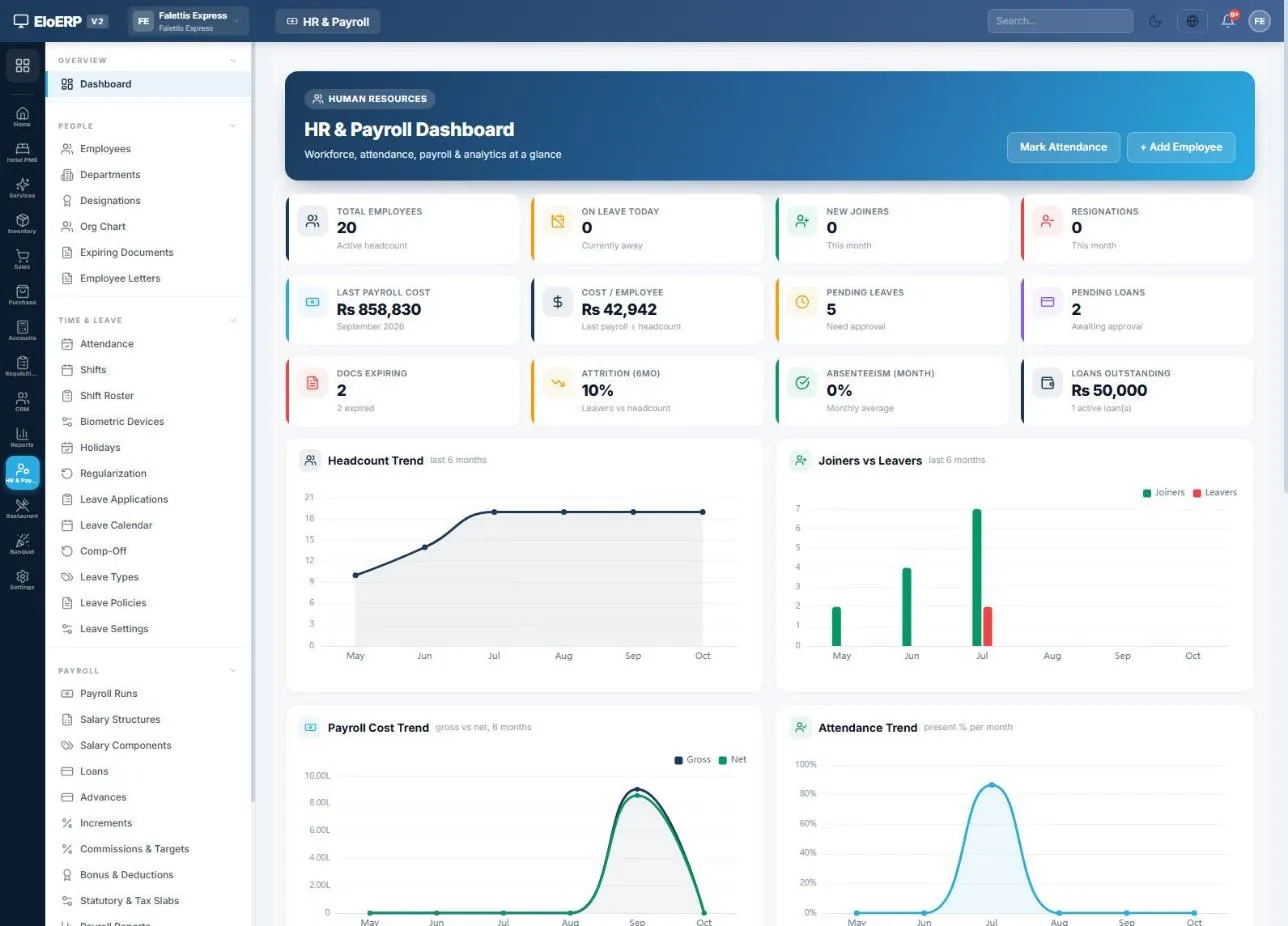
HR & Payroll → Dashboard
EloERP HR and Payroll dashboard showing headcount, last payroll cost and loans outstanding

What is HR and payroll software?

HR and payroll software keeps your employee records, attendance and leave, and turns them into a correct monthly payroll: salaries, absence deductions, overtime, income tax, EOBI, loans and advances, then payslips and payment. In EloERP the HRM module sits on the same cloud system as your accounts, so each run posts one balanced journal entry and every employee has their own ledger.

How payroll works

One payroll month, start to finish

The same eight steps every month. Setup is done once; after that the system carries each step into the next.

SetupWorking week, salary components, tax slabs and statutory rates
EmployeesSalary, bank account, tax and social-security IDs, own ledger
AttendanceAbsences, leave, late arrivals and overtime
Run payrollGenerate the month, apply tax, deductions and overtime
FinalizeLock the run; payslips are ready
Post to accountsSalary expense, employee ledgers, tax and statutory payables
PayFrom bank or cash, or upload a bank bulk-transfer file
Remit & reportDeposit withheld tax and contributions; returns ready to file
Draftreview & adjust →Processedfinalized & posted →Paid
Attendance management system

Attendance and leave that feed payroll directly

Mark attendance daily, bulk-mark a team, import a CSV or sync from a biometric device. Whatever is recorded flows straight into that month's salary.

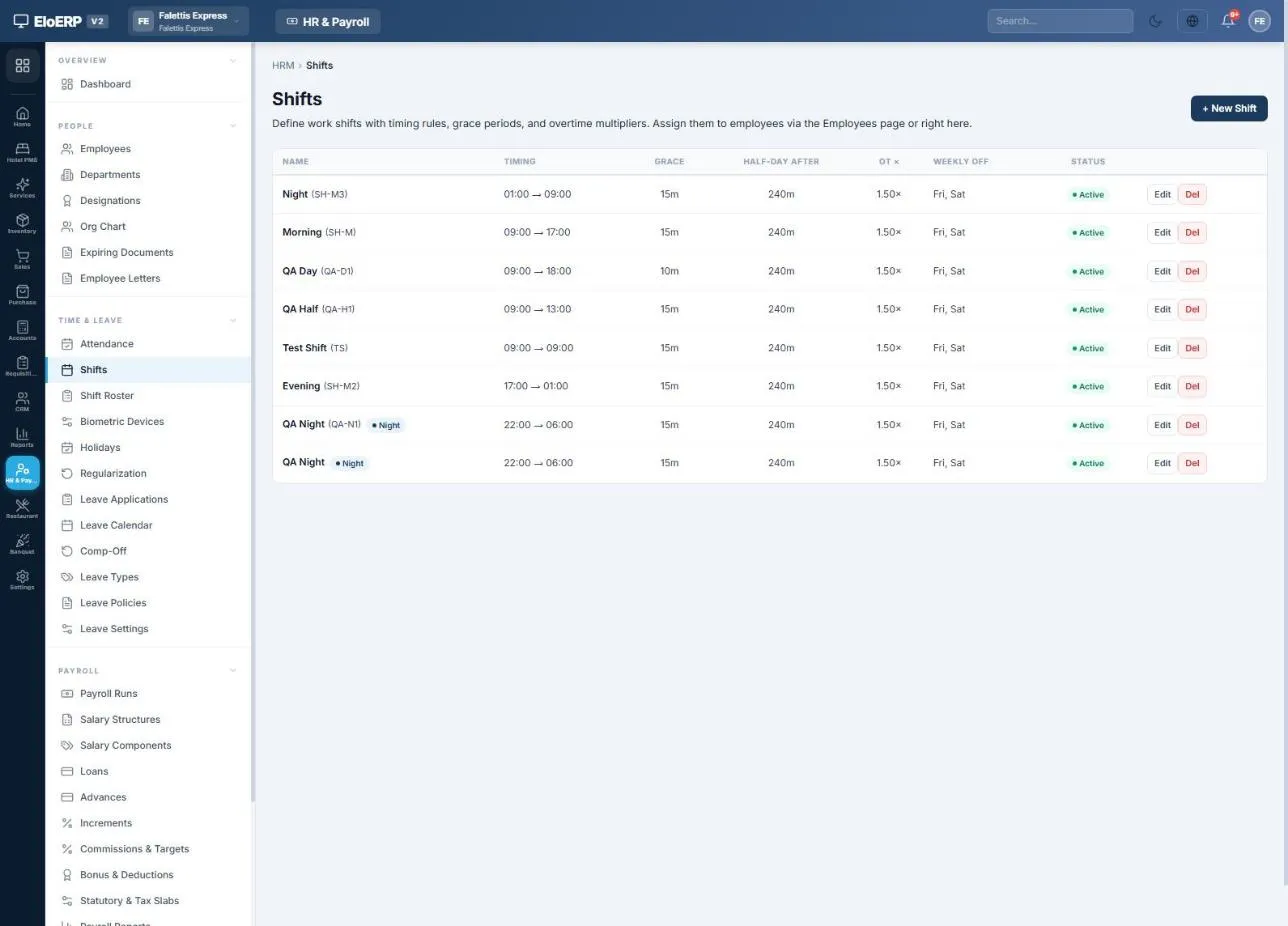
  • Shifts with timings, grace minutes, a half-day threshold and an overtime multiplier.
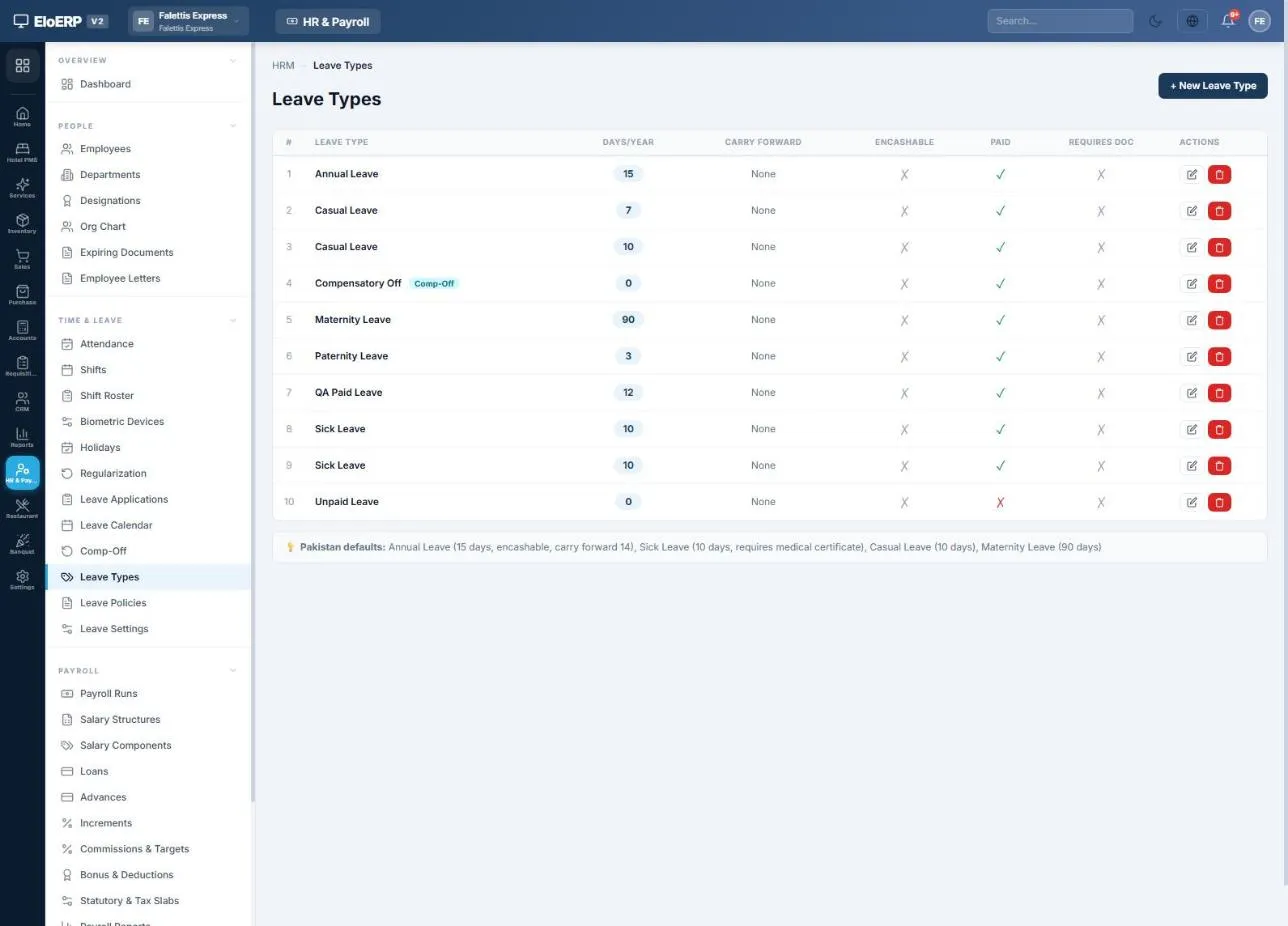
  • Leave types with days per year, paid or unpaid, carry-forward and encashment; leave applications approved against your leave policies.
  • Public holidays left out of working days (Pakistan's national list loads with one button).
  • Missed punches fixed through regularization requests that rewrite the day once approved.
What happensEffect on pay
Absent on a working dayOne day's pay deducted (monthly gross ÷ working days)
Half dayHalf a day's pay deducted
Paid leave / unpaid leaveNo deduction / deducted like an absence
Late arrival or early leavingOptional fines, with grace minutes and free occurrences
OvertimePaid at your multiplier, if switched on
Joined or left mid-monthSalary prorated automatically
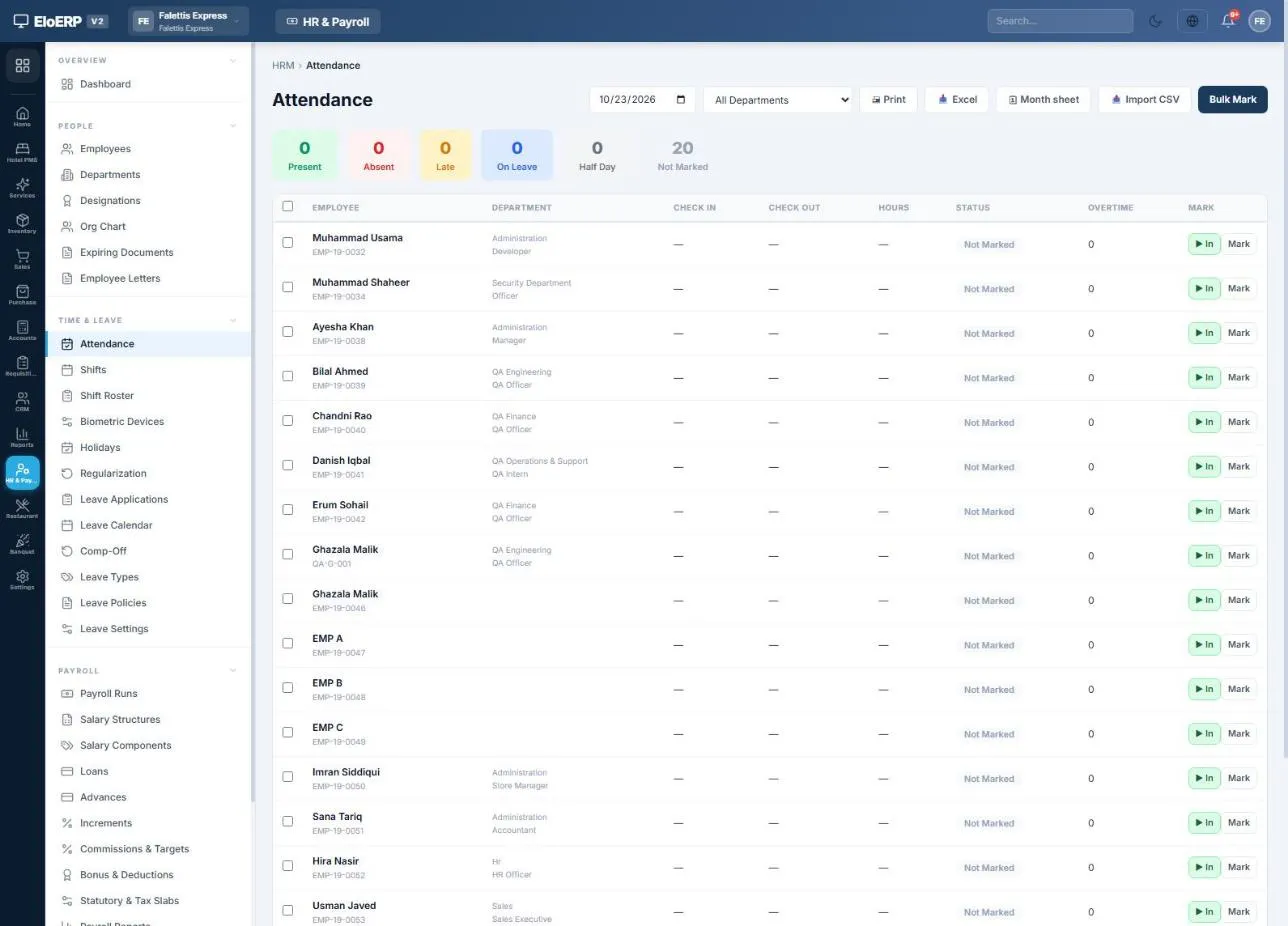
Time & Leave → Attendance
EloERP attendance page with present, absent, late and on-leave counters and each employee's check-in and check-out

Attendance: mark one employee, bulk mark many, import a CSV or open the month sheet.

Shifts list with timings, grace period, half-day threshold and overtime multiplier
Leave types with days per year and paid or unpaid flag
Income tax on salary

Income tax on salary, worked out from your tax slabs

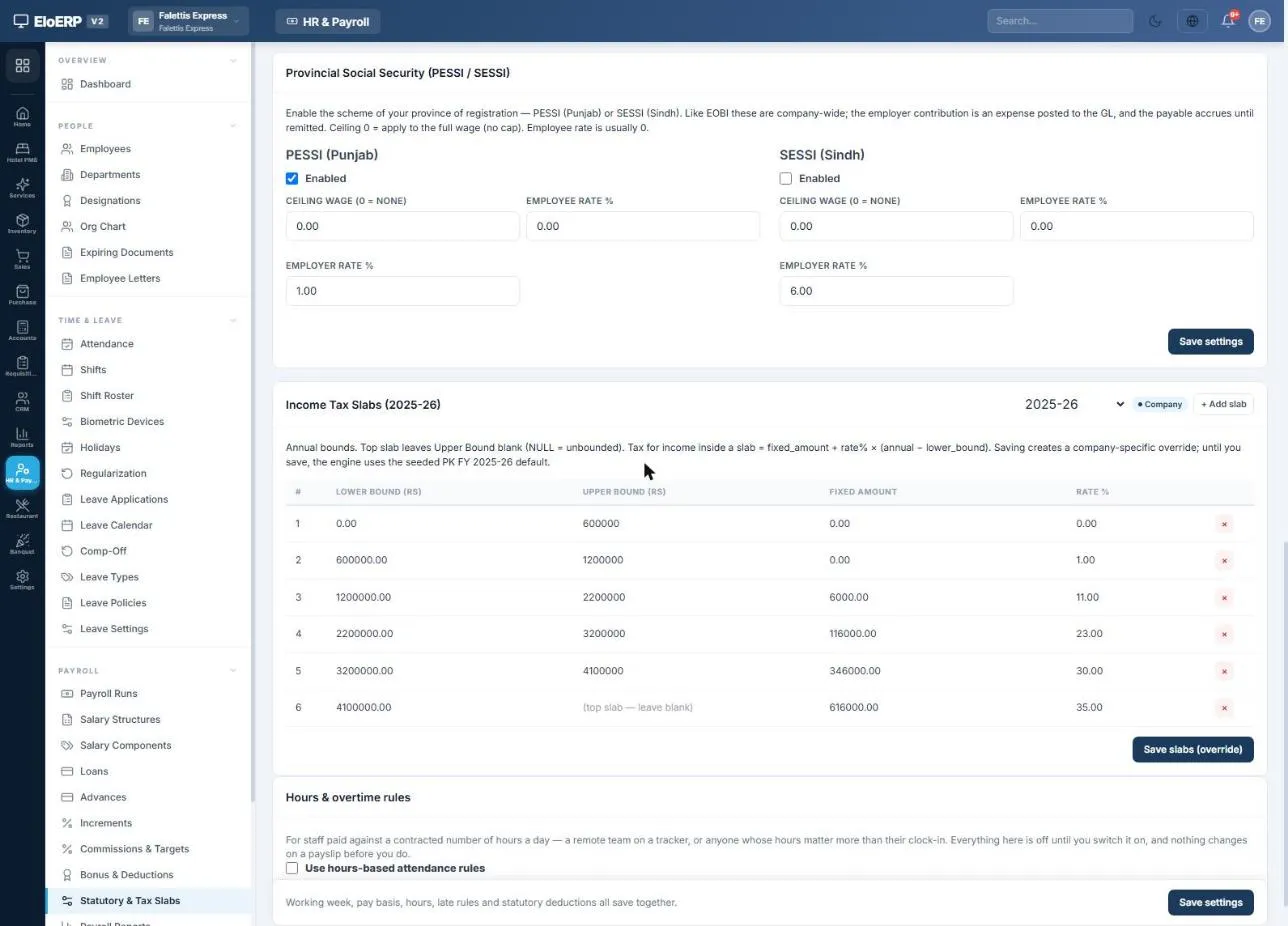
Enter the tax year's income-tax slabs for salaried employees once. On every payroll run, EloERP annualises each employee's taxable pay, applies the slab and withholds one-twelfth of the annual tax. When a new tax year starts, you add its slabs and the next run uses them. Pakistan's salaried slabs (for example 2025-26) are built in.

Example · Pakistan, tax year 2025-26
Taxable pay this month (185,000 + 25,000)210,000
Annualised (× 12)2,520,000
Slab: 2,200,001 – 3,200,000 → 116,000 + 23% above 2,200,000189,600 / year
Monthly tax withheld (÷ 12)15,800
EOBI, employee 1% of the 37,000 ceiling370
Net salary193,830
Example from a demo company using the slab settings shown. The slabs are yours to maintain; EloERP applies whatever you enter.
  • Taxable flag on each earning decides what counts towards income tax.
  • Tax withheld per employee in an income-tax statement, plus a tax deduction certificate for each person (Section 149 in Pakistan).
Payroll → Statutory & Tax Slabs
Income tax slabs for salaried individuals, Pakistan tax year 2025-26, entered in EloERP payroll settings

Income tax slabs (Pakistan, 2025-26) for salaried individuals, entered once and applied on every run.

Statutory deductions · Pakistan

Pakistan statutory payroll: EOBI, PESSI and SESSI

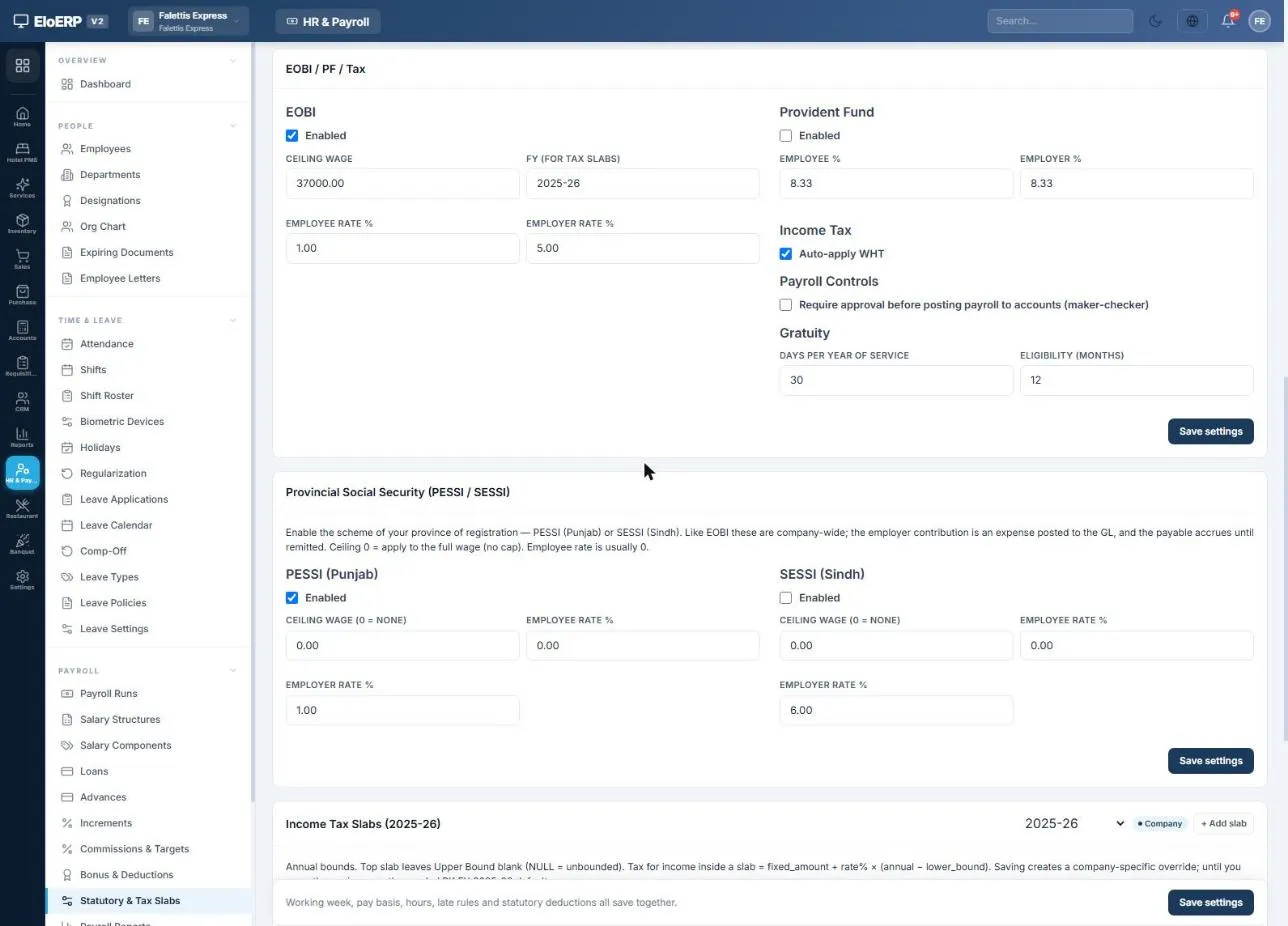
For companies in Pakistan, EOBI is built in. Set the ceiling wage and the employee and employer percentages once; the employee share is deducted from salary and the employer share is booked as a company expense, both worked out on gross pay up to the ceiling.

  • Example settings: ceiling Rs 37,000, employee 1%, employer 5%. Change them when the rates change.
  • PESSI (Punjab) or SESSI (Sindh) social security, usually employer-only, on full wages unless you set a ceiling.
  • Provident fund with optional employee and employer percentages, and gratuity by days per year of service for final settlement.
  • Monthly EOBI contribution list, WHT return, salary bank files for HBL, UBL and MCB, and CNIC, NTN and EOBI numbers on every employee record.
Payroll → EOBI / PF / Tax & Social Security
EOBI settings with ceiling 37,000, employee 1% and employer 5%, income tax auto-apply and PESSI employer 1%

EOBI, provident fund, income tax and provincial social security settings.

Payroll management

Run monthly payroll in three steps

Generate the month, apply tax, EOBI and overtime, then finalize. Loan instalments and advance recoveries are picked up automatically.

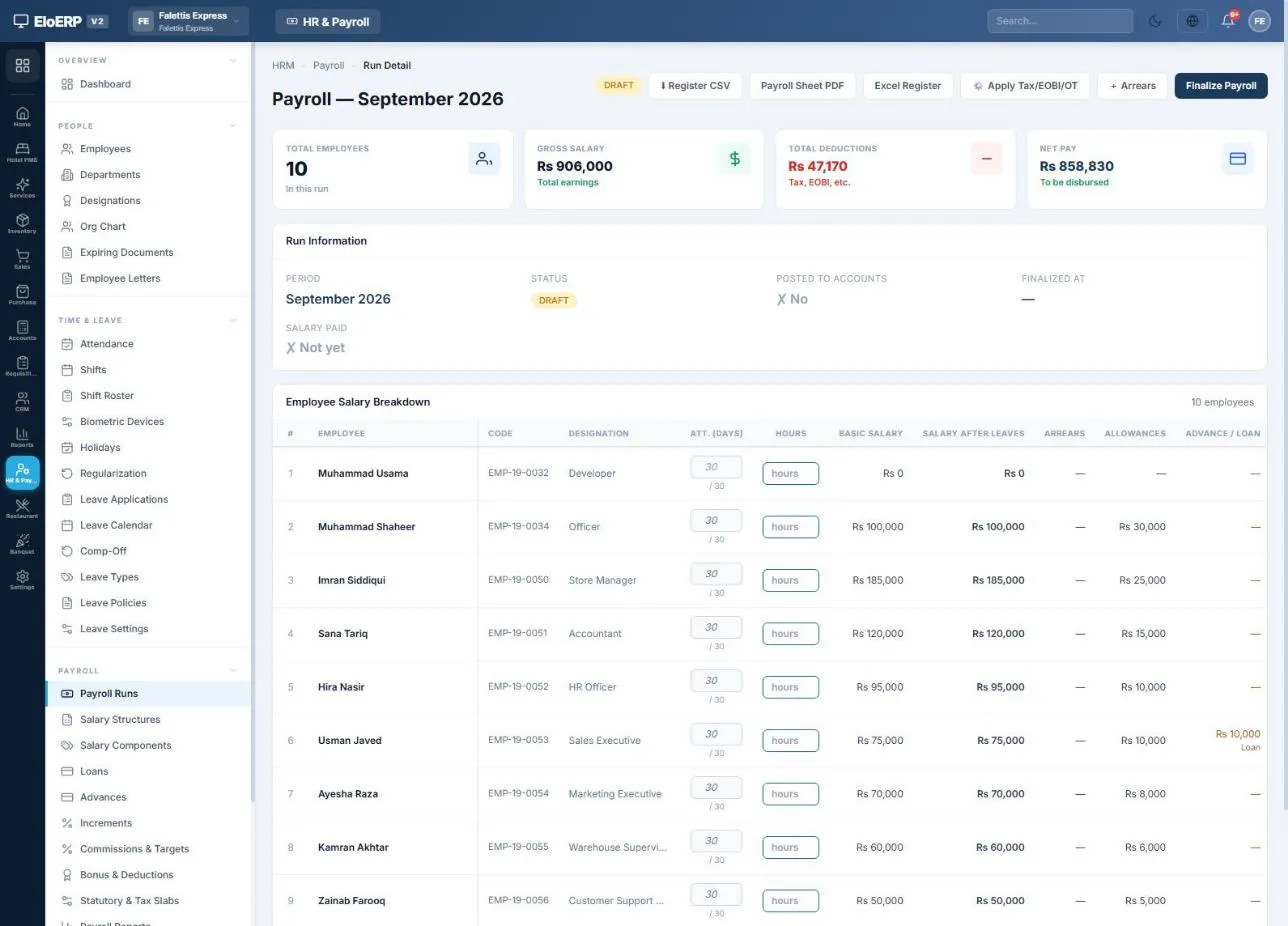
Payroll Runs → September 2026 (Draft)
Draft payroll run for September 2026: 10 employees, gross 906,000, deductions 47,170, net 858,830

1 · Generate, 2 · Apply Tax/EOBI/OT. Absences, half days, late fines, unpaid leave, overtime, commissions, EOBI, PESSI, provident fund and income tax for every employee. Safe to press again after any change.

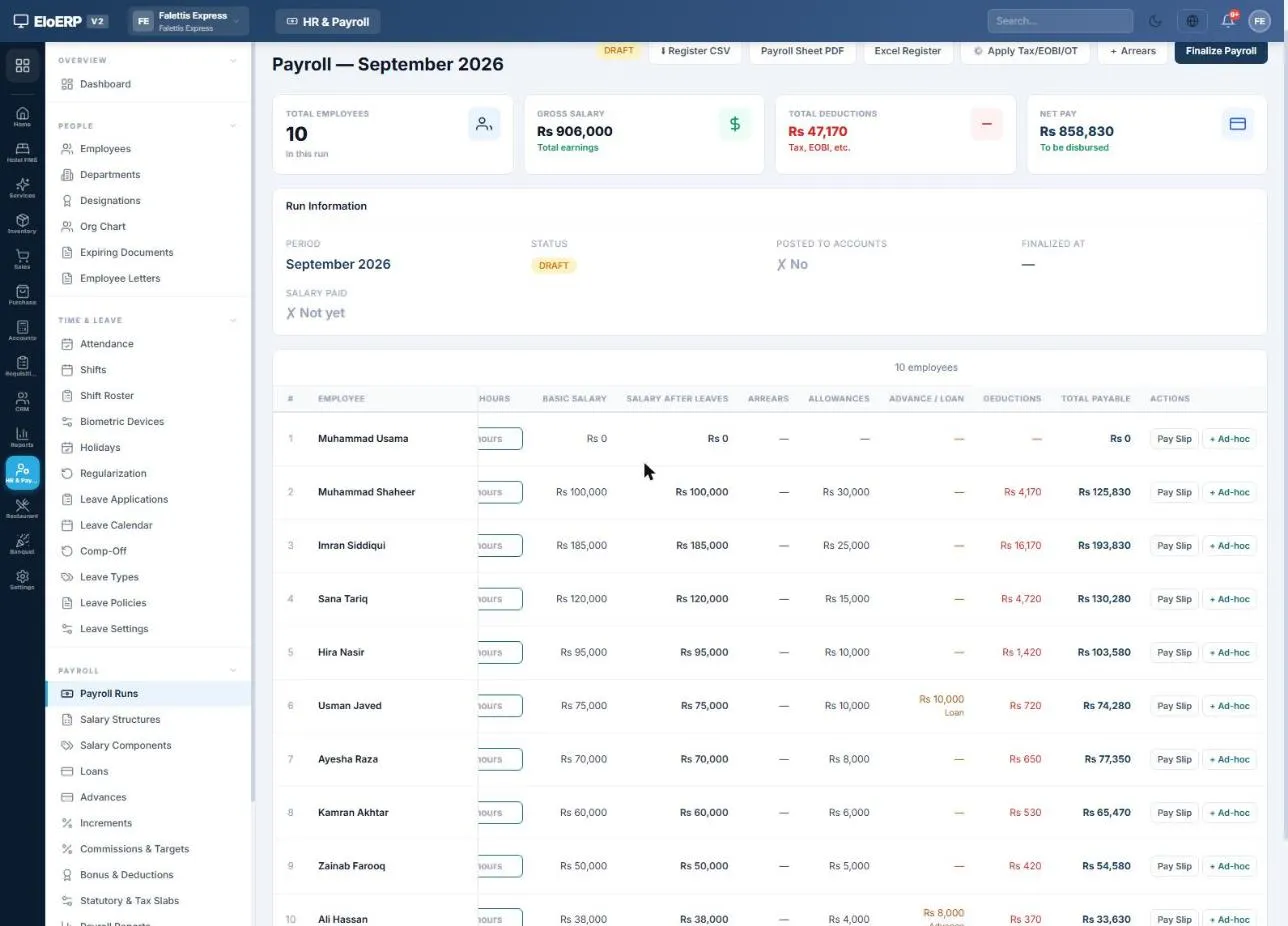
Payroll run → deductions per employee
Employee salary breakdown with deductions, loan and advance recovery and total payable per employee

Adjust the draft: type paid days, add a one-off bonus or deduction with + Ad-hoc, pay backdated raises with + Arrears, and preview any payslip. 3 · Finalize locks the run, with optional maker-checker approval.

Salary slips

A salary slip for every employee, from every run

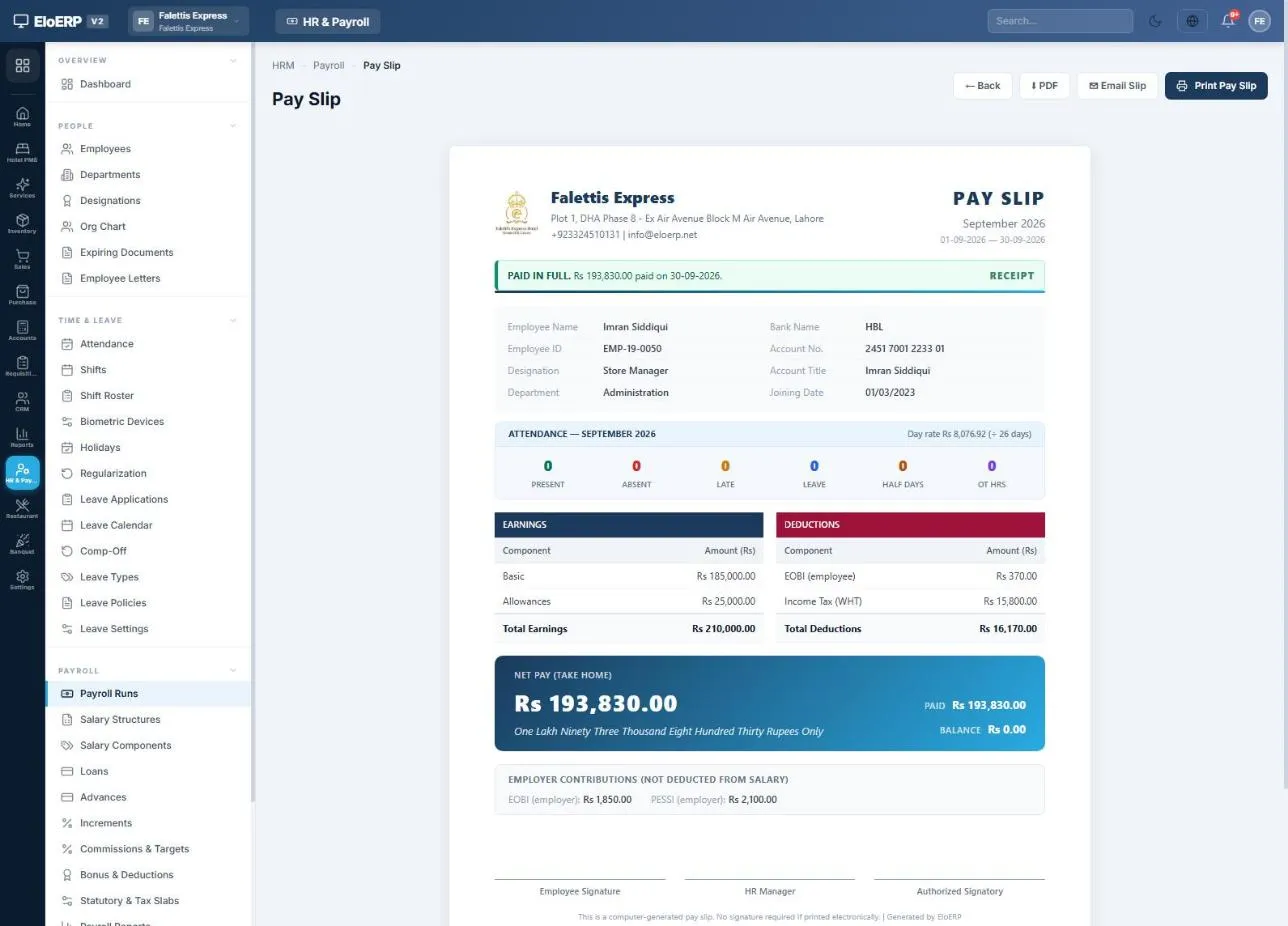
Payslips are generated when the run is finalized. Each one shows earnings, deductions, attendance, net pay in words, payment status and the employer's contributions.

  • PDF or print any slip, or download a whole month's slips in one PDF.
  • Email the slip once salary is paid, or send slips automatically on payment.
  • My HR Portal: employees with a login see their own slips, leave balances, attendance and loans.
  • Salary certificates and letters (appointment, experience, bank and increment letters) on your letterhead.
Pay Slip · September 2026
EloERP salary slip for September 2026 showing basic salary, allowances, EOBI, income tax and net pay

Salary slip: net Rs 193,830 paid in full; employer EOBI and PESSI shown but not deducted.

Loans & advances

Employee loans and salary advances, recovered from salary

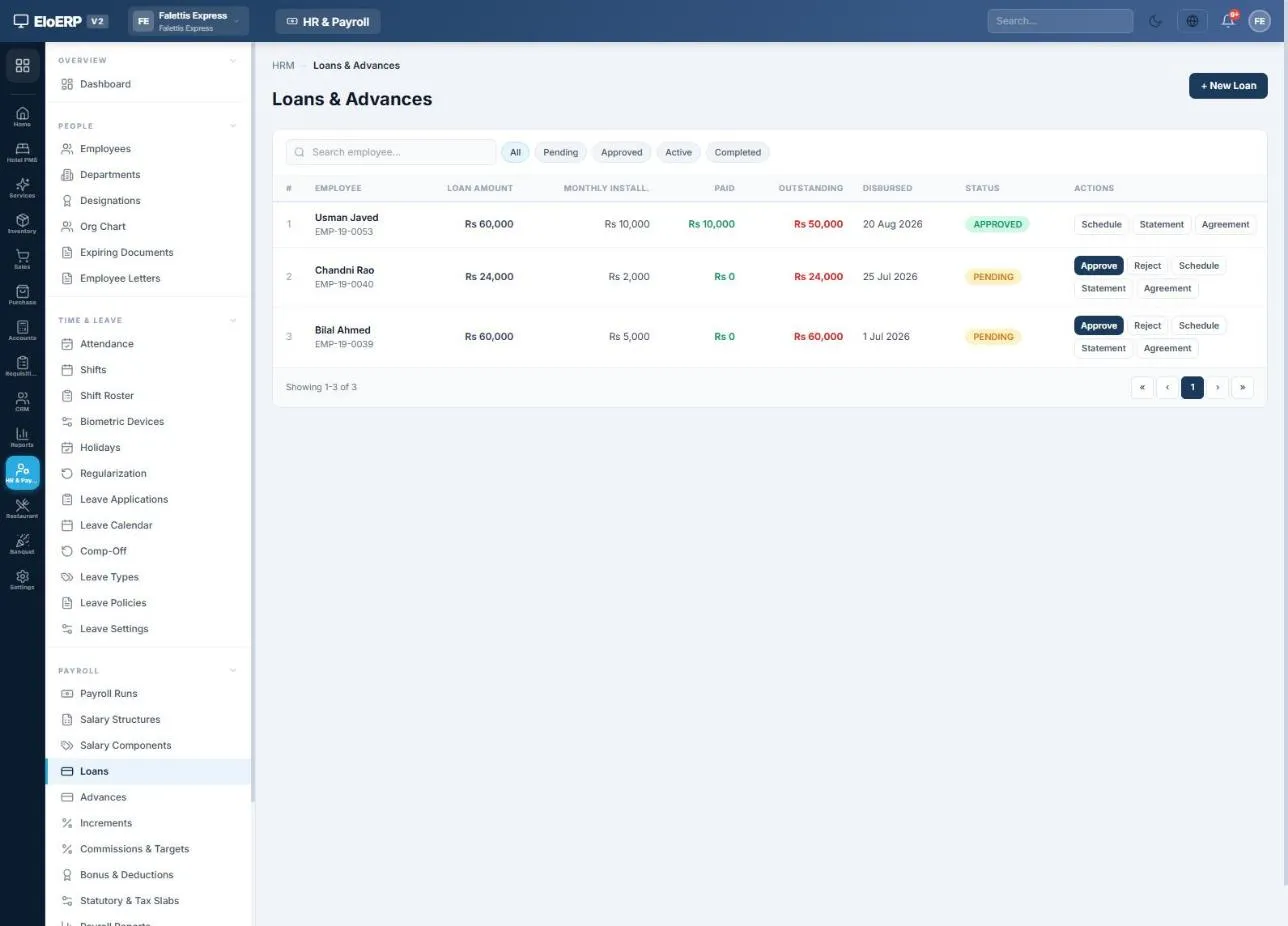
Approve a loan or advance, pay it from bank or cash, and EloERP builds the schedule. Each payroll run deducts the instalment until it is cleared, and every movement lands on the employee's own ledger.

Employee loans list: a 60,000 loan at 10,000 per month with 50,000 outstanding

Loans: Rs 60,000 over six months, with the loan statement and agreement one click away.

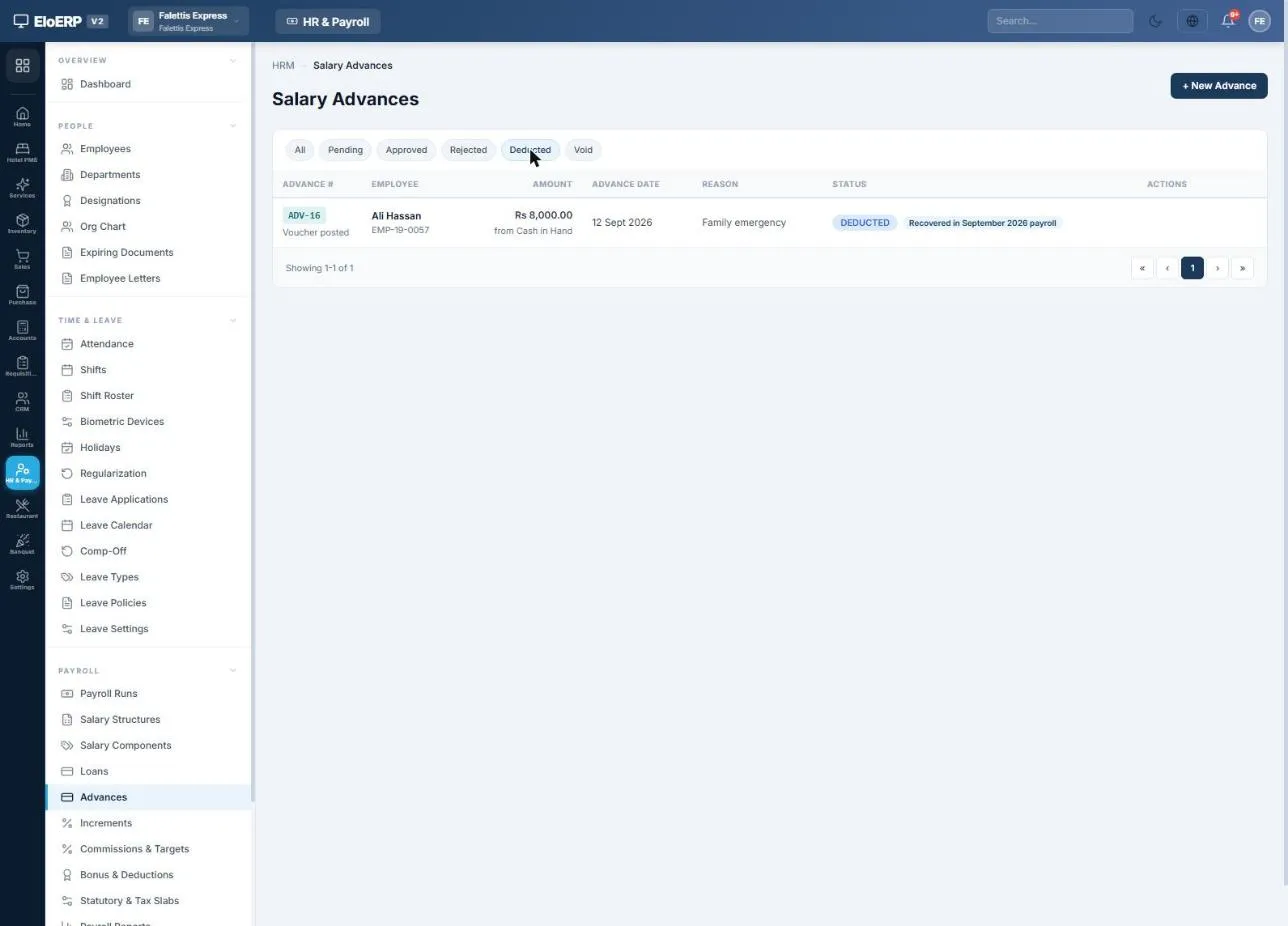
Salary advance of Rs 8,000 recovered in the September 2026 payroll

Advances: recovered in full from the next payroll, or carried over if the salary does not cover it.

Payroll with accounting

Every payroll run posted to your books

Press Post to Accounts and EloERP posts one balanced journal entry for the month: salary expense, employer contributions, net pay owed to each employee, and the tax and contributions withheld. Salary cost shows in the Profit & Loss straight away.

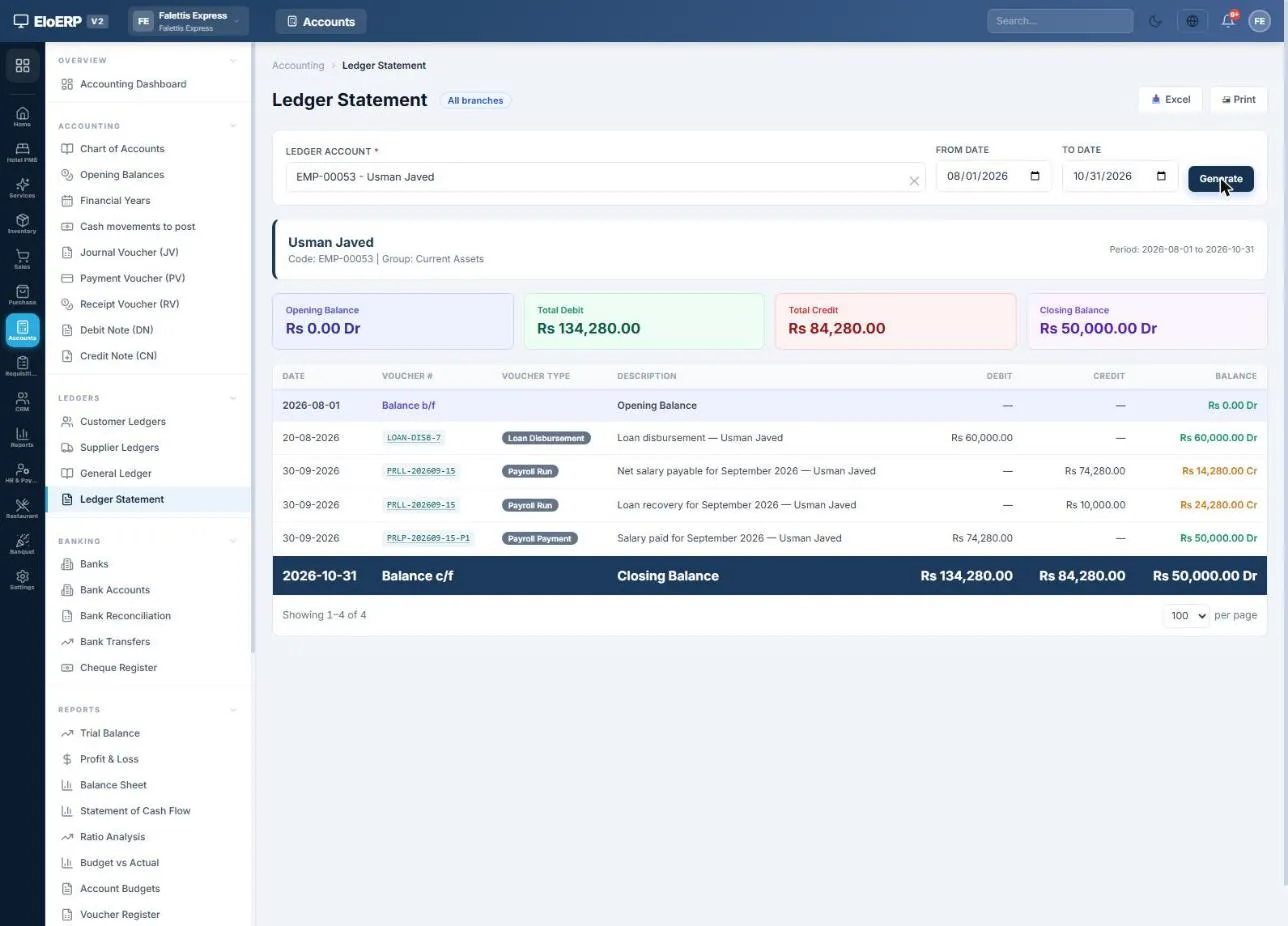
  • Each employee's own ledger: loans paid out, salary owed, instalments recovered and salary paid, in one running statement.
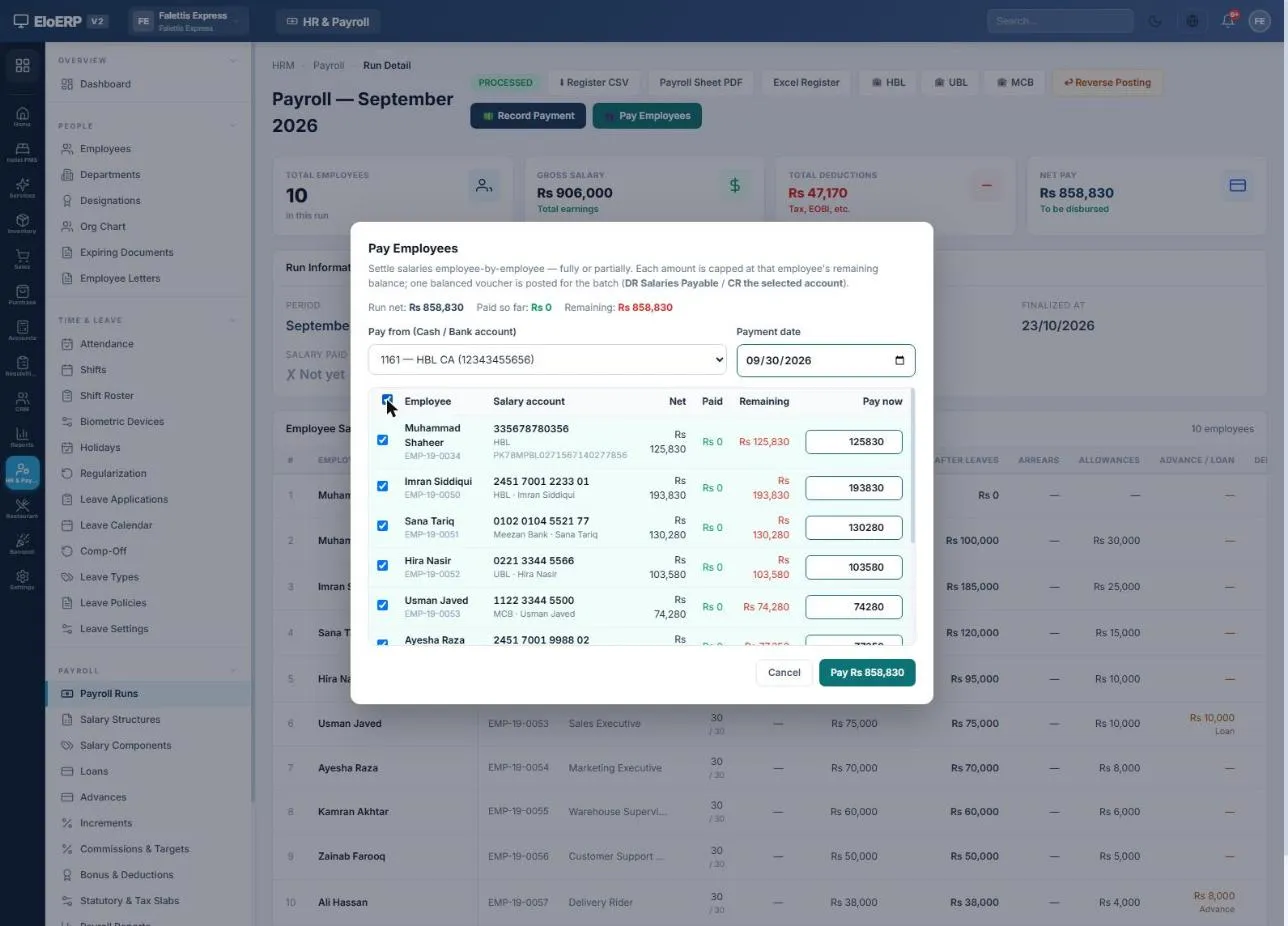
  • Pay salaries to everyone or one by one, from any bank or cash account, or download a bank bulk-transfer file for internet banking (HBL, UBL and MCB formats today).
  • Withheld tax and contributions stay as liabilities until you deposit them; one payment voucher clears each.
AccountDebitCredit
Salaries & Wages906,000
Employer contributions (EOBI, PESSI)25,710
Employee ledgers and salaries payable (net pay)858,830
Income tax and contributions payable54,880
Loan and advance recovered18,000

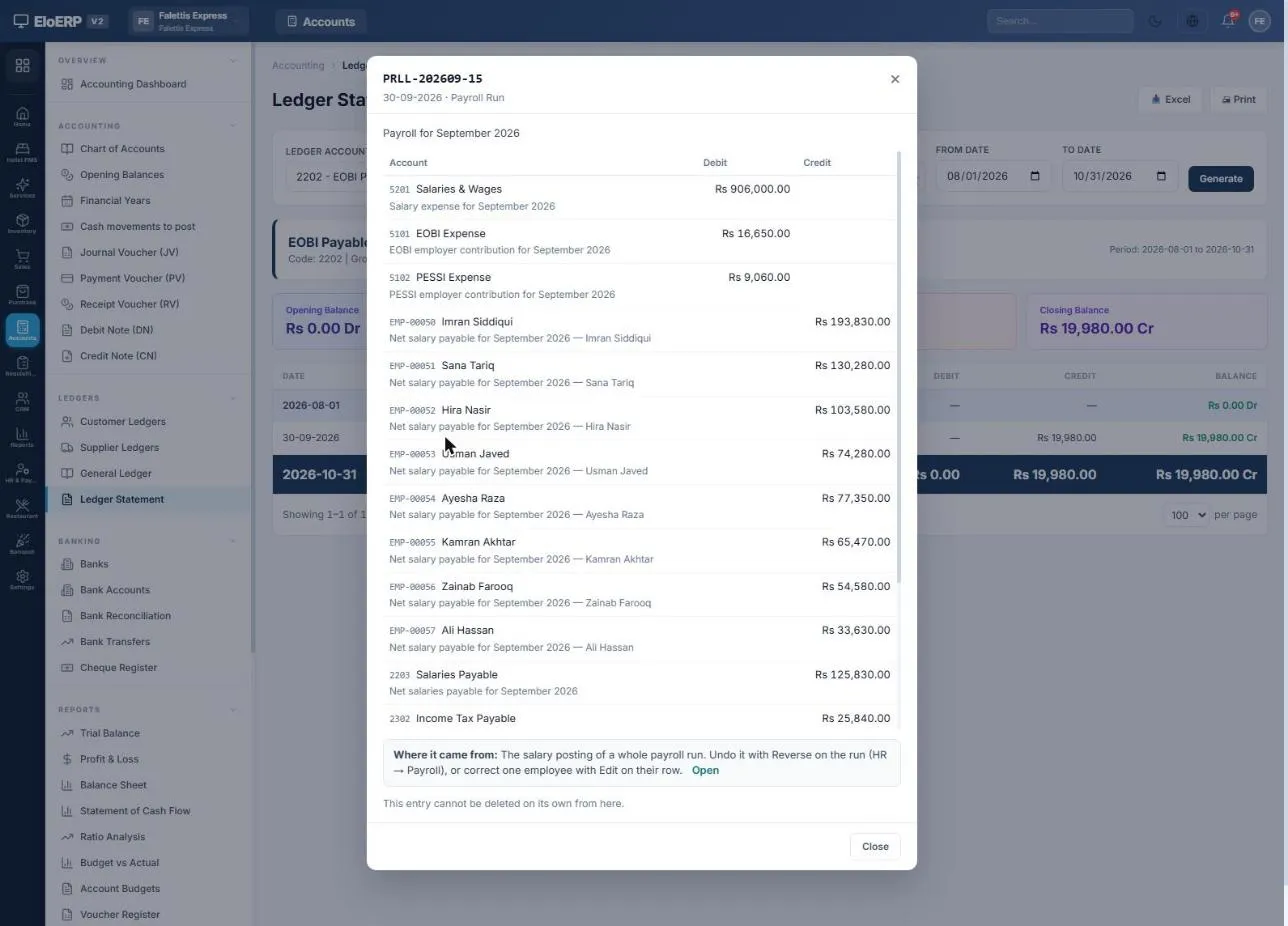
September 2026 run of a demo company in Pakistan, summarised from voucher PRLL-202609-15 (total 931,710 each side).

Voucher PRLL-202609-15
Payroll journal voucher with salaries and wages, EOBI and PESSI expense, each employee's net salary and tax payable
Employee ledger statement with loan disbursement, net salary credit, instalment recovered and salary payment
Pay Employees dialog paying all employees from the company's HBL account

An employee's ledger statement, and paying the whole run from the company's bank account.

Payroll reports

Salary register, tax statements and every HR report

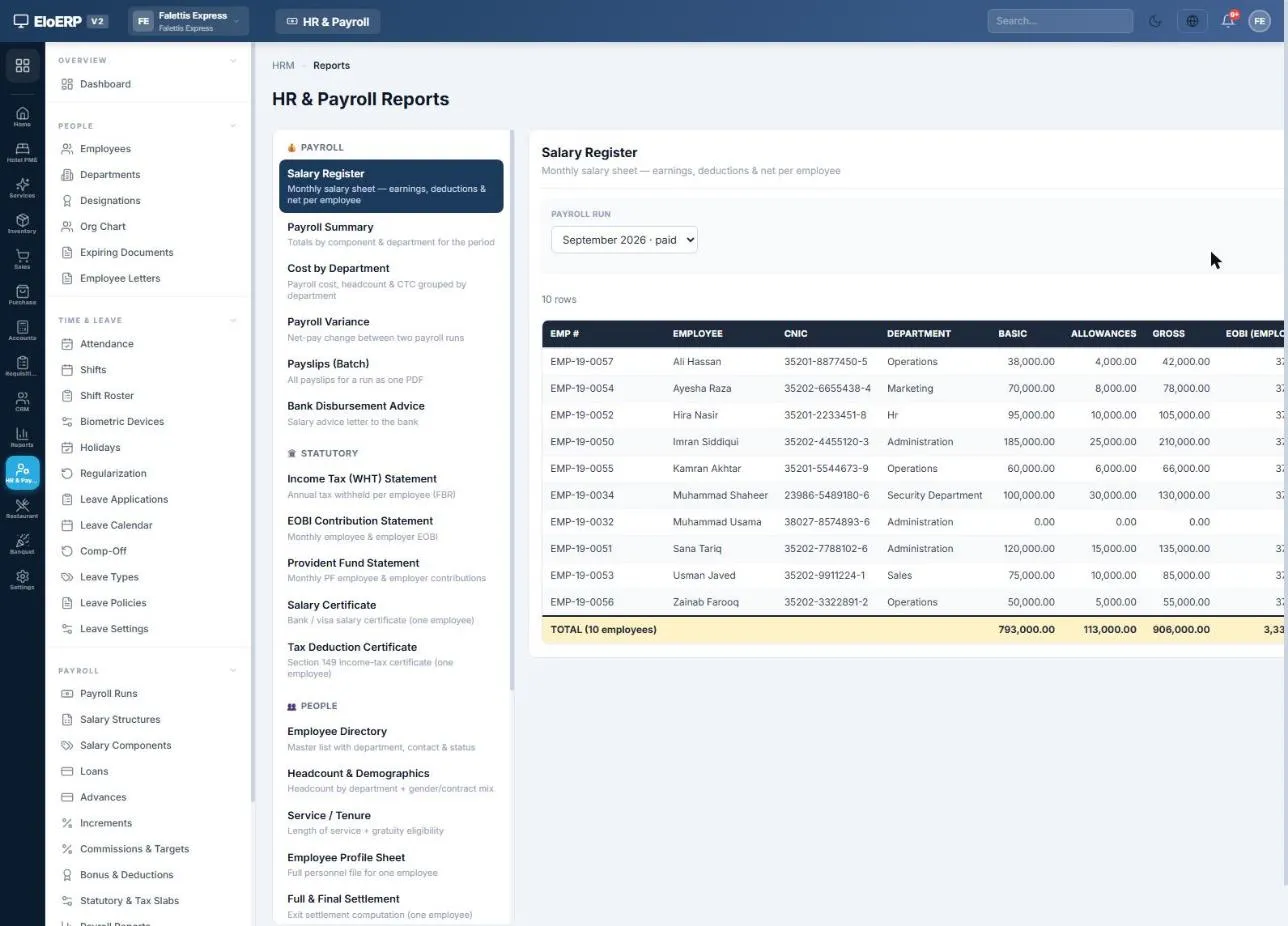
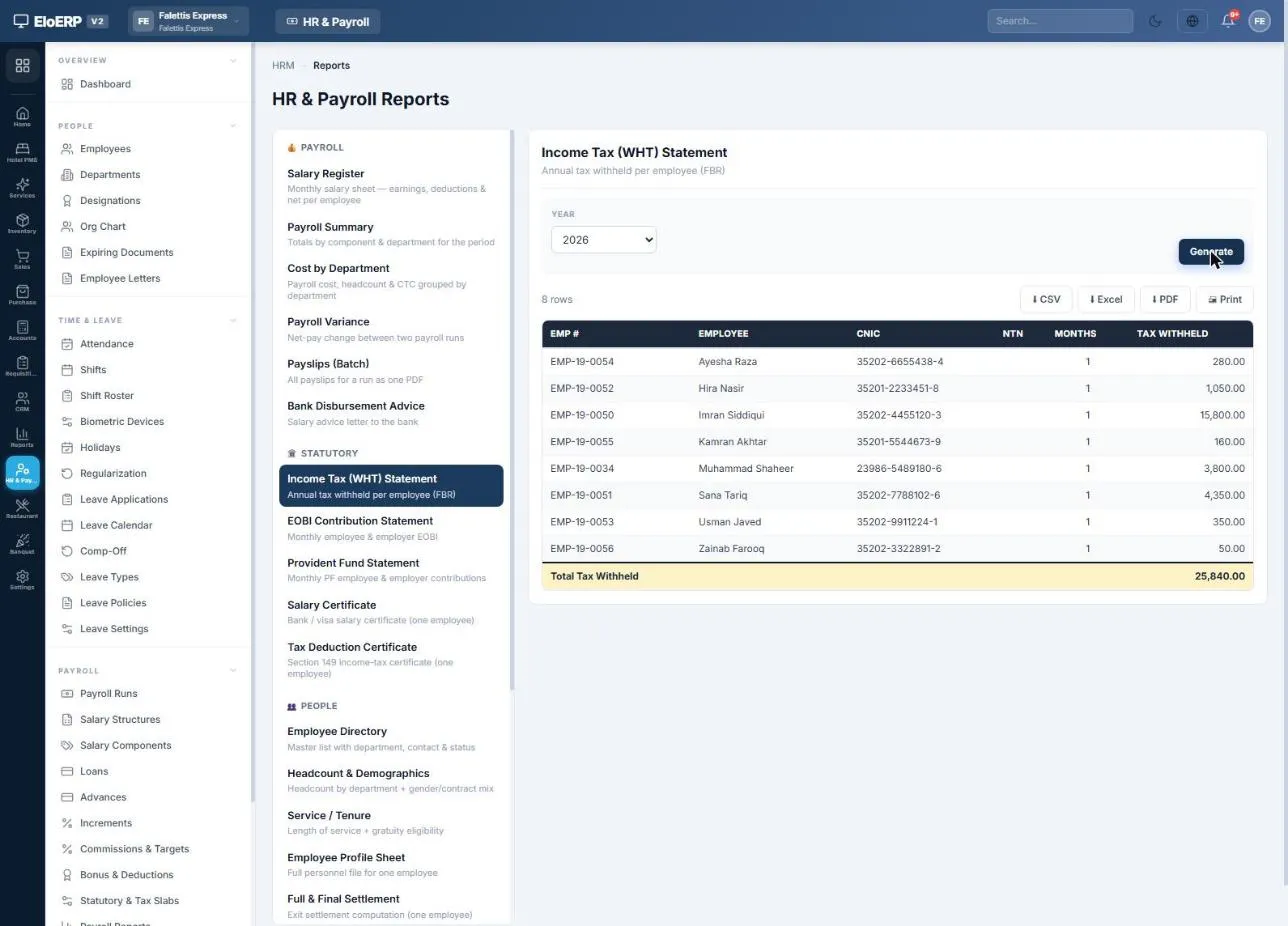
Pick a report, choose the run or period, and export to PDF, Excel or CSV.

Salary register for September 2026 with basic, allowances, gross and EOBI per employee

Salary register: the monthly salary sheet per employee.

Income tax withholding statement listing tax withheld per employee

Income Tax (WHT) statement with CNIC and NTN per employee.

GroupReports
PayrollSalary Register · Payroll Summary · Cost by Department · Payroll Variance · Payslips (Batch) · Bank Disbursement Advice
StatutoryIncome Tax (WHT) Statement · WHT Return · EOBI Contribution Statement · Provident Fund Statement · Salary Certificate · Tax Deduction Certificate
PeopleEmployee Directory · Headcount & Demographics · Service / Tenure · Employee Profile Sheet · Full & Final Settlement
Time & LeaveAttendance Register · Attendance Summary · Leave Balance · Leave Register
LoansLoan & Advance Ledger · Document & Contract Expiry
Where it runs

HR and payroll for companies in any country

The HR and payroll engine is the same everywhere. Pakistan's statutory rules come built in; elsewhere you set your own salary components and tax slabs, and switch off what does not apply.

EverywhereEmployees and documents, attendance (biometric, CSV, web), shifts, leave and holidays, salary components and structures, overtime, loans and advances, income-tax slabs per tax year, provident fund and gratuity settings, payslips and the employee portal, bank or cash salary payments, posting to the general ledger, maker-checker approval and the full HR report catalogue.
Built in for PakistanFBR salaried tax slabs, EOBI with ceiling wage, PESSI (Punjab) and SESSI (Sindh), CNIC and NTN on employee records, WHT statement and return, Section 149 tax deduction certificates, EOBI contribution list, and HBL, UBL and MCB salary transfer files.

Need your country's statutory deductions or bank file format? Tell us what you need and we will scope it with you.

Controls

Corrections that leave a clean trail

Posted figures are never edited in place. EloERP posts the difference, so the books always show what changed and why.

Correct one employeeChange paid days, hours or lines on a processed run, give a reason, and only the difference is posted as an adjustment.
Reverse a postingBefore salaries are paid, reverse the whole month with a mirror voucher; loan instalments reopen.
Maker-checkerRequire a second person to approve a finalized run before it can be posted to accounts.
Step-by-step guide

How to run HR and payroll in EloERP

The complete guide, from one-time setup to the monthly payroll checklist. Jump to a step:

Open the full HR & Payroll guide

FAQ

HR and payroll software: questions

What is HRM software?
HRM (human resource management) software keeps employee records, attendance and leave, and runs payroll from them. EloERP's HRM module covers employees, attendance, shifts, leave, loans and advances, monthly payroll, payslips and HR reports, and posts every payroll run to the same accounts the rest of the business uses.
Can EloERP run payroll outside Pakistan?
Yes. Attendance, leave, salary components, overtime, loans and advances, payslips, salary payments and posting to the accounts work the same in any country, and you enter your own income-tax slabs per tax year. Pakistan's statutory rules (FBR salary slabs, EOBI, PESSI and SESSI) and its bank transfer files are built in; for other countries' statutory deductions or bank formats, talk to us first.
Does EloERP calculate income tax on salary in Pakistan?
Yes. You enter the salary tax slabs for the tax year once (for example 2025-26). On each payroll run EloERP annualises every employee's taxable pay, applies the slab and withholds one-twelfth of the annual tax. It also produces the Income Tax (WHT) statement and a Tax Deduction Certificate for each employee.
How is the EOBI contribution calculated in EloERP?
You set the ceiling wage and the employee and employer percentages (for example a Rs 37,000 ceiling, 1% employee and 5% employer). EloERP works out both shares on gross pay up to the ceiling, deducts the employee share from salary, books the employer share as an expense and keeps the total as EOBI payable until you pay it.
Can EloERP generate salary slips?
Yes. Every finalized run generates a salary slip for each employee with earnings, deductions, attendance, net pay in words and employer contributions. You can download it as a PDF, print it, email it, download a whole month's slips in one PDF, or let employees see their own slips in the My HR Portal.
Does it work with biometric attendance machines?
Attendance can be synced from a biometric device, imported from a CSV file, marked in bulk or marked one employee at a time. Absences, half days, late arrivals, unpaid leave and overtime then flow into that month's payroll.
Can I pay salaries through the bank?
Yes. Pay everyone or individual employees from any bank or cash account, and each payment is posted to the accounts and settles the employee's ledger. In Pakistan you can also download the HBL, UBL or MCB bulk-transfer file to upload to internet banking.
Are employee loans and advances deducted from salary automatically?
Yes. Once a loan is approved and paid out, EloERP builds the instalment schedule and every payroll run deducts that month's instalment until the loan is cleared. A salary advance is recovered in full from the next payroll, or carried over if the salary does not cover it.
Is there a free trial?
Yes, a 15-day free trial with no credit card. HR and payroll is part of EloERP, alongside POS, inventory and accounting.

Pay your team right, every month

Attendance, payroll, statutory deductions and payslips, on the same platform that runs your books. Start free.

Start 15-Day Free TrialBook a demo
Schedule a demo