
ERP with POS Integration: Real-Time vs Batch Sync Explained
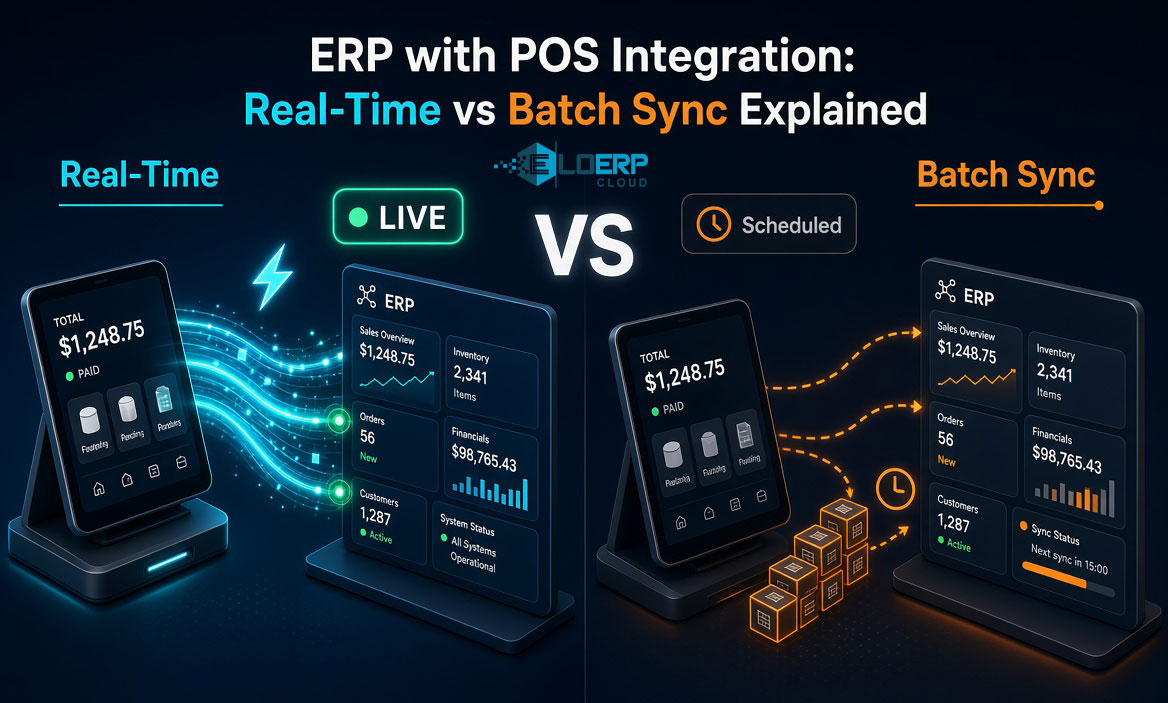
Your POS records a sale at 3 PM. When does your ERP know about it? Instantly, or after tonight's batch sync?
ERP-POS integration connects your front-end sales system with back-office operations — inventory, accounting, purchasing, and financial reporting. Done right, it eliminates manual data entry, reduces reconciliation errors, and gives you real-time visibility across your entire business. Done wrong, it creates sync delays, compliance gaps, and month-end reconciliation nightmares.
The challenge: not all integration is created equal. Unified real-time systems (single database, instant sync) operate fundamentally differently from bolt-on batch integration (separate systems connected via APIs). Understanding the difference determines whether your business operates on live data or yesterday's numbers.
This guide explains how ERP-POS integration works, compares real-time versus batch sync architectures, and provides a decision checklist for choosing the right system for retail, pharmacy, restaurant, or wholesale businesses.
Explore how EloERP's integrated POS system delivers real-time integration by design, or start a 15-day free trial to see unified architecture in action.
What Is ERP-POS Integration?
ERP-POS integration connects your point-of-sale system with your enterprise resource planning software to synchronize sales, inventory, accounting, and customer data across your entire business. When a sale is recorded at the POS, inventory levels automatically decrement, financial ledgers update, and reporting systems reflect the transaction — eliminating manual data entry and reconciliation errors.
Traditional businesses run separate systems: POS for checkout and sales, ERP for accounting, inventory management, purchasing, and back-office operations. Without integration, you face manual data entry at the end of each day — keying sales totals into accounting, reconciling inventory counts, chasing discrepancies between what the POS shows and what the books reflect.
With integration, data flows automatically. A customer buys an item at your retail counter — the sale records in POS, inventory decrements, the accounting ledger updates, and your financial reports reflect the transaction. No double-entry. No reconciliation gaps. No "which system is right?" debates.
But integration comes in two fundamentally different forms: unified database architecture (real-time by design) and API/middleware integration (batch sync between separate systems). The architecture you choose determines whether your business operates on live data or delayed snapshots.
For POS basics, see What is a POS System?
How Does ERP-POS Integration Work?
ERP-POS integration operates through two distinct architectural models — unified real-time systems and bolt-on batch integration. Understanding how each processes a single sale clarifies the trade-offs.
Unified Real-Time System (EloERP Model)
- Sale occurs — Cashier scans item, processes payment at POS terminal
- Single transaction — POS records sale in unified database (same database as ERP)
- Instant update — Inventory, accounting, and customer records update simultaneously in one database transaction
- Real-time reporting — Dashboard and reports reflect changes immediately across all locations
- Compliance — Real-time e-invoicing (FBR Digital Invoicing, ZATCA) generates IRN and QR code at point of sale
When the POS and ERP share a single database, a sale isn't "integrated" after the fact — it is the inventory update, is the accounting entry, is the financial report update. They happen atomically (together or not at all), eliminating sync delays and reconciliation errors.
Bolt-On Batch Integration (Traditional Model)
- Sale occurs — Cashier scans item, processes payment at standalone POS
- Local storage — POS saves transaction to its own local database
- Scheduled sync — Hourly or nightly batch process exports POS data (CSV file or API call)
- API transfer — Middleware or integration platform imports batch into ERP database
- Delayed update — Inventory and accounting updated hours later; sync failures create reconciliation gaps
When POS and ERP are separate systems, integration is a second step. The sale records in POS first. Later — minutes, hours, or overnight — a sync job pushes that data into the ERP. During the gap, your ERP shows yesterday's inventory. If the sync fails (network issue, API timeout, data format mismatch), the discrepancy compounds until someone manually fixes it.
Technical Depth Without Jargon
Database transaction means when a sale saves, stock count and accounting ledger save at the exact same moment. Either both succeed or both fail — no orphaned sales with missing inventory updates.
Batch sync means collecting a group of sales (10 transactions, an hour's worth, or a full day) and transferring them together. It's efficient for network bandwidth but introduces delay. Your head office doesn't see Branch A's 3 PM sale until the next sync runs — maybe at 4 PM, maybe at midnight.
Use Cases: When Each Model Fits
Real-time unified systems fit businesses needing:
- Multi-branch retail — head office visibility into stock across all locations (customer asks if an item is available at another branch; you answer accurately right now)
- Restaurant chains — real-time recipe costing and ingredient depletion (kitchen uses 5kg flour; procurement knows instantly to reorder)
- Pharmacies — batch/expiry tracking and regulatory compliance (sell batch #A123, accounting and Drug Regulatory Authority-ready reports update simultaneously)
- FBR/ZATCA compliance businesses — real-time e-invoicing at point of sale (IRN generated during checkout, not hours later)
Batch integration is acceptable for:
- Single-location businesses with no compliance deadlines — if nightly sync is fast enough, delay doesn't hurt
- Best-of-breed tech stack preference — you want Shopify POS (best e-commerce integration) + Xero (best accounting UI), even if they sync hourly
- Low-margin businesses prioritizing lowest upfront cost — separate systems may be cheaper initially (integration maintenance costs appear later)
Real-Time vs Batch Integration — Key Differences
| Feature | Real-Time Integration (Unified Systems) | Batch Integration (Bolt-On Systems) |
|---|---|---|
| Inventory Sync | Instant — sale updates stock immediately, no lag | Delayed — sync runs hourly/nightly, intraday discrepancies common |
| Financial Sync | Simultaneous — accounting entry created with sale transaction | Deferred — end-of-day posting, reconciliation required |
| Speed | Real-time visibility across all locations | Hours-to-overnight delay |
| Accuracy | Single source of truth, no sync errors | Potential sync failures, duplicate/missing records |
| Compliance (FBR/ZATCA) | Real-time e-invoicing at point of sale (IRN/QR generated instantly) | Batch submission after sync (compliance delay risk) |
| Multi-branch | Head office sees all sales and stock levels live | Visibility lags behind actual sales activity |
| Architecture | Single unified database (POS + ERP = one system) | Separate databases connected via APIs/middleware |
| Example | EloERP, SAP Business One, NetSuite | Traditional ERP + Shopify POS, QuickBooks + Square |
Inventory Sync: Live vs Lagged Stock Counts
Customer asks: "Do you have this item in stock?" With real-time integration, your answer reflects the exact current count — another customer bought the last unit 10 minutes ago, you know it instantly. With batch sync, you're looking at this morning's numbers. The item might have sold out 2 hours ago, but your system won't know until tonight's sync runs.
For single-location retail, that's manageable. For multi-branch operations, it's a breakdown. Branch A sells the last unit at 2 PM. Branch B promises it to a customer at 3 PM, based on stale data. Customer drives across town. Item's gone. Trust erodes.
Financial Sync: Atomic vs Reconciliation-Required
Month-end close scenario:
Unified system: Sales total Rs 2,847,500. Accounting ledger shows Rs 2,847,500. They match because they're the same number — one database transaction recorded both. Close the month in 10 minutes.
Batch system: POS shows Rs 2,850,000 sales. Accounting ledger shows Rs 2,847,500. What happened to Rs 2,500? Was a sale missed in the batch? Did someone void a transaction that didn't sync? Was there a refund that posted to POS but not ERP? Spend 90 minutes tracing discrepancies.
Real-time integration eliminates variance investigation. The sale is the ledger entry. They can't disagree.
Compliance: Real-Time vs Batch Submission
FBR Digital Invoicing (Pakistan) requires Invoice Registration Number (IRN) and QR code on every retail invoice. With unified real-time systems, IRN generation happens at checkout — customer receives compliant invoice immediately. With batch systems, invoices must queue and submit after sync completes. If batch fails overnight, you have a compliance gap (sales occurred, invoices not filed).
ZATCA Phase 2 (Saudi Arabia) mandates simplified or standard e-invoicing at point of sale. Real-time architecture generates Fatoora-compliant XML during the transaction. Batch systems must retrofit compliance into a sync process designed before e-invoicing existed.
Learn more about FBR Digital Invoicing compliance and ZATCA Phase 2 e-invoicing.
When Batch Integration Is Acceptable
Not every business needs real-time. Batch sync is legitimate for:
- Single-location retail with no multi-branch coordination needs
- Low compliance burden — no real-time e-invoicing mandates
- Cost sensitivity — separate POS and ERP may be cheaper upfront (integration and maintenance costs appear later)
- Best-of-breed preference — you want specific vendors for POS and accounting (Shopify POS for e-commerce, Xero for accounting UI), accepting sync delays
The key: understand the trade-off. You're choosing delayed visibility in exchange for vendor flexibility or lower initial cost.
Benefits of Unified ERP-POS Systems
Unified architecture (single database, real-time by design) delivers operational, compliance, and decision-making advantages that bolt-on integration cannot match.
Operational Accuracy
Single source of truth — No "which system is right?" debates. Inventory count, ledger balance, and sales reports all pull from one database. If the POS shows it, the ERP agrees. Automatically.
Zero reconciliation overhead — Month-end close is verification, not investigation. Sale equals stock update equals ledger entry, atomically. No variance hunting. No manual adjustments to force POS and ERP totals to match.
Multi-location real-time visibility — Head office sees all branches live. Customer service can check stock at any location and answer accurately. Procurement sees company-wide inventory and reorders based on actual current levels, not yesterday's snapshot.
Compliance and Audit Trail
FBR/ZATCA/MyInvois real-time reporting — E-invoice generation happens at point of sale. Customer receives FBR-compliant invoice with IRN and QR code during checkout. No batch queue. No delayed submission risk.
Audit trail integrity — Every sale has a simultaneous inventory and financial record. No orphaned transactions (sale recorded in POS, missing from accounting). Auditors trace revenue to inventory depletion to ledger posting — single transaction, single timestamp.
GST/sales tax real-time calculation — Tax liability updates with each sale. Month-end tax filing is a report export, not a manual calculation reconciling POS totals with accounting.
Decision-Making Speed
Live dashboards — Today's sales, current stock levels, cash position update in real-time. Business owners make promotion, pricing, and reorder decisions based on now, not yesterday at 11 PM when the batch ran.
Reorder alerts based on actual current stock — Automated reorder triggers fire when stock drops below threshold. With batch sync, the alert is delayed — you might stockout before the sync runs and the alert fires.
Promotion and pricing decisions with instant feedback — Run a 20% discount promotion at lunch. See sales velocity immediately. Adjust pricing before dinner rush based on real customer response, not tomorrow's batch report.
Reduced IT Complexity
Single system to maintain — No middleware to monitor. No sync jobs to babysit. No "did the nightly batch run successfully?" checks every morning.
Single vendor relationship — When something breaks, one support team owns it. No finger-pointing between POS vendor and ERP vendor ("that's their API's fault, not ours").
Unified training — Staff learn one system, not two. New cashier training covers POS checkout and basic inventory checks in the same interface. No switching between applications.
EloERP Specific Example
EloERP's POS module operates on the same database as inventory and accounting. When a pharmacy sells a strip of medicine, the batch number, expiry date, stock count, and accounting entry all update in one transaction. No nightly import required. No reconciliation. Pharmacist checks stock — sees exactly what's on the shelf. Accountant checks revenue — sees exactly what the POS collected. They agree because they're reading the same data.
EloERP POS works offline (queues sales during outages, syncs when reconnected). Internet drops during a busy hour — sales continue. Connection restores — queued transactions sync automatically. Real-time architecture doesn't require constant connectivity, just eventual connectivity.
How to Choose an Integrated ERP-POS System
Selecting the right ERP-POS system requires evaluating architecture, industry fit, compliance coverage, and pricing models. Use this checklist to compare options.
Decision Checklist: 8 Evaluation Factors
☐ Architecture type:
- Unified database (real-time by design) vs API-connected (batch sync)
- Ask vendor: "Does your POS write to the same database as your ERP, or do they sync via API?"
- Validation: "If I sell an item at Branch A right now, can Branch B see the stock decrease within 30 seconds?" (real-time = yes, batch = no)
☐ Industry fit:
- Retail: IMEI/serial/batch tracking, barcode support, multi-variant items (size/color), gift cards, layaway
- Pharmacy: batch/expiry/formulary management, Rx vs OTC split, Drug Regulatory Authority reporting
- Restaurant: recipe costing, ingredient depletion, table/order management, kitchen display system
- Wholesale/distribution: B2B pricing tiers, credit limits, territory management, sales rep commissions
☐ Compliance coverage:
- FBR Digital Invoicing (Pakistan) — real-time IRN and QR code at POS checkout?
- ZATCA Phase 2 (KSA) — simplified/standard invoice generation at POS?
- MyInvois (Malaysia) — e-invoice consolidation from POS sales?
- UAE FTA — Peppol-compliant invoice from POS transaction?
- Ask vendor: "Does your POS generate the IRN and QR code at the moment of sale, or does it batch-submit invoices later?"
☐ Offline capability:
- Does POS work during internet outages? (critical for retail, restaurants)
- How does offline-to-online sync work? (queue and replay vs manual reconciliation)
- Validation: "Disconnect internet. Record a sale. Reconnect. Does the sale appear in ERP automatically?"
☐ Multi-branch support:
- Real-time inventory visibility across locations?
- Inter-branch transfers tracked automatically?
- Centralized vs location-level pricing/promotions control?
- Ask vendor: "Can head office see live sales and stock at all branches, or do they see yesterday's batch?"
☐ Pricing model:
- Flat rate vs per-user/per-terminal (cost scaling with growth)
- Implementation and training costs (one-time or ongoing?)
- Support and updates included in subscription, or charged separately?
- Example: Per-terminal model costs Rs 5,000/month at 3 terminals. At 10 terminals, Rs 16,667/month. Flat-rate pricing eliminates scaling penalty.
☐ Integration ecosystem:
- Payment gateways: JazzCash, Easypaisa, Stripe, Square, PayPal support?
- E-commerce: Does POS sync with Shopify, WooCommerce, Daraz? (online and offline inventory unified?)
- Courier/logistics: TCS, Leopards, BlueEx, Aramex integration for order fulfillment?
- Accounting exports: QuickBooks, Xero compatibility (if migrating from existing accounting system)
☐ Migration and data import:
- Can vendor import existing data (customers, inventory master, pricing lists)?
- Training and onboarding included, or charged separately?
- Pilot/phased rollout option for multi-branch? (test at one location before company-wide deployment)
Architecture Validation: Real-Time vs "Real-Time"
Vendors claiming "real-time integration" might mean 5-minute API polling. That's faster than nightly batch, but it's not real-time.
Test: Sell an item at Branch A. Log into Branch B's system. Does the stock count reflect the sale within 30 seconds? If yes, it's real-time. If it takes 5 minutes, 30 minutes, or "wait for the next sync," it's batch with a short interval.
Compliance Validation: Built-In vs Bolt-On
FBR/ZATCA compliance isn't binary. Some systems bolt it on (export sales data, submit invoices via separate compliance software). Others integrate it natively (IRN generation happens during POS transaction, customer receives compliant invoice at checkout).
Ask: "Does your POS generate the FBR IRN and QR code at the moment of sale, or does it queue invoices and submit them later in a batch?"
Native integration = customer receives compliant invoice at checkout. Bolt-on = invoices submitted later (customer receives generic receipt, compliant invoice generated hours later when batch runs).
Pricing Model Trade-Offs
Per-user/per-terminal pricing scales cost with growth. Start with 3 terminals at Rs 15,000/month total. Grow to 10 terminals — now Rs 50,000/month. Revenue grew 3×, software cost grew 3×.
Flat-rate pricing decouples cost from growth. Rs 25,000/month for unlimited users and terminals. Grow from 3 to 10 terminals — cost stays Rs 25,000/month. You keep the margin.
Ask vendors about pricing at your current scale and at 2× and 5× scale. Project 3-year total cost of ownership (TCO), not just year-one sticker price.
Ready to evaluate ERP-POS options for your business? Book a 30-minute demo to see EloERP's real-time integration in action.
Common Mistakes When Integrating ERP and POS
Avoid these five integration pitfalls that derail deployments and create long-term operational pain.
1. Assuming "Integration" Means Real-Time
Vendors claim "integrated" to mean batch sync running every 5 minutes, every hour, or nightly. That's integration, but it's not real-time.
Mistake: Accept vendor claims without validation.
Fix: Test actual sync frequency. Ask: "If I sell an item right now, how long until my ERP reflects the sale?" Measure it. 30 seconds = real-time. 5 minutes to overnight = batch.
2. Underestimating Compliance Requirements
Bolt-on POS systems not designed for real-time e-invoicing can't easily retrofit FBR/ZATCA compliance. Adding compliance later is expensive, technically complex, or impossible.
Mistake: Choose POS based on features today, ignore compliance requirements launching next year.
Fix: Verify compliance roadmap upfront. If FBR Digital Invoicing is mandatory in 6 months, choose a system with native support now. Retrofitting batch systems is painful.
3. Choosing Based on POS Features Alone
Best-in-class POS with weak ERP functionality = you'll outgrow it. You need purchase orders, manufacturing, multi-currency, payroll — the POS is perfect, but the ERP can't scale.
Mistake: Prioritize POS bells and whistles, overlook ERP depth.
Fix: Evaluate the full system. Does the ERP handle procurement (purchase orders, supplier management, 3-way matching)? Manufacturing (bill of materials, work orders)? Multi-branch accounting (inter-company transactions, consolidated reporting)?
4. Ignoring Offline Needs
Cloud-only systems fail during internet outages. Retail counters and restaurant tables go idle. Sales stop.
Mistake: Assume internet is reliable enough. It's not.
Fix: Validate offline capability. Does POS queue transactions locally during outages and auto-sync when reconnected? Or does it freeze until internet restores?
EloERP POS works offline — sales continue, sync happens automatically when connection returns.
5. Skipping Pilot Testing
Vendors demo smooth workflows with clean sample data. Real-world complexity (1,000-SKU inventory, multi-variant items, partial payments, refunds across branches) surfaces under load, not in demos.
Mistake: Deploy company-wide immediately based on demo.
Fix: Pilot at one location for 2-4 weeks. Test actual workflows: sale → stock update → ledger entry → financial report. Verify sync speed, offline behavior, compliance output, and reconciliation accuracy before full rollout.
EloERP's unified POS avoids these pitfalls with built-in compliance, offline mode, and real-time sync by design. Explore EloERP POS features or start a 15-day free trial.
Learn more: FBR Digital Invoicing Complete Guide
Sources
- EloERP product features and architecture: https://eloerp.net
- FBR Digital Invoicing requirements: https://eloerp.net/blog/fbr-digital-invoicing-complete-guide
- ZATCA Phase 2 e-invoicing: https://eloerp.net/blog/zatca-phase-2-e-invoicing-guide
- POS system fundamentals: https://eloerp.net/blog/what-is-pos-system-complete-guide-pakistan-2026
- ERP-POS integration architecture: General industry knowledge (unified database vs API integration models)
- Compliance e-invoicing standards: FBR (Pakistan), ZATCA (Saudi Arabia), MyInvois (Malaysia), UAE FTA