
MyInvois E-Invoicing Malaysia: Complete Guide to LHDN Compliance (2026)
Malaysia is rolling out mandatory e-invoicing through MyInvois, the national digital invoicing platform managed by Lembaga Hasil Dalam Negeri (LHDN), also known as the Inland Revenue Board of Malaysia. The mandate is being applied in phases based on annual revenue, starting with the largest businesses. Check LHDN's current MyInvois guidance (or ask your tax adviser) for what applies to your business and when. For businesses managing retail operations, restaurant sales, or wholesale distribution, this means switching from manual paper invoices to LHDN-validated digital invoices transmitted in real time. If you are comparing ERP systems with MyInvois integration, this guide covers how the rollout is structured, how validation works, and how modern cloud ERP handles LHDN submission automatically vs manual portal uploads.
What Is E-Invoicing Malaysia (MyInvois)?
E-invoicing Malaysia, implemented through the MyInvois system by Lembaga Hasil Dalam Negeri (LHDN), is a mandatory digital invoicing framework requiring businesses to issue, validate, and submit invoices electronically to the tax authority in real time. Unlike PDF invoices, MyInvois-compliant invoices are structured XML or JSON documents transmitted directly to LHDN for approval before being shared with buyers.
The key difference between traditional invoicing and MyInvois: traditional invoices are unstructured documents (PDF scans, printed receipts, Word files) sent directly from seller to buyer with no government visibility until annual tax filing. MyInvois invoices are machine-readable structured data (XML/JSON format following the Peppol BIS 3.0 international standard) validated by LHDN before the buyer receives them.
How MyInvois Validation Works
When a business issues an invoice under MyInvois:
- The invoice is generated in structured format (XML or JSON)
- It's transmitted to LHDN's MyInvois platform via API or portal
- LHDN validates the format, tax calculations, buyer/seller Tax Identification Numbers (TIN)
- LHDN returns a Unique Invoice Reference Number (UIRN) and QR code if valid
- Only then is the invoice shared with the buyer (printed receipt, email, customer portal)
This real-time validation means every invoice is checked by LHDN at the point of sale — catching errors, fraud and unreported income. LHDN introduced MyInvois to digitize the economy and improve tax compliance.
Who Must Comply? (Phase Rollout Timeline)
MyInvois is being implemented in phases based on annual turnover, starting with the largest businesses and moving down to smaller ones. LHDN has also set an exemption threshold for the smallest businesses and has allowed relaxation periods (such as consolidated monthly e-invoices) for newly covered businesses. Because the thresholds and dates have been revised more than once, check LHDN's current MyInvois guidance (or ask your tax adviser) for what applies to your business and when.
Sources: LHDN official phase timeline [2] [3]
Key Points
Voluntary early adoption encouraged. Businesses not yet in a mandatory phase can voluntarily adopt MyInvois by registering on the LHDN MyInvois portal.
Industry coverage: MyInvois applies to all industries — retail (grocery stores, pharmacies, electronics shops), restaurants and cafes, wholesale distribution, manufacturing, professional services, healthcare, and more. If your business issues invoices and falls within a current phase, MyInvois e-invoicing applies to you.
How MyInvois E-Invoicing Works (5-Step Process)
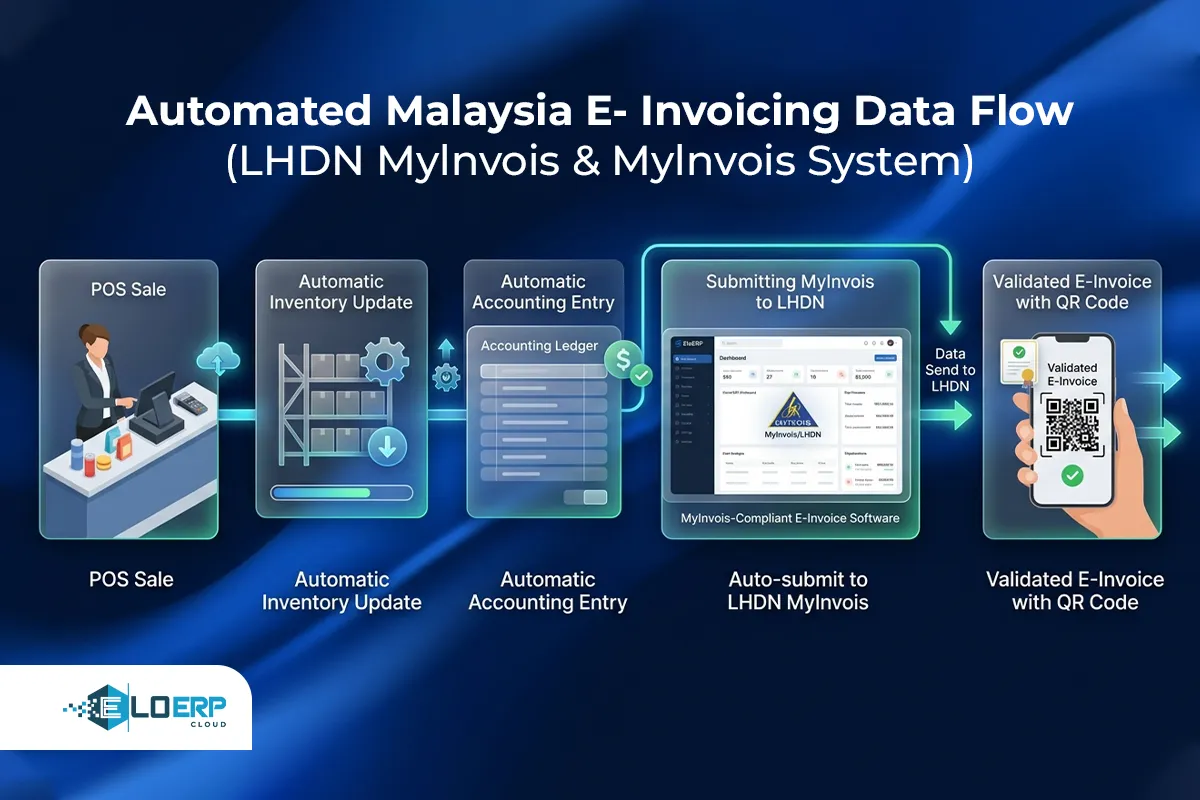
Every MyInvois invoice follows this lifecycle:
 Step 1: Business Issues Invoice
When a sale, purchase, credit note, or debit note occurs, the business's POS system or ERP generates an invoice containing:
- Seller details (name, TIN, address)
- Buyer details (name, TIN if business buyer, address)
- Line items (product/service descriptions, quantities, unit prices)
- Tax breakdown (SST calculations per item)
- Total amount due
The invoice is created in structured format (XML or JSON) following the Peppol BIS 3.0 standard, which ensures machine-readable consistency across all MyInvois submissions.
Step 2: Transmit to MyInvois
The invoice is transmitted to LHDN's MyInvois platform via:
- API integration (for cloud ERP systems that integrate with MyInvois, such as EloERP) — automatic real-time transmission as sales occur
- MyInvois portal (manual upload) — business logs in and keys in invoice details line by line
- Batch upload (CSV/Excel import via portal) — for businesses issuing multiple invoices daily
Real-time API transmission is the most common method for retail, restaurant, and distribution businesses issuing 10+ invoices per day.
Step 3: LHDN Validates Invoice
LHDN's MyInvois system checks:
- Format compliance: Is the invoice valid XML/JSON per Peppol BIS 3.0?
- Tax calculations: Do SST amounts match item tax codes and rates?
- TIN verification: Are seller and buyer Tax Identification Numbers registered with LHDN?
- Mandatory fields: Are all 55 required fields present (invoice date, amounts, item descriptions, etc.)?
Validation happens in seconds. If the invoice passes, LHDN proceeds to Step 4. If it fails, LHDN returns an error message (e.g., "Buyer TIN not found" or "Invalid tax code") and the business must correct and resubmit.
Step 4: LHDN Returns Validation Code + QR Code
Upon successful validation, LHDN issues:
- Unique Invoice Reference Number (UIRN) — a unique identifier linking this invoice to LHDN's records
- QR code — contains the UIRN, invoice total, seller TIN, and buyer TIN for easy verification
The QR code is digitally signed by LHDN, making it tamper-proof. Buyers (or LHDN auditors) can scan the QR code to verify the invoice was officially validated.
Step 5: Share Invoice with Buyer
The business shares the LHDN-validated invoice with the buyer:
- Printed receipt (retail POS) — QR code printed on thermal receipt
- Email (B2B invoices) — PDF attachment with embedded QR code
- Customer portal (online orders) — downloadable invoice with QR code
Only invoices containing the LHDN-issued UIRN and QR code are valid for tax deduction, audit trail, and buyer expense claims.
MyInvois Requirements for Businesses
To comply with MyInvois, businesses need:
Registration and Accounts
✅ Tax Identification Number (TIN) — All businesses must be registered with LHDN and have a valid TIN.
✅ MyInvois portal account — Register at the LHDN MyInvois portal to access manual upload, sandbox testing, and compliance dashboards.
Technical Infrastructure
✅ E-invoicing software — choose one of three options:
- Cloud ERP that integrates with the MyInvois API (such as EloERP) — automatic transmission
- E-invoicing service provider — third-party bridge for legacy systems
- Manual LHDN portal (free) — suitable for micro businesses issuing <10 invoices/day
✅ Structured invoice data — Invoices must contain all 55 mandatory fields per LHDN guidelines, including item-level descriptions, tax codes, buyer/seller TINs, and payment terms [4].
✅ Digital certificates for secure transmission — API integrations require SSL/TLS encryption to protect invoice data in transit.
Record Retention
✅ Audit trail storage — LHDN requires businesses to retain MyInvois submission records (invoices, validation responses, error logs) per Malaysia's record-keeping laws (typically 7 years for tax documents).
Staff Preparation
✅ Training on new invoice workflow — Staff issuing invoices need to understand:
- How to handle LHDN validation errors (rejected invoices, incorrect TINs)
- When to issue credit/debit notes (returns, adjustments)
- How to verify buyer TINs before transmission
✅ Sandbox testing — LHDN provides a test environment where businesses can submit sample invoices and verify their system works before going live. Use this to train staff and troubleshoot integration issues.
How Businesses Can Comply: Three Implementation Options
Businesses have three paths to MyInvois compliance, each suited to different transaction volumes and technical capabilities:
| Option | How It Works | Who It's For | Pros | Cons |
|---|---|---|---|---|
| MyInvois Portal (Manual) | Log in to LHDN portal, key in invoice details manually, field by field | Micro businesses issuing <10 invoices/day | Free, no software purchase needed, works on any browser | Time-consuming (5–10 min per invoice), high risk of human error, no integration with inventory or accounting |
| E-Invoicing Service Provider | Third-party tool uploads invoices to MyInvois on behalf of business | Businesses with existing legacy ERP that doesn't support MyInvois API | Adds MyInvois compliance without replacing current system | Extra subscription cost, requires double data entry (ERP → service → LHDN), no inventory/accounting integration |
| Native ERP Integration | Cloud ERP that integrates with the MyInvois API (such as EloERP) transmits invoices automatically | Retail stores, restaurants, wholesale distributors, multi-location businesses issuing 10+ invoices/day | Zero double-entry (one sale updates stock, books, and LHDN), automatic retry on failure, full audit trail, real-time submission | Requires MyInvois-ready ERP subscription |
Detailed Comparison
Manual LHDN portal: Works for very small businesses (sole proprietors, consultants, home-based businesses) issuing occasional invoices. However, it doesn't scale — a retail pharmacy issuing 50+ invoices per day would need dedicated staff just to key in invoice data manually. No integration with inventory (stock doesn't update) or accounting (ledger entries done separately). High risk of typos causing LHDN validation errors.
E-invoicing service providers: A bridge solution for businesses already invested in older systems that do not connect to the MyInvois API. The service provider acts as middleware: you export invoices from your ERP (CSV or API), upload them to the service provider's portal, and the service transmits to LHDN on your behalf. This avoids replacing your entire ERP but introduces an extra layer (and extra cost). You still manage inventory and accounting in your old system, then separately handle e-invoicing through the service provider.
Native ERP with MyInvois API: The most streamlined option for businesses issuing 10+ invoices daily. When a cashier rings up a sale at the POS, the cloud ERP:
- Updates inventory (stock decreases)
- Records the accounting entry (revenue increases, sales tax liability increases)
- Generates the e-invoice in the MyInvois format (XML/JSON)
- Transmits it to LHDN via API
- Receives UIRN + QR code from LHDN
- Prints the QR code on the customer receipt
All five steps happen in under 3 seconds with zero manual intervention. No double-entry, no export/import steps, no risk of forgetting to transmit an invoice to LHDN. The invoice, stock movement, and accounting entry are guaranteed to match because they're one transaction.
Cost comparison:
- Manual portal: Free (but staff time cost — 5 min/invoice × 50 invoices/day × RM 15/hour wage = RM 62.50/day or ~RM 1,800/month in labor)
- Service provider: a monthly subscription, plus staff time to export/upload invoices
- Native ERP: Included in ERP subscription with no additional MyInvois fee (e.g., EloERP cloud ERP + POS — pricing on request; ask us for a quote)
For high-volume businesses, native ERP integration delivers the lowest total cost of ownership because it eliminates manual labor, reduces error rates, and prevents stockouts or accounting mismatches.
How EloERP Handles MyInvois E-Invoicing (Natively)
EloERP cloud ERP + POS includes a built-in MyInvois e-invoicing module for Malaysia businesses. The module is toggled on/off per company, allowing multi-country operations to enable MyInvois only for Malaysia entities while using FBR for Pakistan branches, ZATCA for Saudi Arabia branches, or UAE FTA for UAE branches from the same centralized ERP instance.
MyInvois Workflow in EloERP
Step 1: Sale occurs at POS — Cashier scans items, customer pays, receipt prints.
Step 2: Invoice auto-generated — EloERP creates a MyInvois-format invoice (XML format, Peppol BIS 3.0 standard) containing all 55 mandatory fields: seller TIN, buyer TIN (if business buyer), item descriptions, quantities, unit prices, SST tax codes per item, totals.
Step 3: Auto-transmit to LHDN — The invoice is sent to LHDN's MyInvois API in real time (as the sale completes). No manual upload, no batch processing delays.
Step 4: LHDN validates and returns UIRN + QR code — LHDN responds with a validation status. If approved, EloERP receives the UIRN and QR code. If rejected (e.g., invalid buyer TIN), the system logs the error and alerts the user.
Step 5: QR code printed on receipt — The LHDN-validated QR code is automatically printed on the thermal receipt handed to the customer. For B2B invoices, the QR code is embedded in email PDFs or visible on the customer's online portal.
Step 6: Automatic retry on failure — If LHDN's API is temporarily unavailable (server downtime, network issues), EloERP queues the invoice locally and retries transmission every 60 seconds until LHDN acknowledges receipt. This prevents lost invoices during connectivity drops.
Zero Double-Entry
The same transaction updates:
- Inventory: Stock quantity decreases for sold items
- Accounting ledger: Revenue account increases, SST liability increases, cash/receivables increase
- LHDN MyInvois submission: Invoice transmitted and validated
Because all three updates happen atomically (one database transaction), there's no risk of inventory showing 10 units sold while LHDN records show 8 invoices — the data is guaranteed to match.
Multi-Location Support
Businesses operating multiple branches (retail chain with 5 locations, restaurant group with 8 outlets) configure MyInvois per branch:
- Each branch has its own seller TIN (or shares a parent company TIN with branch-level invoice numbering)
- Each POS terminal transmits invoices independently to LHDN
- Centralized admin dashboard shows MyInvois submission status across all locations (invoices submitted, validation pass/fail rates, error logs)
This prevents bottlenecks — no single server queuing invoices from 8 locations. Each location's POS handles its own LHDN transmission in real time.
Audit Trail
EloERP stores every MyInvois submission with:
- Invoice copy (XML/JSON submitted to LHDN)
- LHDN validation response (UIRN, QR code, timestamp)
- Status (approved, pending, rejected)
- Error logs (if rejected, what was the reason?)
Auditors can pull a report showing all invoices issued in a date range, their LHDN validation status, and matching stock movements — the records LHDN may ask for during an audit.
Industries Covered
EloERP's MyInvois module supports:
- Retail: Grocery stores, pharmacies, electronics shops, fashion boutiques, hardware stores
- Restaurants: Dine-in, takeaway, delivery (integrated with Foodpanda, GrabFood for online order invoicing)
- Wholesale distribution: B2B invoices with buyer TIN validation, bulk order invoicing, credit/debit notes for returns
- Manufacturing: Production material invoices, finished goods sales invoices
Feature Highlights
Real-time transmission — Invoices transmit as sales occur, not in overnight batches. Customers receive LHDN-validated receipts immediately.
Automatic retry on failure — Network drops or LHDN server downtime trigger automatic retries, preventing lost invoices.
Credit/debit note support — Returns, refunds, and price adjustments automatically generate MyInvois-format credit notes or debit notes transmitted to LHDN.
SST tax calculation — EloERP applies the correct Sales and Service Tax (SST) rates per item tax code — 5% or 10% for sales tax, 6% or 8% for service tax, with automatic line-by-line tax breakdowns on invoices [5].
Customer TIN validation — When issuing a B2B invoice, EloERP checks the buyer's TIN against LHDN's registry before transmitting, reducing rejection risk.
SST and Tax Compliance in Malaysia
Malaysia uses the Sales and Service Tax (SST) system, reintroduced in September 2018 to replace the Goods and Services Tax (GST). MyInvois invoices must show SST breakdown per item.
SST Rates (2026)
- Sales Tax: 5% or 10% depending on product category
- Service Tax: 6% for essential services (food & beverage, telecommunications, logistics, parking), 8% for most other services [5] [6]
How MyInvois Handles SST
Each line item on a MyInvois invoice must specify:
- Tax code (SST category — e.g., "Sales Tax 10%", "Service Tax 6%", "Exempt", "Zero-rated")
- Tax amount (calculated per line item)
- Total tax summary (sum of all line-item taxes)
LHDN validates that the tax amounts match the declared tax codes. If a business incorrectly applies 5% sales tax to an item that should be 10%, LHDN rejects the invoice during validation.
How Cloud ERP Automates SST Compliance
Systems like EloERP assign tax codes to products during setup:
- Grocery item (essential food): Sales Tax 5%
- Electronics (non-essential): Sales Tax 10%
- Restaurant meal: Service Tax 6%
- Professional consulting: Service Tax 8%
When the cashier scans the item or selects it from the menu, the ERP automatically calculates the correct SST rate and includes it in the MyInvois invoice. The tax breakdown appears line by line on the receipt, and the total SST amount is transmitted to LHDN for validation.
LHDN audit readiness: Because MyInvois submissions and accounting ledger entries come from the same ERP transaction, SST liability reports (showing total tax collected) match MyInvois invoice totals exactly — preventing discrepancies during LHDN audits.
Businesses needing SST-ready POS systems for Malaysia operations should ensure their ERP supports per-item tax code assignment and automatic MyInvois transmission.
Common Challenges & Solutions
Challenge 1: Legacy POS Doesn't Support E-Invoicing
Problem: Many businesses run older POS systems (standalone cash registers, Excel-based invoicing, basic POS software purchased 5–10 years ago) that can't connect to LHDN's MyInvois API.
Solution: Upgrade to a MyInvois-ready cloud ERP or use an e-invoicing service provider as a bridge. For retail stores issuing 50+ invoices daily, upgrading to a native ERP integration (like EloERP) eliminates double-entry and reduces compliance labor by 80–90% compared to manual portal uploads or service provider workarounds.
Challenge 2: Manual Portal Too Slow for High-Volume Retail
Problem: A pharmacy issuing 100+ invoices per day cannot afford 5–10 minutes per invoice for manual LHDN portal keying. That's 8–16 staff hours per day just for e-invoice compliance.
Solution: Automate with cloud ERP that transmits invoices in real time. EloERP processes 100 invoices in the same time it takes to manually key 1 invoice — each sale auto-transmits to LHDN within 3 seconds, requiring zero manual data entry.
Challenge 3: Internet Downtime = Can't Issue Invoices?
Problem: What happens if the internet connection drops during peak hours? Can the business still process sales, or must it turn away customers?
Solution: Ask your ERP vendor how their system handles LHDN transmission during outages — different systems handle this differently. Some systems allow offline sales processing with invoices queued locally and transmitted when connectivity returns. However, verify this capability with your specific vendor before relying on it during critical sales periods.
Challenge 4: Multi-Location Businesses = Multiple TINs?
Problem: A restaurant chain with 10 outlets — does each outlet need a separate MyInvois account and TIN?
Solution: Single parent company TIN with branch-level invoice numbering. EloERP (and most multi-location ERPs) allow one MyInvois account (parent company TIN) with each branch generating unique invoice numbers (Branch-A-0001, Branch-B-0001). Centralized admin dashboard shows submission status across all locations. No need for separate TINs per branch unless branches are legally separate entities (different company registrations).
Challenge 5: Training Staff on New Workflow
Problem: Cashiers and invoice clerks accustomed to paper receipts or basic POS systems need to learn LHDN validation error handling, buyer TIN verification, credit note issuance.
Solution: Choose an ERP with minimal workflow change at the POS level. With EloERP, the cashier's process stays nearly identical (scan items → collect payment → print receipt), but the system handles LHDN transmission in the background. Staff only intervene when LHDN rejects an invoice (e.g., invalid buyer TIN), which triggers a clear error message with corrective action ("Buyer TIN not found — verify TIN with customer and resubmit").
LHDN's sandbox environment allows businesses to test invoice submissions and train staff on error handling before going live, reducing confusion during the compliance cutover.
Frequently Asked Questions (FAQs)
1. What is the difference between e-invoice and regular invoice in Malaysia?
A regular invoice is an unstructured document (PDF, printed receipt, Word file) sent directly from seller to buyer with no government validation. An e-invoice under MyInvois is a structured digital document (XML or JSON format) transmitted to LHDN for real-time validation before being shared with the buyer. Only invoices validated by LHDN and containing a LHDN-issued UIRN and QR code qualify as MyInvois-compliant e-invoices.
2. Is MyInvois mandatory for small businesses?
It depends on your annual turnover. LHDN has phased MyInvois in by turnover band, starting with the largest businesses; it has set an exemption threshold for the smallest businesses and allowed a relaxation period (consolidated monthly e-invoices instead of per-transaction e-invoices) for newly covered businesses. Check LHDN's current MyInvois guidance (or ask your tax adviser) for what applies to your business and when. [2]
3. Can I still use paper invoices once MyInvois applies to my business?
No. Once MyInvois applies to your business, your invoices must be MyInvois e-invoices transmitted to LHDN (or covered by a consolidated e-invoice where LHDN allows it). You can still print receipts for customers, but the underlying invoice must be LHDN-validated with a QR code.
4. What happens if my internet is down when issuing an invoice?
This depends on your invoicing system. Some cloud ERP systems queue invoices locally during connectivity outages and automatically transmit to LHDN when the connection returns. However, offline invoice queuing is a vendor-specific feature — ask your ERP provider how their system handles network interruptions before relying on it during peak sales periods.
5. Do I need to buy special software for MyInvois?
Not necessarily. LHDN provides a free MyInvois portal for manual invoice submission, suitable for micro businesses issuing <10 invoices/day. However, businesses issuing 10+ invoices daily benefit significantly from cloud ERP with native MyInvois API integration (automatic transmission, zero double-entry, full audit trail). The software cost is typically included in the ERP subscription — compare Malaysia ERP options here.
6. How much does MyInvois compliance cost?
Manual LHDN portal: Free, but labor-intensive (5–10 minutes per invoice × wage rate = hidden cost).
E-invoicing service provider: a monthly subscription, plus staff time to export/upload invoices.
Native ERP integration: Included in ERP subscription (no additional MyInvois fee). For example, EloERP cloud ERP + POS subscriptions include MyInvois e-invoicing at no extra charge — pricing is on request; ask us for a quote.
Total cost of ownership is usually lowest with native ERP for businesses issuing 10+ invoices daily, as it eliminates manual labor and reduces error rates.
7. Can I use the free LHDN portal instead of ERP software?
Yes, but only if you issue <10 invoices per day. The MyInvois portal requires manually keying in every invoice field (item descriptions, quantities, prices, tax codes, buyer TIN) — feasible for consultants or freelancers issuing occasional invoices, but impractical for retail stores, restaurants, or distributors issuing 50–500 invoices daily. Those businesses need automated API transmission via cloud ERP to avoid dedicating full-time staff to manual portal data entry.
8. What is a UIRN (Unique Invoice Reference Number)?
The UIRN is a unique identifier issued by LHDN when it validates a MyInvois invoice. It links the invoice to LHDN's central records and appears in the QR code printed on customer receipts. Buyers (and LHDN auditors) can scan the QR code to verify the invoice was officially validated and matches LHDN's database. The UIRN proves tax compliance and is required for buyer expense claims and audit trails.
9. Does MyInvois apply to B2C sales (retail) or only B2B?
MyInvois applies to all transactions — B2B (business-to-business), B2C (business-to-consumer), and B2G (business-to-government). A grocery store selling to walk-in customers (B2C) must issue MyInvois e-invoices just like a wholesaler selling to a restaurant (B2B). The only difference: B2B invoices include the buyer's TIN; B2C invoices may omit buyer TIN if the customer is an individual not claiming tax deductions.
10. How do I get a MyInvois account?
Register at the LHDN MyInvois portal using your business's Tax Identification Number (TIN). You'll need:
- Valid TIN registration with LHDN
- Business registration documents (SSM certificate)
- Email address for account verification
Once registered, you can access the manual upload portal, sandbox testing environment, and compliance dashboards. If you're using cloud ERP with MyInvois API integration (like EloERP), your ERP vendor will guide you through linking your MyInvois account to the ERP system for automatic transmission.
Conclusion & Next Steps
MyInvois is being phased in across Malaysian businesses by turnover — check LHDN's current guidance for when it applies to you. When it does, there are three implementation paths:
- Manual LHDN portal (micro businesses, <10 invoices/day) — free but labor-intensive
- E-invoicing service provider (bridge for legacy ERP) — adds compliance without replacing current system, but introduces extra cost and double-entry
- Native ERP integration (retail, restaurants, multi-location businesses, 10+ invoices/day) — zero double-entry, automatic transmission, full audit trail, real-time submission
For businesses managing retail operations, restaurant sales, or wholesale distribution, native ERP integration delivers the lowest total cost of ownership. One transaction updates inventory, accounting, and LHDN submission simultaneously — eliminating manual labor, reducing error rates, and preventing stockouts or accounting mismatches.
EloERP provides cloud ERP + POS with built-in MyInvois e-invoicing for Malaysian businesses. The system handles LHDN transmission automatically, prints QR codes on receipts, retries on network failures, and maintains full audit trails for LHDN inspections.
Ready to Automate MyInvois?
Try EloERP free for 15 days — cloud ERP + POS with built-in MyInvois e-invoicing, no credit card required.
Compare Malaysia ERP options and features — EloERP is an all-in-one solution for retail, restaurants, and wholesale, with pricing on request.
Book a 30-minute demo to see MyInvois integration in action — watch how invoices transmit to LHDN in real time, QR codes print on receipts, and audit trails generate automatically.
Regulatory Sources
All LHDN compliance information in this guide is sourced from:
- LHDN MyInvois Official Portal — Official government e-invoicing platform
Note: The SST rates cited in this guide are drawn from official and third-party tax advisory publications as of August 2026. Businesses should verify current requirements directly with LHDN or a licensed tax advisor before making implementation decisions.
What to Read Next
POS Software for Pakistan: Cloud Point of Sale with Built-In FBR Digital Invoicing — Complete guide to choosing POS software with FBR digital invoicing, offline mode requirements, and multi-branch features for retail, restaurants, and pharmacies.
ERP with POS Integration: Complete Guide — Why integrated ERP-POS beats bolt-on compliance: single-system benefits, implementation steps, and ROI scenarios.
Best POS Software in Pakistan (2026) — Honest comparison of POS systems with FBR digital invoicing: pricing, features, and recommendations by business type.
E-Invoicing Malaysia: MyInvois Guide (LHDN Compliance 2026) — Malaysia's MyInvois mandate explained: phase rollout, LHDN requirements, and how cloud ERP automates e-invoicing (similar to Pakistan's FBR system).