
ERP with POS Integration: Complete Guide for Retailers & Restaurants (2026)
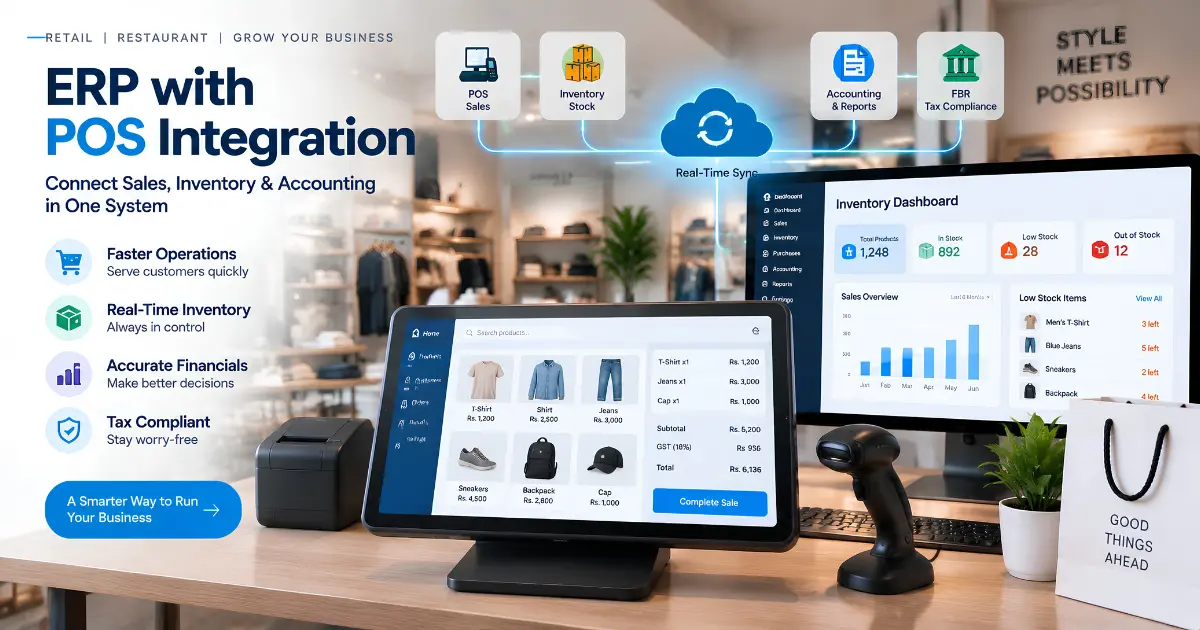
ERP with POS integration connects your point-of-sale system directly to enterprise resource planning software, so sales, inventory, accounting and customer data stay in step in one database. This removes double entry, reduces stock discrepancies, automates financial posting and gives multi-location visibility to retailers, restaurants and service businesses.
For businesses with several locations or hundreds of SKUs, the gap between front-counter sales and back-office records creates costly problems: manual reconciliation, inventory mismatches and e-invoicing errors. An integrated ERP-POS system treats every sale as a single transaction that updates inventory, ledger accounts, customer records and tax reporting together.
Our recommendation: for most retailers, restaurants, pharmacies and distributors, choose a POS that is built into the ERP rather than a separate POS connected by middleware. That is how EloERP works: the POS, inventory, purchasing and accounting share one database. We build EloERP, so we explain the reasoning below and you can test it against any alternative.
What Is ERP with POS Integration?
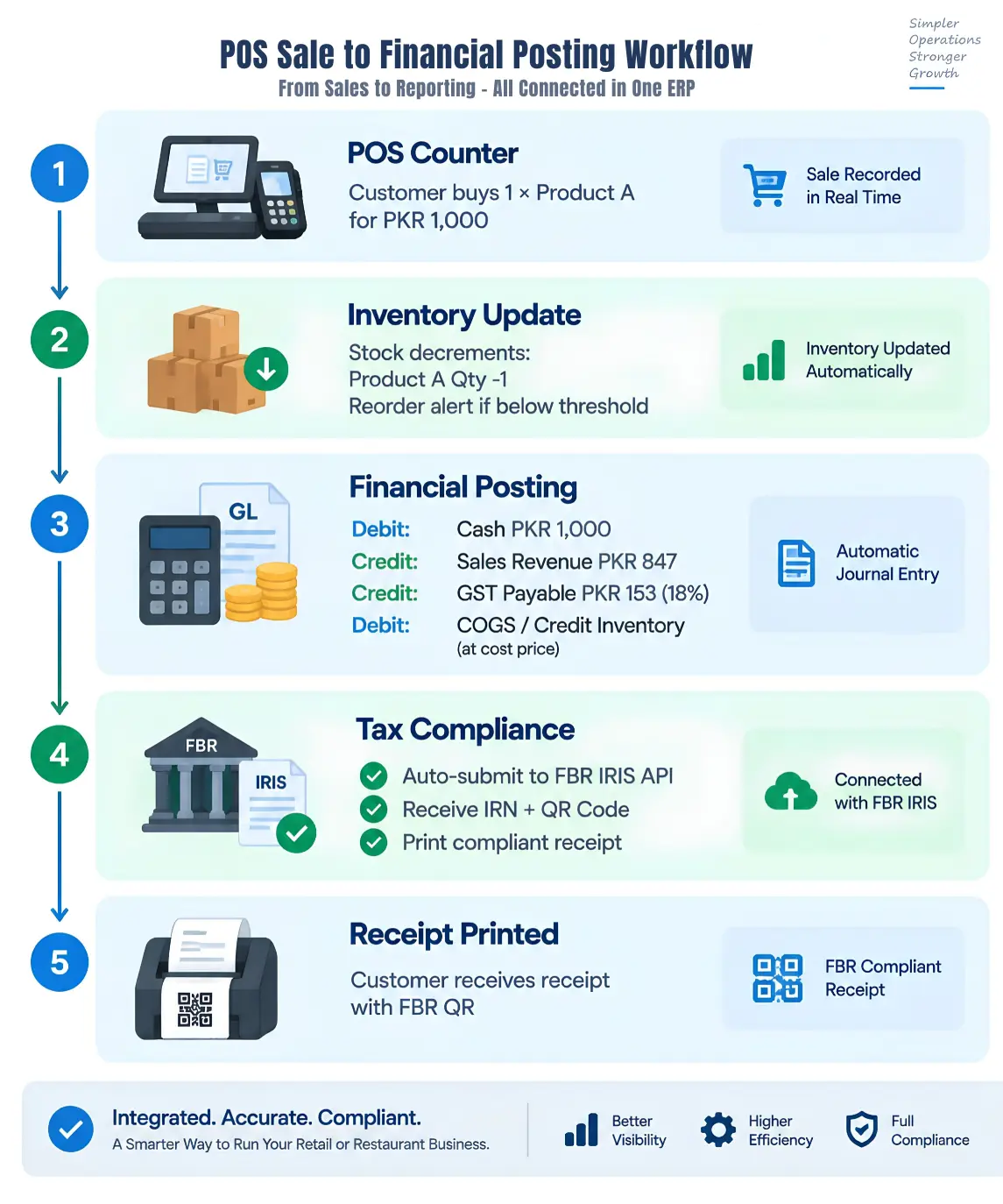
ERP-POS integration means your point-of-sale system and your enterprise resource planning software work as one connected system rather than separate tools that need manual data transfer. When a cashier scans an item and completes a sale, the transaction updates stock levels, posts to the general ledger, adjusts the customer's loyalty balance and flags the item if it falls below its reorder level.
This differs fundamentally from "bolted-on" setups where a standalone POS exports sales to separate accounting or inventory software through CSV files or scheduled batch uploads. Those disconnected workflows create reconciliation gaps, sync delays and audit risk.
Two Architecture Types
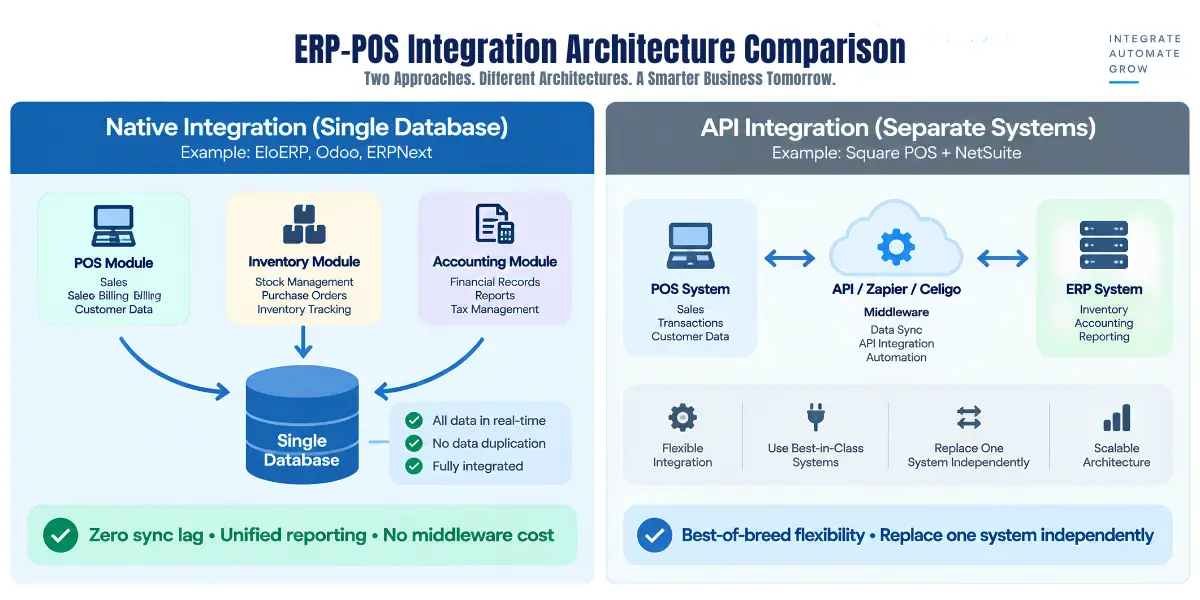
Native integration uses a single database in which the POS, inventory and accounting modules are built by the same vendor. Sales at the counter write directly to the same records that power financial reports and purchase orders. EloERP is built this way.
API/middleware integration connects a standalone POS to a separate ERP or accounting package through connectors. Data moves between the systems through APIs, either in real time (triggered by each sale) or in scheduled batches (hourly or daily).
Key Difference: Real-Time vs. Batch Sync
Native integration removes sync lag: a sale is visible to inventory, accounting and purchasing at once because every module reads the same database. API integrations depend on the uptime of each system and the connector between them, and may batch-sync sales every 15 minutes or every hour, creating temporary discrepancies if someone checks stock between cycles.
Where e-invoicing applies (Pakistan's FBR Digital Invoicing, Saudi Arabia's ZATCA Phase 2, Malaysia's MyInvois, UAE e-invoicing), native integration keeps the audit trail simpler, because every transaction exists as one record rather than separate POS and ERP entries that must be reconciled.
Why Retailers & Restaurants Need ERP-POS Integration
1. Real-Time Inventory Accuracy
Manual stock counts and spreadsheet tracking lead to "sorry, that's out of stock" after a customer has already queued to pay. When POS and inventory run separately, sales at Branch A don't show in Branch B's stock lookup, and purchase orders are raised from out-of-date numbers.
Integrated systems fix this: a sale reduces available stock straight away, a goods received note (GRN) adds the new delivery, and low-stock items are flagged before they run out.
For a 12-location clothing chain, this means seeing which branch has size 42 in stock when a customer at another branch asks for it, and arranging an inter-branch transfer, or telling the customer "we can get it from our Karachi store by tomorrow".
2. Automated Financial Posting
Retailers using a standalone POS face a month-end grind: accountants re-enter hundreds of daily transactions from POS reports into separate accounting software. Every manual entry risks typos, mis-categorisation or duplicates.
An integrated ERP-POS system posts every sale to the general ledger the moment it completes. A PKR 10,000 cash sale that includes 18% sales tax creates the journal entries at once: debit Cash PKR 10,000, credit Sales Revenue PKR 8,475, credit Sales Tax Payable PKR 1,525, plus debit Cost of Goods Sold and credit Inventory at the item's cost. Month-end close becomes a check of automated postings rather than days of re-entry.
3. Multi-Location Visibility
Branch managers phoning head office to ask "do we have stock in the Lahore warehouse?" are a sign of disconnected systems. When each location runs an isolated POS, group reporting means stitching spreadsheets together every weekend.
A cloud ERP-POS gives one view of stock, sales, cash and customer activity across all branches from a single login. The owner sees profit and loss by branch, the purchasing manager sees reorder needs for the group, and branch staff check stock at other branches while the customer is still at the counter.
4. Unified Customer Data (CRM + Loyalty)
A customer buys at Branch A and returns a faulty item at Branch B. If the POS systems aren't connected to one customer record, Branch B's cashier can't see the purchase, can't verify the sale, and either refuses the return (losing the customer) or accepts it on trust (risking return fraud).
Integrated systems keep purchase history, loyalty points, credit limits and payment terms in one customer record across every counter. For wholesale distributors, this means customer-specific price tiers apply automatically at the counter, and credit sales are blocked when a customer would go over their credit limit.
5. Procurement Automation
Manual buying — checking stock, building purchase orders in spreadsheets, emailing suppliers, typing in received goods and matching paperwork by hand — wastes hours and misses reorder points.
With ERP-POS integration, items below their reorder level are flagged and can be turned into a pre-filled purchase order in one click. Receiving a delivery against the purchase order updates stock and cost, and three-way matching of the purchase order, goods received note and supplier invoice stops you over-receiving or paying twice for the same goods.
6. Tax Compliance Integration
Pakistan's FBR Digital Invoicing requires businesses in scope to report invoices to FBR in real time and print the FBR invoice number and QR code on the receipt. Saudi Arabia's ZATCA Phase 2, Malaysia's MyInvois and UAE e-invoicing move in the same direction: invoices reported electronically to the tax authority.
Uploading daily sales files to a government portal by hand is error-prone and time-consuming. When the POS is part of the ERP, each sale can be submitted from the transaction itself, the invoice number and QR code come back onto the receipt, and every attempt is logged. EloERP integrates with FBR Digital Invoicing (through PRAL) and PRA in Pakistan, and with ZATCA Phase 2, MyInvois and UAE e-invoicing.
Integrated systems remove the manual steps where submission errors happen. Which rules apply to you, and from when, depends on your business: check the current notifications on FBR's website (or ZATCA's, LHDN's or the UAE FTA's), or ask your tax adviser.
7. Scalability & Growth Readiness
Small businesses often start with an inexpensive standalone POS and then hit a ceiling: it can't handle multi-location stock, the accounting export breaks as volume grows, or payroll needs yet another disconnected system.
Migrating from a standalone POS to an ERP mid-growth is painful: data-migration risk, staff retraining and downtime at cutover. A native ERP-POS grows with you: start with POS and inventory, add purchasing and accounting, then payroll or recipe costing later. All modules share the same database, so there is nothing to migrate, only modules to switch on. (In EloERP, add-ons such as HRM & Payroll and Manufacturing are priced separately.)
A restaurant group might start with kitchen order tickets (KOT) and billing, add multi-branch purchasing when it opens a third location, and switch on payroll when headcount grows — all on the same platform.
How ERP-POS Integration Works: Architecture & Data Flow
Native Integration Architecture (Single Database)
In a native architecture, the POS, inventory, accounting and every other module write to the same database. When a cashier completes a sale, the POS records the sale; inventory reads it to reduce stock, accounting reads it to create journal entries, and the customer record reads it to update purchase history.
Example: EloERP — POS, inventory, purchasing, accounting and the other modules in one database.
Pros: no sync lag, no middleware subscription, unified reporting (one query pulls sales, stock and financials), simpler audit trail.
Cons: vendor lock-in — all modules come from the same platform, although modules can be switched on one at a time without data migration.
API/Middleware Integration (Separate Systems)
API-based integration connects an independently run POS and ERP through a middleware platform or a custom-built API bridge. When a sale happens in the POS, it triggers a webhook or a scheduled job that pushes the transaction to the ERP.
Sync modes:
- Real-time webhooks: a sale in the POS triggers an immediate call to the ERP (delay: seconds).
- Scheduled batch: the POS exports sales every hour or day (delay: minutes to hours).
Pros: you can keep a POS you already own and add a different back office, and replace one system without touching the other.
Cons: a middleware subscription that grows with transaction volume, sync failures when either side or the connector is down, reconciliation when sales arrive late, and three vendors to manage (POS, ERP and middleware).
Key Data Entities Synchronized
Whichever architecture you choose, an integrated ERP-POS keeps these records in step:
- Sales transactions: line items (SKU, quantity, price, discount), payment methods, customer, time, cashier and branch.
- Inventory movements: stock out on sale, stock in on GRN, inter-branch transfers, adjustments from physical counts, and batch/expiry for pharmacy and food.
- Financial postings: journal entries (cash or receivables, sales revenue, cost of goods, inventory, sales tax/VAT) and payment postings.
- Customer master data: contact details, loyalty balance, credit limit, purchase history, outstanding balance.
- Product master data: SKU, barcode, description, cost and selling price (including customer price tiers), reorder level, supplier, and variants (size/colour for apparel).
Advanced setups extend this to batch and expiry tracking (pharmacy), IMEI/serial tracking (electronics and mobile phones), and approval workflows in which high-value documents need a second person's sign-off.
ERP-POS Integration for Different Industries
Retail (Apparel, Electronics, General Merchandise)
Industry pain points:
- Size/colour variant complexity (one shirt, 5 sizes × 8 colours = 40 variants).
- Stock visibility across locations ("do we have size 42 in blue at another branch?").
- Seasonal planning (order winter stock in July, clear summer stock by September).
Integration requirements:
- Variant SKU management (a barcode per variant, not just per parent product).
- Low-stock alerts by location and variant.
- Inter-branch transfers (move 20 units of SKU-12345-blue-L from Branch A to Branch B and update both branches at once).
Example scenario (composite): A 12-location clothing chain buys centrally and distributes to branches by sales. Head office places bulk orders with suppliers, receives goods at the main warehouse (the GRN updates central stock), then creates transfers to individual branches. When a customer at Branch B asks for size 42 and it's out locally, the cashier checks stock across all branches, finds 3 units at Branch A, and arranges a next-day transfer or sends the customer to Branch A.
Pharmacy & Healthcare
Industry pain points:
- Batch and expiry tracking (one medicine can sit in stock in several batches with different expiry dates).
- Short-dated stock sitting at a slow branch while another branch runs out.
- Stock and sales spread across branches with no single view.
Integration requirements:
- Batch-level inventory (track batch #12345, expiring 2027-06, separately from batch #12346, expiring 2027-09).
- Near-expiry reporting, so slow-moving batches can be moved to busier branches before they expire.
- Inter-branch transfers that update stock at both ends.
Example scenario (composite): A 5-branch pharmacy group buys 1,000 units of a pain reliever expiring in June 2027. Each purchase records the batch number and expiry date, and stock is allocated to branches. The near-expiry report, set to a 90-day window, shows Branch C still holding 200 units of that batch while Branch A has sold out, so the manager transfers the stock from C to A before it expires.
Restaurant & QSR (Quick Service Restaurant)
Industry pain points:
- Recipe costing (a burger needs chicken, a bun, lettuce and sauce, each with its own cost).
- Getting kitchen order tickets (KOT) to the kitchen display without errors.
- Table management and delivery orders.
- Knowing how much stock went into dishes versus how much was wasted.
Integration requirements:
- Recipes as bills of materials (BOM): selling a dish deducts its ingredients automatically.
- Ingredient deduction tied to the sale, so stock reflects what the kitchen used.
- Recipe costs based on current ingredient costs, so margins are real.
Example scenario (composite): A cloud kitchen runs 3 virtual brands (burgers, pizza, sushi) from one shared store. An online order arrives in the POS, a KOT goes to the kitchen screen, and when the sale is confirmed the recipe BOM deducts 150g chicken breast, 1 bun, 20g lettuce and 30ml sauce. A production report shows the cost and margin of each sale. When chicken drops below its reorder level it is flagged for a purchase order, and the supplier's invoice is matched against the order and the delivery before it is paid.
Wholesale & Distribution
Industry pain points:
- Customer-specific price tiers (some customers get wholesale prices, others pay list price).
- Credit limits and aging (don't keep selling on credit to a customer who is over their limit or long overdue).
- Break-bulk margins (buy by the case, sell by the pack: what is the margin per unit?).
Integration requirements:
- Price tiers that apply automatically at the counter and on invoices.
- Real-time credit-limit checks on credit sales.
- Multi-unit products (case, pack, piece) with conversions, and procure-to-pay with three-way matching and aging reports.
Example scenario (composite): An FMCG distributor buys biscuits by the case and sells by the pack to 200 small retailers on 30-day credit. Multi-unit products convert cases to packs, so stock and cost per pack stay accurate. When a salesperson selects a customer, their price tier applies automatically; if the sale would take the customer over their credit limit, it is blocked until payment comes in. Aging reports show the collections team which accounts are overdue.
Choosing the Right ERP-POS Integration: What to Check in Any Vendor
Use these questions on every vendor you shortlist. The right-hand column shows how EloERP answers them.
| Question | Why it matters | EloERP |
|---|---|---|
| Is the POS native or connected? | Sync lag, middleware cost, reconciliation | Native: POS and ERP share one database |
| Which e-invoicing systems does it integrate with? | Invoices must reach the tax authority correctly | FBR Digital Invoicing (through PRAL), PRA, ZATCA Phase 2, MyInvois, UAE e-invoicing |
| Does the POS keep selling offline? | Load-shedding and weak connections | Yes: the offline POS syncs to the cloud when the connection returns |
| How does it handle branches? | Stock, transfers and reports across locations | Multiple branches and outlets, transfers, consolidated reports |
| How deep is inventory? | Your trade's stock rules | Batch/expiry, variants, multi-unit, IMEI/serial, price tiers |
| Does it cover restaurants? | Tables, kitchen and counter service | Tables, KOT, kitchen display, tokens, drive-thru, reservations |
| What controls does it have? | Fraud and errors | Roles, field-level permissions, approval thresholds, audit log |
| How is it priced? | Three-year cost | On request; billed yearly (monthly on request); add-ons priced separately |
Key Decision Factors
1. Business size & complexity
Count your branches, users, SKUs and daily transactions, and write down the processes you can't change. Whatever your size, ask each vendor to demonstrate your branch count and transaction volume, not a demo company.
2. Native vs. API integration
Native integration pros: no sync lag, unified reporting (one query pulls sales, inventory and financials), no recurring middleware fees, and a simpler audit trail (one transaction record instead of separate POS and ERP entries to reconcile).
API integration pros: you can keep the POS hardware and software you already have and add a new back office, and you can replace one system without affecting the other.
Recommendation for SMBs: native integration reduces complexity and removes middleware failure points. Where e-invoicing applies, it also means the POS and the tax submission are the same system rather than separate tools passing data between them. This is the approach we recommend, and the one EloERP takes.
3. Tax compliance requirements
List the e-invoicing systems you are in scope for (FBR Digital Invoicing and PRA in Pakistan, ZATCA Phase 2 in Saudi Arabia, MyInvois in Malaysia, UAE e-invoicing) and ask each vendor to show a live sandbox submission during the demo. Manual uploads of sales files to a tax portal are error-prone; submission from the POS transaction itself is the safer path.
4. Implementation timeline
Timelines depend on data quality, branch count and how much you customise. The fastest path to go-live is a cloud system with a native POS, configured with its standard features and without heavy custom workflows. Ask each vendor for a written plan with dates for each phase.
5. Total Cost of Ownership (TCO) — 3-Year Example (10 Users)
EloERP: pricing on request — a yearly subscription (monthly on request), with add-ons priced separately. Ask us for a written 3-year quote for the same 10-user scenario. Because POS and ERP are one system, there are no middleware fees.
Other vendors: for each one you shortlist, take the current subscription for 10 users over 36 months, then add implementation services, any add-on modules or licences, and middleware if the POS is a separate product. Ask each vendor for a written 3-year quote for the same scenario so the totals are comparable.
Key insight: implementation, training and data migration can be a large share of first-year spend, so make sure every quote includes them.
How to Implement ERP-POS Integration: 7-Step Roadmap
Step 1: Process Mapping (Week 1)
Document your current workflows end to end: how a sale is recorded, when inventory is updated, how purchase orders flow, when entries reach the ledger, how long month-end close takes. Identify pain points: where manual data entry happens, where discrepancies appear, which reports take hours to compile.
Define your integration requirements: real-time or batch, which data must sync, e-invoicing needs (FBR/ZATCA/MyInvois), and must-have reports (profit and loss by branch, stock aging by location, customer receivables aging).
Step 2: Vendor Selection & Demo (Week 2-3)
Shortlist three vendors on business fit, e-invoicing needs, budget and timeline. Ask for demos with YOUR data, not a generic demo company: bring sample products, customer records and real workflows.
Validation checklist:
- E-invoicing test (FBR/ZATCA/MyInvois if applicable): can the vendor show a real sandbox submission during the demo, not just screenshots?
- Multi-branch transfer: transfer stock from Branch A to Branch B and check that A goes down and B goes up straight away.
- Financial posting drill-down: complete a sale at the POS, then open the journal entry and check cash, sales revenue and cost of goods.
- Offline test (if load-shedding is a concern): disconnect the internet mid-sale, complete the transaction, reconnect and check it synced. EloERP's POS works offline.
Step 3: Data Migration Planning (Week 3-4)
Extract master data from your existing systems: products (SKU, barcode, cost price, selling price, reorder level), customers (name, contact, credit limit, outstanding balance), opening stock (quantity and value per location) and chart of accounts.
Clean it up: remove duplicate customers ("ABC Ltd", "ABC Limited" and "ABC Pvt Ltd" should be one record), standardise SKU naming, and do a physical count before migration so opening balances are accurate.
Migration method: CSV or Excel import (most SMB systems provide upload templates), vendor-assisted extraction for complex legacy data, or an API sync if you are moving from another cloud system.
Step 4: Configuration & Customization (Week 4-6)
System setup:
- Company profile (legal name and tax registration: NTN in Pakistan, VAT number in Saudi Arabia, SST registration in Malaysia).
- Tax settings (sales tax/VAT rates and your e-invoicing credentials).
- User roles and permissions (cashiers record sales and returns, warehouse staff receive and transfer stock, accountants post journals and run financial reports, managers approve and see everything).
- Receipt and invoice templates (logo, space for the e-invoice number and QR code, footer text).
POS terminal configuration:
- Barcode scanner (USB or Bluetooth; test a scan to confirm the product lookup).
- Receipt printer (thermal printer driver, 80mm or 58mm paper).
- Cash drawer (connected to the printer or by USB).
- Card terminals and the payment methods your customers use.
Approval workflows: maker-checker for high-value documents (for example, purchase orders above a threshold need a manager's approval before they go to the supplier).
Step 5: User Training (Week 6-7)
Run role-based training:
- POS cashiers (2 hours): sale entry, barcode and name search, discounts, cash/card/credit payments, voids, duplicate receipts, end-of-day cash settlement.
- Warehouse staff (2 hours): goods received notes, transfers between branches, physical stock counts and adjustments.
- Accounts team (3 hours): financial reports (profit and loss, balance sheet, trial balance), tax reports, bank reconciliation, journal entries.
- Management (2 hours): dashboards (sales by branch, top sellers, slow stock, receivables aging), drilling from summary to transaction, and the approval queue.
Format: a 2-hour session per role plus a week of hands-on practice in a training company, so mistakes don't touch real records.
Step 6: Parallel Run & User Acceptance Testing (Week 7-8)
Run the old system and the new ERP-POS side by side for a week. Process real sales in both and compare daily: sales totals match, stock balances reconcile, ledger postings agree.
User acceptance testing: define about 20 real scenarios (cash sale, credit sale, sale with discount, return, GRN that doesn't match the PO, inter-branch transfer, stock-count adjustment, month-end close, e-invoice submission test). Assign staff to run each one, log issues and confirm fixes before go-live.
Step 7: Go-Live & Post-Launch Support (Week 8+)
Cutover: freeze the old system on Friday evening, do a final stock reconciliation, move closing balances into the new ERP, and switch POS terminals over on an off-peak day (Saturday morning for many retailers; a quiet weekday for restaurants, to avoid the weekend rush).
First-week hyper-care: make sure the vendor is reachable for immediate fixes. Common go-live issues: printer drivers, misconfigured scanners, forgotten logins, and a payment terminal still in test mode.
Month 1 review: after the first month-end in the new system, check posting accuracy (bank statements against the cash account, tax payable against tax collected, stock against a physical count) and gather user feedback on what is smoother and what needs more training.
Common ERP-POS Integration Challenges & How to Avoid Them
Challenge 1: Data Migration Errors
Cause: duplicate SKUs in the old system, missing opening balances, inconsistent naming.
Solution: audit the data before migrating (Week 3 above). Export master data to Excel, find duplicates, standardise names, and reconcile opening balances with physical counts and bank statements. Use the import validation (required fields, unique SKUs, numeric prices and quantities).
Challenge 2: Sync Lag or API Failure
Cause: API integrations depend on the uptime of the POS, the ERP and the connector between them. If any one is down, sales don't reach the ERP and stock figures drift.
Solution: choose native integration (one database, no connector between POS and accounts), or build retry logic into the API integration (queue failed transactions, retry automatically, alert someone if retries keep failing) and monitor the connector's status.
Challenge 3: User Resistance & Training Gaps
Cause: staff used to the old system worry about automation ("if sales post themselves, what happens to the accountant?"), and too little training leaves users guessing.
Solution: explain that the system removes repetitive data entry so staff can focus on customers and analysis. Involve staff in acceptance testing, and appoint internal champions in each department who get extra training and support colleagues after go-live.
Challenge 4: Compliance Misconfiguration
Cause: wrong tax rates (standard rate applied to exempt items), missing invoice fields (for example, the buyer's NTN), or an e-invoicing setup that doesn't match the tax authority's current format.
Solution: choose a vendor whose system integrates with your e-invoicing regime (EloERP integrates with FBR through PRAL, PRA, ZATCA Phase 2, MyInvois and UAE e-invoicing), and test end to end before go-live: submit a test invoice to the sandbox, receive the invoice number and QR code, and print the receipt.
Risk example: a misconfigured tax setup sends wrong data to the tax authority on every sale until someone notices. Errors have financial and reputational costs, so test e-invoice submission end to end before go-live.
Challenge 5: Over-Customization & Scope Creep
Cause: during implementation, stakeholders ask "while we're at it, can we also add…?" and a short deployment turns into a six-month customisation project.
Solution: freeze scope at the end of configuration. Go live with the core (sales, inventory, accounting, e-invoicing), stabilise for two to three months, then plan a second phase for extras (manufacturing, e-commerce, extra dashboards).
ERP-POS Integration: Illustrative Case Scenarios
Scenario 1: 12-Location Retail Chain (Apparel — Pakistan)
Before integration:
- A standalone POS at each branch, with no cloud sync.
- Daily sales consolidated by hand in Excel from branch managers' emails.
- Stock transfers arranged over WhatsApp, with manual stock adjustments at both branches.
- A month-end close that takes days of chasing and reconciling branch reports.
After ERP-POS integration (native, cloud-based):
- Live stock across branches, so transfers are based on today's numbers rather than yesterday's messages.
- Low-stock items flagged across branches and turned into purchase orders.
- Sales posted to the ledger automatically, so month-end is a check rather than re-entry.
- FBR Digital Invoicing submitted from the POS, replacing manual portal uploads.
Scenario 2: Cloud Kitchen Network (3 Brands, 1 Warehouse — Karachi)
Before integration:
- A separate POS for each brand.
- Shared store inventory kept in a spreadsheet, with ingredients deducted from the chef's daily report.
- Recipe costs worked out in Excel once a quarter, so food cost was always out of date.
After ERP-POS integration with recipe BOMs:
- One inventory: selling a burger deducts its ingredients from the shared store automatically.
- Cost and margin reported for each sale, so menu pricing decisions use real numbers.
- Ingredients below their reorder level flagged and turned into purchase orders before the weekend rush.
- Supplier invoices matched against the order and the delivery before payment.
Scenario 3: 5-Branch Pharmacy Group (Lahore + Faisalabad)
Before integration:
- Standalone pharmacy software at each branch, with no multi-branch sync.
- Batch and expiry details kept in notebooks.
- No group view of which branch holds short-dated stock.
After ERP-POS integration with batch and expiry tracking:
- Batch-level stock: each purchase records batch number, expiry date and quantity per branch.
- A near-expiry report shows which batches will expire within the window you set, and where they are.
- Short-dated stock transferred to branches that will sell it before it expires.
Note: these are illustrative composite scenarios built from the capabilities described in this guide. They do not describe specific clients.
Conclusion & Next Steps
ERP with POS integration closes the gap between customer-facing sales and back-office records: real-time inventory, automatic financial posting, multi-location visibility and e-invoicing from the sale itself. Whether you run a retail chain, a restaurant group, a pharmacy or a distribution business, an integrated system cuts manual work, reduces stock discrepancies and grows with you.
Our Recommendation: A POS Built into the ERP
For retailers, restaurants, pharmacies and distributors, from a single branch to a multi-branch group, we recommend EloERP's built-in POS and ERP over a separate POS connected by middleware. One database means no sync lag, no middleware fees, and one record per sale for your accounts and your tax authority. The offline POS keeps selling through outages, and add-ons such as HRM & Payroll and Manufacturing can be switched on as you grow.
E-Invoicing Markets (Pakistan, Saudi Arabia, Malaysia, UAE)
If FBR Digital Invoicing, PRA, ZATCA Phase 2, MyInvois or UAE e-invoicing applies to your business, prioritise a POS that submits the e-invoice from the sale itself over manual portal uploads. Check it during the demo: watch a test invoice go to the sandbox, come back with an invoice number and QR code, and print on the receipt.
Next Steps
- Map your current process: document your sale-to-ledger workflow and mark every manual step (see Step 1 of the roadmap above).
- Shortlist three vendors: use the checklist above, filtered by size, budget and e-invoicing needs.
- Ask for live demos with your data: your products, your workflows, your tax requirements — not a generic presentation.
- Validate e-invoicing: if FBR, ZATCA or MyInvois applies, ask for a live sandbox submission during the demo.
Take Action
EloERP is a cloud ERP with a built-in POS for multi-branch retailers, restaurants, pharmacies and distributors. It integrates with FBR Digital Invoicing (through PRAL) and PRA in Pakistan, and with ZATCA Phase 2, MyInvois and UAE e-invoicing.
- Start your 15-day free trial (no credit card required)
- Book a personalised demo with your data, to see how your products, workflows and tax requirements work in EloERP
- Ask us for a quote (pricing on request: yearly subscription, monthly on request; add-ons priced separately)
What to Read Next
- POS Software for Pakistan: Cloud Point of Sale with Built-In FBR Digital Invoicing — how to choose POS software with FBR digital invoicing, offline selling and multi-branch features for retail, restaurants and pharmacies.
- Best POS Software in Pakistan (2026) — how to choose POS software with FBR digital invoicing in Pakistan, by type of business.
- E-Invoicing Malaysia: MyInvois Guide — Malaysia's MyInvois rollout explained, and how a cloud ERP handles e-invoicing (similar in approach to Pakistan's FBR system).