
FBR IRN & QR Code: How Digital Invoice Verification Actually Works
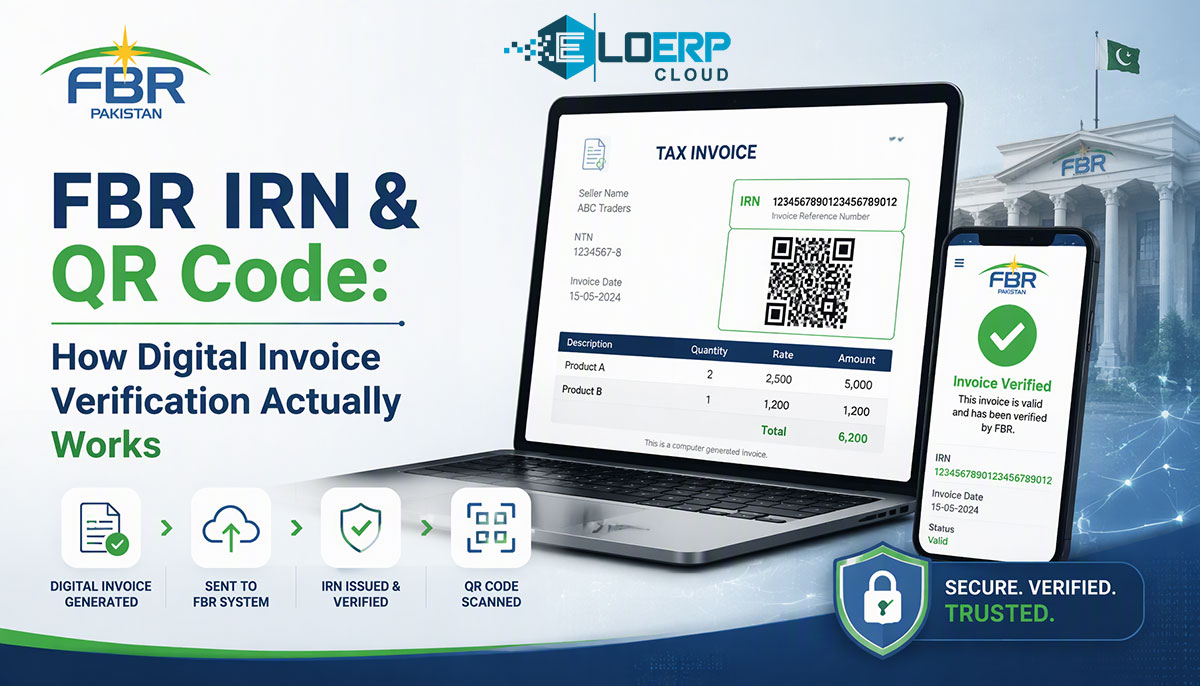
Every FBR digital invoice carries two things that prove it is real: a unique FBR invoice number (commonly called an IRN — Invoice Reference Number) — a code roughly 22 characters long that FBR's system assigns the moment your POS or ERP transmits the sale — and a QR code that encodes that number so anyone with a phone can verify the invoice against FBR's records. If a receipt does not carry both, it is not a compliant digital invoice. [1][2]
Most guides on FBR compliance explain what you must do. This one explains how the system actually works — from the moment your cashier taps "sale" to the printed receipt in the customer's hand — so you can evaluate any POS vendor's claims and troubleshoot problems yourself.
What Is an IRN (Invoice Registration Number)?
The IRN (the industry shorthand; Pakistani law calls it the "unique FBR invoice number") is a unique identifier that FBR's Computerized System generates for every sales tax invoice submitted through PRAL (Pakistan Revenue Automation Pvt Ltd), FBR's IT subsidiary. Think of it as a receipt number — but issued by the government, not your cash register. [1][3]
Key facts about the IRN:
- Format. Approximately 22 characters (example:
7000007DI1747119701593). The string includes your business identifier, a document-type code, and a timestamp-based serial. [2] - Generated in real time. Your POS transmits the invoice data; PRAL's gateway validates it; the IRN comes back in the same request — typically within seconds. [1][3]
- One per invoice. Every sales tax invoice, POS receipt, debit note, credit note, and sales return gets its own IRN. No batch submission — each document is individually registered. [1]
- Proof of reporting. An invoice without an IRN was never transmitted to FBR. If a vendor claims "FBR compliance" but the receipt has no IRN printed on it, the system is not integrated. [2]
- Editable within 72 hours. Under STGO 01 of 2026, a transmitted invoice can be edited, deleted, or cancelled within 72 hours. After that, amendment requires prior approval from the Commissioner Inland Revenue. [2]
What Does the QR Code on Your Receipt Contain?
The QR code is not decoration — it is a machine-readable verification seal generated from the IRN data according to PRAL's published specification. [2]
Data encoded in the QR code:
| Field | What it contains |
|---|---|
| Invoice Reference Number (IRN) | The unique FBR-assigned number for this invoice |
| Seller's NTN | The seller's National Tax Number |
| Invoice date and time | Timestamp of the transaction |
| Total amount including tax | The invoice total (gross) |
| FBR verification URL | A link to verify the invoice on FBR's system |
[4]
How verification works. Anyone — a customer, an FBR inspector, or an auditor — can verify an invoice three ways:
- Scan the QR code with any phone camera or the FBR Tax Asaan app. The app connects to FBR's system and shows whether the invoice was reported, when, and for what amount. [4]
- Enter the IRN on FBR's portal. Go to the verification page on fbr.gov.pk, enter the IRN manually, and see the registered invoice details. [4]
- SMS verification. Send
INV <space> CNIC <space> FBR invoice numbervia SMS to 9966 to receive a confirmation reply. [4]
Compliance note: a valid FBR digital invoice must display both the QR code and the official FBR Digital Invoicing logo. A QR code alone, or the logo without a valid underlying IRN, does not constitute compliance. [2]
The Invoice Flow: Step by Step
Here is what happens in the 2–5 seconds between your cashier pressing "sale" and the customer getting a receipt:
Step 1 — Sale entered at POS
The cashier rings up items. Your POS calculates line totals, applicable sales tax (federal GST and, where relevant, provincial — SRB, PRA, KPRA), and the invoice total. At this point the invoice exists only in your local system.
Step 2 — POS transmits to PRAL gateway
Your POS (or ERP) sends the invoice data — seller NTN, buyer NTN (if B2B), item details with HS codes, tax amounts, units of measure — to PRAL's gateway via API. The API documentation is published by FBR as version 1.12. [3][5]
The transmission happens in real time, not in a batch at end-of-day. This is a legal requirement: the invoice must be transmitted to FBR before it is issued to the buyer. [1]
Step 3 — PRAL validates
PRAL's system runs validation checks:
- Is the seller's NTN active and registered for digital invoicing?
- Are all required fields present (item descriptions, HS codes, tax calculations)?
- Is the invoice format correct per the API specification?
- Is the hash/integrity of the transmission intact?
If validation fails, PRAL returns an error code. The invoice is not registered, and your POS should display the error for correction. [3][5]
Step 4 — FBR assigns the IRN
If validation passes, FBR's Computerized System assigns a unique IRN to the invoice. This number is returned to your POS in the same API response. [1][3]
Step 5 — QR code generated locally
Your POS takes the IRN and other returned data and generates the QR code locally, following PRAL's encoding specification. This is a local operation — the QR image is not sent from FBR's server. [2][4]
Step 6 — Receipt printed
The thermal printer produces the customer receipt with:
- All standard invoice details (items, amounts, tax)
- The IRN printed in text
- The QR code
- The FBR Digital Invoicing logo
The customer walks away with a verifiable government-stamped receipt. The invoice is now visible in FBR's IRIS portal, and FBR has a real-time record of the sale. [1][2]
The entire flow — steps 2 through 6 — typically takes 2 to 5 seconds on a stable connection. The customer barely notices.
What Happens If the Connection Drops? (Offline Handling)
Pakistan's internet infrastructure is not perfect. Power cuts, ISP outages, and slow mobile data at smaller shops are normal. A compliant POS system must handle this without stopping sales.
How offline mode should work:
- Sale proceeds normally. The cashier completes the transaction. The POS generates a preliminary receipt (without the IRN and QR code, since FBR has not yet seen the invoice).
- Invoice queued locally. The POS stores the invoice data in an encrypted local queue.
- Auto-sync on reconnect. When internet connectivity returns, the POS automatically transmits all queued invoices to PRAL in order. Each invoice receives its IRN.
- Customer notification. Best practice: the customer can return for a verified receipt, or the business provides a corrected receipt upon request.
How EloERP handles this: Every invoice, POS receipt, and sales return is reported to FBR through PRAL the moment it is issued. The offline POS keeps working when the connection drops and pushes the queued data to the cloud once the connection returns — and per-line error messages with one-click retry on rejections mean a cashier can fix and resubmit without calling IT. [5][6]
What to ask any vendor: "What happens to invoices if internet goes down mid-shift? Show me the queue." If the vendor cannot demonstrate an offline queue with automatic retry, the system will halt your sales counter during outages.
Common IRN/QR Errors and How to Fix Them
These are the errors your team is most likely to encounter:
| Error | What it means | Fix |
|---|---|---|
| Authentication failed | API key or token is expired or incorrect | Re-generate credentials in the FBR IRIS portal; update your POS settings |
| NTN mismatch | The NTN in your POS does not match the NTN registered with FBR for digital invoicing | Verify your NTN registration in IRIS; contact your licensed integrator |
| Invalid invoice format | Required fields are missing (HS code, unit of measure, tax calculation) | Check FBR's invoice schema; ensure your POS maps all required fields |
| Timeout / no response | Slow internet or FBR server under load | Implement retry logic; check your internet speed; invoice should auto-queue |
| Duplicate invoice number | Your internal invoice number was already submitted | Check for duplicate transmissions; your POS should assign unique sequential numbers |
| QR code not printing | Thermal printer cannot render the QR, or POS did not receive IRN data | Check printer resolution (203 DPI minimum for readable QR); verify the IRN was returned before print |
| IRN returned but QR blank | POS received the IRN but the QR generation module failed | Software issue — update your POS software; contact vendor support |
When to escalate: if you see persistent validation errors (not timeout errors), your POS configuration likely has a mapping problem. Contact your licensed integrator or POS vendor — do not attempt to modify API payloads manually.
Frequently Asked Questions
Can FBR track my sales in real time through the QR code?
Yes. Every invoice transmitted to FBR is logged in real time in their Computerized System. FBR can see the sale amount, items, tax collected, date, time, and your NTN the moment the IRN is issued. The QR code is a verification tool for the buyer — FBR already has the data before the QR is even printed. [1]
Do I need a special printer for QR codes?
No. Any standard 80mm thermal receipt printer at 203 DPI or higher can print a readable QR code. Most POS printers sold in Pakistan already meet this specification. If your current printer produces blurry QR codes, check the print density setting before replacing hardware.
What if my IRN does not match FBR's records?
This should not happen under normal operation — the IRN is generated by FBR's system, so your copy and theirs are identical. If a customer reports a verification mismatch, check three things: (1) the receipt was not from the offline queue and still awaiting sync, (2) the invoice was not edited or cancelled within the 72-hour window after printing, (3) there is no data-corruption issue in your POS. If the mismatch persists, file a support request with your licensed integrator and FBR's technical assistance desk. [2][3]
Want to see the full IRN and QR flow running on your own products and prices? Start a 15-day free trial — FBR digital invoicing is built in on every plan, no add-on fee — or book a 30-minute demo to see it in action with your business type.
Sources
- FBR — Digital Invoicing FAQs: https://fbr.gov.pk/faqs/173967/173969
- InvoiceFlow — FBR E-Invoicing Compliance Guide 2026: https://invoiceflow.pk/fbr-compliance/
- FBR — Digital Invoicing Technical Assistance: https://fbr.gov.pk/di-technical-assistance/173967/173970
- LogicLayer — FBR Invoice QR Code Verification:
- EloERP — FBR Digital Invoicing (product page): https://eloerp.net/compliance/fbr-digital-invoicing
- EloERP — Product POS module: https://eloerp.net/product/pos