
EloERP Cloud
The compliance differentiator

FBR, ZATCA, MyInvois & UAE e-invoicing — built into every invoice, not a bolt-on. Sell compliantly from day one.

Compliance hub
Guide

FBR Integrated POS Software & Digital Invoicing in Pakistan: The Complete 2026 Guide
EEloERP Team··5 min read
FBR Integrated POS Software & Digital Invoicing in Pakistan: The Complete 2026 Guide

This guide focuses specifically on FBR POS integration requirements for Pakistani retailers.  For a comprehensive overview of Pakistan's digital invoicing ecosystem—including regulatory timeline, compliance for all business types, and step-by-step registration—see our [complete FBR digital invoicing guide].

Quick answer: FBR integrated POS software is a Point of Sale system connected to Pakistan’s Federal Board of Revenue digital-invoicing platform, so every counter sale is reported to FBR in real time and the receipt carries a unique FBR invoice number and a verifiable QR code. It is mandatory for Tier-1 retailers, and the right platform handles it automatically — even offline. This guide explains the rules, how the integration works, who must comply, and how to choose FBR POS software in 2026.

What Is FBR Integrated POS Software?

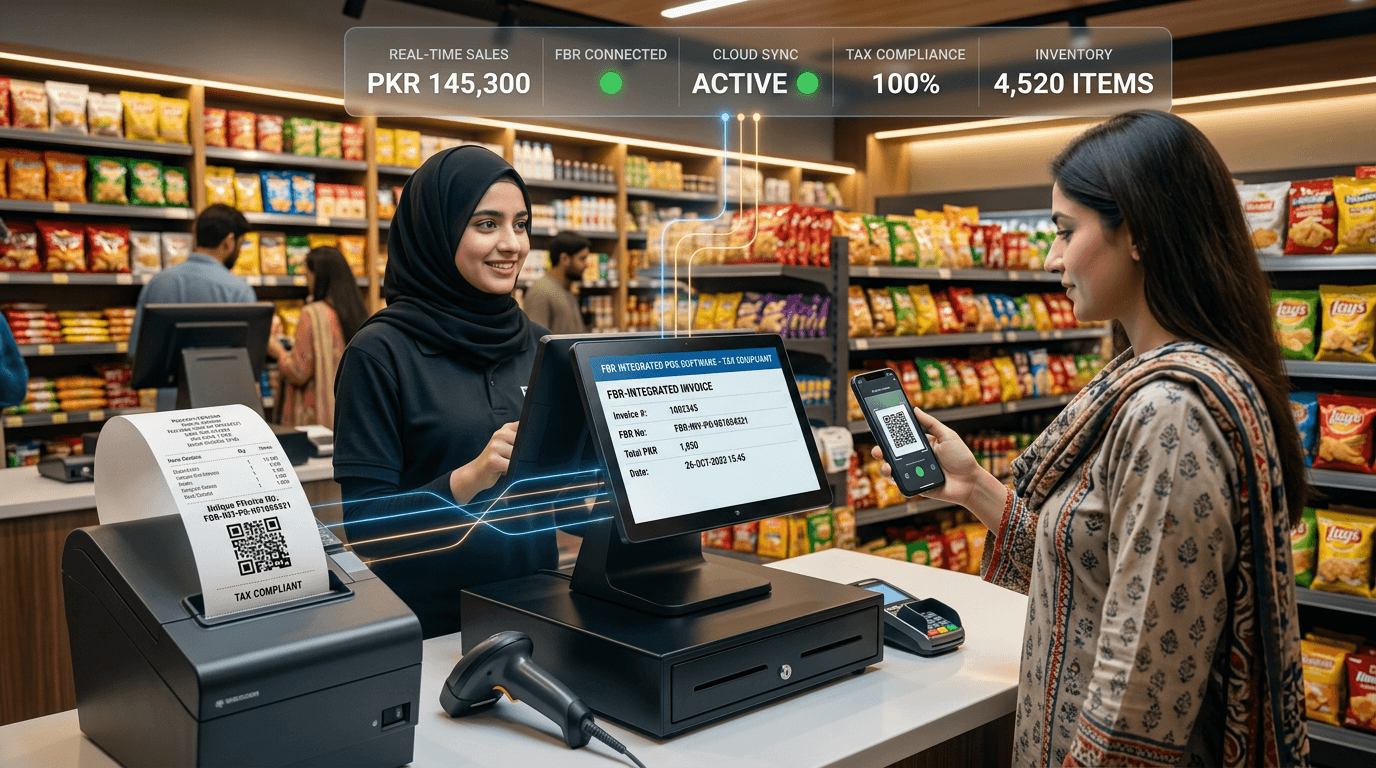
FBR integrated POS software is a point-of-sale system electronically connected to Pakistan's Federal Board of Revenue digital invoicing portal. When a sale is processed, the system transmits the invoice to FBR in real time, receives a unique invoice reference number (IRN) and QR code, and prints both on the customer's receipt for verification via FBR's Tax Asaan app.

This is the backbone of Pakistan’s drive to document retail sales and broaden the tax base. For a retailer, “FBR integrated” means your POS is not just a billing machine — it is a real-time reporting channel to the tax authority, fully compliant with the POS integration requirements introduced under SRO 1852(I)/2025 and the Sales Tax Act, 1990.

Is FBR POS Integration Mandatory? (Tier-1 Retailers)

Yes. Under SRO 1852(I)/2025, FBR digital invoicing is mandatory for all sales-tax-registered businesses in Pakistan — both corporate (from 1 June 2025) and non-corporate (from 1 July 2025). Tier-1 retailers must integrate their POS systems with FBR's computerized system through a licensed integrator. Non-Tier-1 registered persons must use FBR's digital invoicing portal for electronic invoice submission.

If your business is Tier-1, integrating your POS with FBR is a legal obligation, not an option. Retailers below these thresholds are not required to integrate, though many do so voluntarily — verifiable invoices build customer trust, and the same system automates their bookkeeping.

What Are the Penalties for Not Integrating with FBR?

Non-compliant businesses face three consequences under Pakistan's Sales Tax Act: (1) reduced input tax adjustment — only 60% allowed instead of 100%, directly increasing tax liability; (2) monetary penalties starting at PKR 25,000 per day, escalating to PKR 500,000–3,000,000 for repeated violations; and (3) premises sealing by Inland Revenue enforcement squads. Invoices issued outside FBR's system are legally invalid.

In short, integration protects both your input-tax position and your reputation.

How Does Real-Time FBR Digital Invoicing Work?

Here is the end-to-end flow when an FBR-integrated POS processes a sale:

  1. Cashier rings up the sale in the POS system.
  2. POS transmits the invoice data to FBR's server via a licensed integrator's API.
  3. FBR validates the invoice and returns a unique invoice reference number (IRN).
  4. POS prints the receipt with the IRN and a scannable QR code.
  5. Customer verifies the invoice by scanning the QR code with FBR's Tax Asaan app.

If the internet drops, a well-built POS does not stop selling: it queues invoices locally and syncs them to FBR automatically when the connection returns — so a network outage never makes you non-compliant.

FBR POS Software Comparison: What to Look For

Not every “FBR POS” is equal. Use this checklist to compare options. The table shows what a complete, integrated platform like EloERP delivers versus a basic standalone FBR billing tool.

CapabilityBasic FBR Billing AppEloERP Cloud (Integrated ERP + POS)
Real-time FBR digital invoicingYesYes
QR code + FBR invoice number on receiptYesYes
Offline mode (queue & auto-sync to FBR)Often missingYes — never stop selling
Automatic inventory deduction per saleNoYes (SKU-level, multi-branch)
Accounting / general-ledger postingNo (export to accountant)Yes — automatic
Sales-tax & withholding handlingBasicFull, rule-driven
Multi-branch central managementNoYes — one cloud platform
Urdu interface & local supportVariesYes
Batch & expiry (pharmacy / food)NoYes
HR, payroll & commissionsNoYes

The lesson: FBR compliance is the entry ticket, but the real value comes when that compliant sale also updates your stock, accounts, and reports automatically — which only an integrated ERP + POS delivers.

FBR Compliance by Industry

The compliance rules are national, but the practical needs differ by sector. EloERP combines FBR invoicing with the industry-specific features each business actually uses:

For the broader sales-tax picture, also read our guide to GST / sales-tax compliance in POS software.

For the complete regulatory context, deadlines, and penalty structure, read our [FBR digital invoicing compliance guide].

How to Make Your Store FBR Compliant with EloERP

Getting a store live on FBR digital invoicing is straightforward with the right platform:

  1. Register your POS with FBR to obtain your integration credentials (POS ID and token).
  2. Enter the credentials in EloERP and map your sales-tax rates and product tax categories.
  3. Run a test invoice — confirm a live FBR invoice number and QR code are returned and printed.
  4. Go live — every subsequent sale is reported automatically, online or queued offline.
  5. Scale — add more terminals or branches centrally from the same cloud account.

Because EloERP is a complete ERP, the same FBR-reported sale also updates inventory, posts to your accounts, and feeds your reports — no separate accounting export required.

Ready to become FBR compliant? Start a free trial or view transparent pricing to see EloERP’s FBR digital-invoicing in action.

TagsFBR Integrated POS SoftwareFBR POS Software PakistanFBR POS IntegrationFBR Digital InvoicingFBR POS SystemTier-1 Retailer POSFBR Compliant POS

Frequently asked questions

What is FBR integrated POS software?
FBR integrated POS software is a Point of Sale system that is connected to the Federal Board of Revenue (FBR) digital invoicing system. Every sale made at the counter is transmitted in real time to FBR, which returns a unique FBR invoice number and a verifiable QR code that is printed on the customer receipt. This makes the retailer compliant with Pakistan's POS integration rules under SRO 1852(I)/2025 and lets buyers verify the invoice through the FBR Tax Asaan app or the FBR verification portal.
Is FBR POS integration mandatory in Pakistan?
FBR POS integration is mandatory for Tier-1 retailers as defined under the Sales Tax Act, 1990. This includes retailers operating in air-conditioned shopping malls, those with a credit/debit card machine, retailers whose electricity bill exceeds Rs 1.2 million per year, and large-format and chain stores. Tier-1 retailers who do not integrate face a reduced input tax adjustment (only 60% allowed) plus penalties and possible shop sealing. Smaller (non-Tier-1) retailers are not required to integrate but many do so voluntarily for the customer-trust and accounting benefits.
How does real-time FBR digital invoicing work?
When a cashier completes a sale, the integrated POS sends the invoice data to FBR's IRIS/digital invoicing API over a secure connection. FBR validates the data and returns a unique invoice number (IRN) and a QR code within a second or two. The POS prints this FBR invoice number and QR code on the receipt. The customer can scan the QR code or enter the invoice number in the FBR Tax Asaan app to confirm the sale was reported. If the internet is down, a good POS queues the invoices offline and syncs them to FBR automatically when the connection returns.
What happens if a Tier-1 retailer does not integrate with FBR?
A Tier-1 retailer that fails to integrate with the FBR POS system loses 40% of its input tax adjustment (only 60% is allowed instead of 100%), which directly raises its tax cost. FBR can also impose monetary penalties under the Sales Tax Act and, for continued non-compliance, seal the business premises. Beyond the legal risk, non-integrated invoices cannot be verified by customers, which is increasingly a competitive disadvantage as buyers expect verifiable, prize-scheme-eligible FBR receipts.
Does EloERP support FBR integrated invoicing and POS?
Yes. EloERP Cloud is an all-in-one ERP and touchscreen POS built for Pakistani retail, distribution, and pharmacy businesses, with FBR digital-invoicing integration, automatic QR-code and FBR-invoice-number printing, offline-then-sync invoice queuing, full sales-tax handling, and Urdu support. Because the POS is one module inside a complete ERP, the same FBR-reported sale also updates inventory, the accounting ledger, and customer records automatically. You can request a free trial or a guided demo to see the FBR flow live.
Can FBR POS software work offline?
Yes - the best FBR POS solutions keep working during an internet outage. Sales continue at the counter, invoices are stored locally, and the moment the connection is restored the queued invoices are transmitted to FBR and the official FBR invoice numbers are reconciled. This offline-then-sync capability is essential in Pakistan, where intermittent connectivity is common, because it means a network drop never stops you from selling or makes you non-compliant.
What is the difference between FBR POS integration and PRAL / PSW?
FBR POS integration refers specifically to connecting a Tier-1 retailer's Point of Sale to FBR's digital invoicing system so that retail sales are reported in real time. PRAL (Pakistan Revenue Automation Limited) is FBR's technology arm that operates the underlying IRIS systems and APIs. PSW (Pakistan Single Window) is a separate platform for cross-border trade and customs. For a shop or chain store, the relevant requirement is POS integration with FBR digital invoicing - which is what EloERP handles end to end.
How long does it take to make a store FBR compliant with EloERP?
For a typical single-branch retailer, EloERP can be configured for FBR digital invoicing in a few days: register the POS with FBR to obtain the integration credentials (POS ID and token), enter them into EloERP, map your tax rates, and run a test invoice that returns a live FBR invoice number and QR code. Multi-branch chains take a little longer because each terminal/branch is registered, but the same cloud platform manages them all centrally.
Back to all articles

Run your business on one system

See how EloERP unifies sales, stock and accounts. Start free, or book a quick demo.

Start 14-Day Free TrialBook a demo