
How to Integrate Your ERP with the ZATCA Fatoora Portal (Step-by-Step)
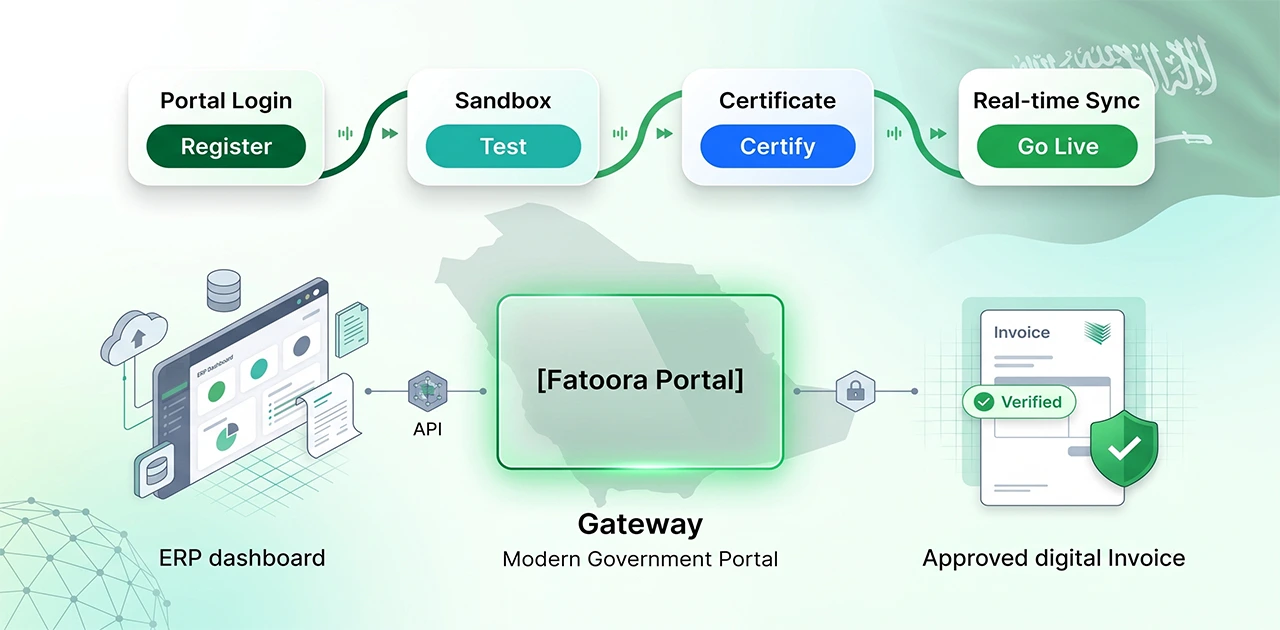
The ZATCA Fatoora Portal is Saudi Arabia's centralized e-invoicing gateway for Phase 2 compliance. Integration follows four stages: register your business and obtain a Compliance CSID, test sample invoices in the sandbox environment, request a Production CSID after validation passes, and switch to live production endpoints. Below is the complete walkthrough.
The portal serves as the validation checkpoint for every invoice issued by VAT-registered businesses. B2B standard invoices must be cleared by Fatoora before delivery to buyers; B2C simplified invoices are issued immediately and reported within 24 hours. If you're selecting an ERP for ZATCA Phase 2 or managing the integration yourself, understanding the Fatoora workflow prevents costly onboarding delays.
What Is the Fatoora Portal?
The Fatoora Portal (https://fatoora.zatca.gov.sa) is ZATCA's central gateway for Phase 2 (Integration Phase) e-invoicing. It handles invoice clearance for B2B standard invoices and reporting for B2C simplified invoices. ZATCA brings VAT-registered businesses into Phase 2 in waves; once your wave applies, your ERP or POS system must connect to Fatoora and transmit invoices in real time.
Phase 1 vs Phase 2 distinction: Phase 1 (Generation Phase, launched December 2021) required businesses to generate e-invoices electronically and store them locally — no ZATCA connection was needed. Phase 2 (Integration Phase, rolled out wave-by-wave from January 2023) mandates real-time API integration with Fatoora for every invoice. The portal validates XML format, cryptographic signatures, and mandatory fields, then returns clearance status or error codes.
The Fatoora Portal also provides facilities for managing cryptographic stamp identifiers (CSIDs), viewing submission statistics, revoking inactive devices, and accessing API documentation. All interactions require ERAD credentials (the same login used for ZATCA's VAT portal).
Prerequisites Before You Begin
You cannot start Fatoora integration until these four elements are in place:
1. Valid VAT registration with ZATCA Your business must have an active VAT registration number and commercial registration (CR) number. ZATCA's portal links your invoices to these identifiers; mismatches cause immediate rejection.
2. Compliant ERP or POS system Your software must generate UBL 2.1 XML invoices, apply cryptographic stamping with an X.509 certificate, embed a UUID for each invoice, and create a hash chain linking invoices together. Systems that output only PDF invoices or proprietary formats cannot connect to Fatoora. For evaluation criteria, see our ZATCA Phase 2 POS software guide.
3. Assigned ZATCA wave group ZATCA is rolling out Phase 2 in waves based on annual taxable revenue and notifies businesses when their wave is selected. Check the current notifications on ZATCA's roll-out page at https://zatca.gov.sa/en/E-Invoicing/Introduction/Pages/Roll-out-phases.aspx (or ask your tax adviser) for what applies to your business and when.
4. A solution that can onboard to Fatoora ZATCA does not approve or certify individual e-invoicing solutions; each solution has to pass ZATCA's compliance checks when it is onboarded through the Fatoora Portal. Ask your vendor to show a successful sandbox onboarding. EloERP generates ZATCA Phase 2 e-invoices and connects to ZATCA's Fatoora platform — the platform handles UBL 2.1 XML generation, cryptographic stamping, UUID assignment, and automatic Fatoora transmission for both B2B clearance and B2C reporting.
Step 1 — Register on the Fatoora Portal
Portal URL: https://fatoora.zatca.gov.sa
Log in using your ZATCA ERAD credentials — the same username and password you use for VAT filing. If you don't have ERAD credentials, create them through ZATCA's main portal at https://zatca.gov.sa first.
Once logged in, the Fatoora landing page displays five primary options:
- Onboard new solution unit/device — Use this to register each ERP instance or POS terminal
- Renew existing CSID — For updating expired cryptographic certificates
- View solutions and devices — Manage, filter, search, or revoke active devices
- E-invoicing statistics — View submission counts (accepted, accepted with warnings, rejected) for the past 12 months
- API Documentation — Access technical specifications and endpoint details
Generate a Compliance CSID for sandbox testing:
- Click Onboard new solution unit/device
- The portal generates a one-time password (OTP) valid for 60 minutes
- Copy the OTP — you will enter it into your ERP or POS system during setup
- Your software uses the OTP to request a Compliance CSID (CCSID) from ZATCA's API
- ZATCA returns the CCSID — a temporary cryptographic certificate that authorizes sandbox testing
What the CSID does: The Cryptographic Stamp Identifier is your software's digital identity. It contains the public key ZATCA uses to verify the digital signatures on your invoices. The Compliance CSID is non-binding and used only for sandbox validation; the Production CSID (issued later) makes invoices legally recognized.
Generate one OTP per device or ERP instance. Multi-branch retailers need separate CSIDs for each location or POS terminal. OTPs expire after 60 minutes; if you miss the window, generate a new OTP and repeat the process.
Step 2 — Sandbox Testing
The sandbox environment (also called the Simulation Portal) is a replica of the production Fatoora platform that uses dummy data and produces unofficial responses. Use it to validate your software's XML structure, cryptographic stamping, and QR code generation before going live.
Configure your ERP to connect to the sandbox API:
Your ERP vendor should provide a sandbox configuration toggle. Switch the ZATCA endpoint from production to sandbox mode. The sandbox URL is documented in ZATCA's API specifications (accessible from the Fatoora Portal's API Documentation section).
Submit sample invoices covering all transaction types:
ZATCA requires you to test multiple invoice scenarios before it issues a Production CSID. Submit at least:
- Standard B2B tax invoice — Full buyer details, line-item breakdown, VAT calculation
- Simplified B2C tax invoice — Retail receipt without buyer VAT registration
- Credit note — Issued for returns or invoice corrections
- Debit note — Issued for additional charges post-invoice
- Export invoice — If your business sells to non-GCC countries
Each invoice must include a globally unique UUID, SHA-256 hash of the previous invoice (forming a chain), and an enhanced QR code with nine TLV (Tag-Length-Value) fields. ZATCA's sandbox validates every mandatory field and returns error codes if anything is missing or malformed.
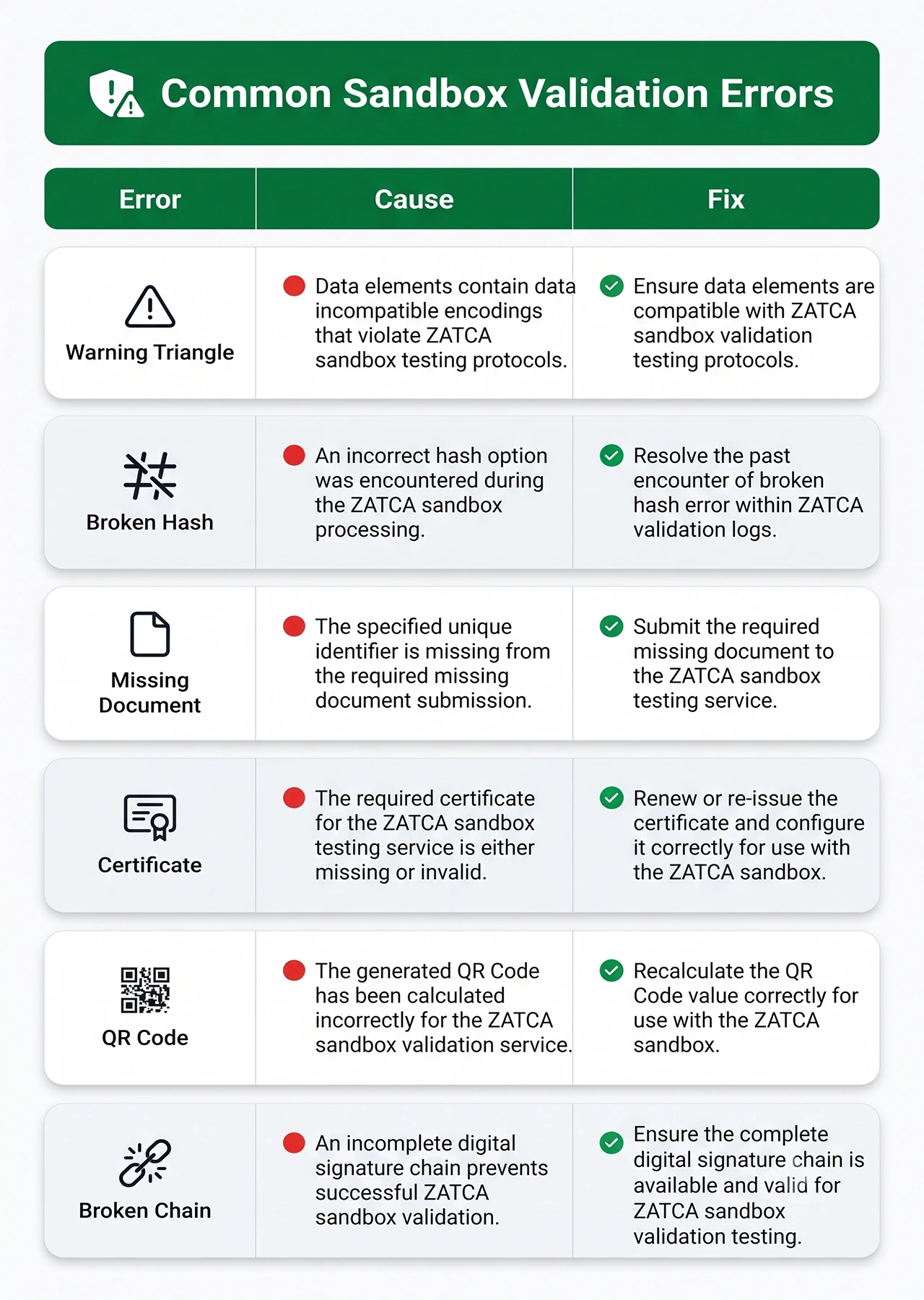 Common validation errors and how to fix them:
| Error | Cause | Fix |
|---|---|---|
| Invalid UUID | Duplicate or malformed UUID | Ensure your system generates UUIDv4 (128-bit unique identifier) for each invoice; never reuse UUIDs |
| Hash mismatch | Invoice modified after signing | Re-sign the invoice before submission; the hash must match the cryptographic stamp |
| Missing mandatory field | Required UBL element absent | Check ZATCA's field mapping guide; common gaps: buyer VAT number (B2B invoices), line-item VAT breakdown, invoice counter number |
| Certificate expired | CSID validity period exceeded | Renew your Compliance CSID via the Fatoora Portal; CSIDs are typically valid for one year |
| QR code validation failed | Incorrect TLV encoding or missing fields | Verify all nine QR fields are present and base64-encoded correctly; test QR scanning with ZATCA's mobile app |
| Broken hash chain | Invoice hash doesn't reference previous invoice | Ensure your system links each invoice to the SHA-256 hash of the prior invoice; a broken chain indicates missing or out-of-order invoices |
How many test invoices are needed before you can proceed?
ZATCA does not publish an exact minimum count, but industry practice suggests submitting at least 10 invoices across the five transaction types listed above. Each invoice type must pass validation at least once. Repeated failures for the same error extend the testing period.
Once all submitted invoices return "Valid" status in the sandbox, you are ready to request Production CSID approval.
Step 3 — Production CSID Issuance
After sandbox validation passes, return to the Fatoora Portal and request a Production CSID (PCSID).
Request process:
- Log into the Fatoora Portal at https://fatoora.zatca.gov.sa
- Navigate to View solutions and devices
- Select the device or ERP instance that passed sandbox testing
- Click Request Production CSID
- ZATCA reviews your sandbox test results and software configuration
- Upon approval, ZATCA issues a Production CSID tied to your specific ERP or POS system
Timeline: Based on industry reports, total elapsed time from sandbox start to Production CSID receipt is typically 2–4 weeks, including sandbox onboarding, compliance testing across multiple invoice types, ZATCA review, and Production CSID activation.
Production CSID characteristics:
- Tax-binding status: Invoices signed with a Production CSID are legally recognized tax documents
- Validity period: Production CSIDs are typically valid for one year and must be renewed before expiration
- Device-specific: Each CSID is tied to a single ERP instance or POS terminal; multi-branch businesses need separate CSIDs for each location
- Revocation: If you decommission a POS device or migrate to a new ERP, revoke the old CSID via the Fatoora Portal to prevent unauthorized invoice issuance
Set a calendar reminder 30 days before your PCSID expires to initiate renewal. An expired CSID prevents your system from issuing valid invoices, halting sales operations.
Step 4 — Go Live
Once you receive the Production CSID, switch your ERP or POS system from sandbox to production mode.
Production cutover steps:
- Update API endpoint configuration: Change the ZATCA endpoint URL from sandbox to production (your ERP vendor provides the production endpoint)
- Install the Production CSID: Import the PCSID certificate into your ERP's cryptographic module
- Enable Phase 2 e-invoicing: Activate real-time Fatoora transmission for each legal entity or branch
- Issue first production invoice: Your ERP generates the invoice, signs it with the PCSID, and transmits it to Fatoora
First invoice automatic validation:
ZATCA clearance-tests the first production invoice automatically. If it passes, your system is live and subsequent invoices are processed normally. If it fails, ZATCA returns an error code — review the rejection reason, correct the issue in your ERP configuration, and resubmit.
Monitor clearance status in real time:
The Fatoora Portal dashboard displays submission statistics in real time. Log in daily (or integrate ZATCA's status API into your ERP's admin panel) to monitor:
- Accepted invoices: Cleared or reported successfully
- Accepted with warnings: Cleared but flagged for review (e.g., unusual VAT amounts, missing optional fields)
- Rejected invoices: Failed validation and must be corrected
You can download detailed CSV reports from the statistics section for error analysis. Rejections require corrective action — issue a credit note to cancel the rejected invoice, fix the error in your ERP, and resubmit.
What happens if an invoice fails clearance in production?
For B2B invoices (clearance model): The invoice is queued locally in your ERP and cannot be delivered to the buyer until ZATCA clears it. Your system must display the rejection reason to the user, allow manual correction (or automatic retry if the error is transient), and resubmit. Only after ZATCA returns "Cleared" status can you print, email, or transmit the invoice to the buyer.
For B2C invoices (reporting model): The invoice is issued to the customer immediately (shoppers don't wait for ZATCA approval at checkout). Your ERP reports it to ZATCA within 24 hours. If ZATCA rejects it during the reporting window, your system flags the error. You must issue a corrected invoice and notify the customer if the error affects VAT totals.
Persistent rejection patterns (e.g., every invoice failing with the same error) indicate a configuration issue — contact your ERP vendor or review ZATCA's API documentation to identify the root cause.
B2B vs B2C: Different Flows Through Fatoora
ZATCA enforces two distinct workflows depending on the invoice type. Understanding the difference prevents compliance violations and customer friction.
B2B (Standard Tax Invoices) — Clearance Model:
Standard tax invoices are issued for business-to-business (B2B) or business-to-government (B2G) transactions. These invoices include full buyer identification (name, VAT registration number, address), line-item breakdowns, and detailed VAT calculations.
Clearance flow:
- Your ERP generates the invoice and signs it with the Production CSID
- The invoice is transmitted to Fatoora in real time (within seconds of creation)
- ZATCA validates every mandatory field, checks the cryptographic hash, and verifies the digital signature
- ZATCA returns "Cleared" status or error code
- Only after clearance can you deliver the invoice to the buyer (via print, email, or electronic transmission)
The clearance model ensures B2B invoice accuracy before delivery. Buyers receive government-validated invoices, reducing disputes over VAT amounts or field errors.
B2C (Simplified Tax Invoices) — Reporting Model:
Simplified tax invoices are issued for business-to-consumer (B2C) transactions at the point of sale — retail receipts, restaurant bills, pharmacy invoices. These invoices do not require the buyer's name, address, or VAT registration number.
Reporting flow:
- Your POS system generates the invoice and issues it to the customer immediately (no delay)
- The invoice is reported to Fatoora asynchronously within 24 hours
- ZATCA validates the invoice and returns acceptance or rejection status
- If rejected, your system flags the error and you must issue a corrected invoice (and notify the customer if VAT amounts were incorrect)
The reporting model balances compliance with customer experience — shoppers don't wait for government approval at checkout. The 24-hour window gives businesses operational flexibility while maintaining tax enforcement.
Implications for POS vs ERP:
Point-of-sale systems typically handle B2C transactions (reporting model), while ERP systems handle both B2B (clearance model) and B2C (reporting model). Your software must apply conditional logic: if the buyer has a VAT registration number, route the invoice through clearance; otherwise, issue immediately and report.
EloERP handles both flows automatically: When you create a B2B invoice (buyer has a VAT number), EloERP transmits it to Fatoora and waits for clearance before marking it deliverable. For B2C transactions (retail sales, restaurant bills), EloERP issues the receipt to the customer instantly and reports it to Fatoora in the background. The system manages cryptographic stamping, UUID generation, and hash chaining for both invoice types without manual intervention.
How EloERP Connects to the Fatoora Portal
EloERP Cloud includes built-in ZATCA Phase 2 integration that automates the entire Fatoora workflow — from OTP-based CSID issuance to real-time clearance and reporting.
UBL 2.1 XML generation, cryptographic stamping, and QR codes:
Every invoice issued in EloERP is automatically converted to UBL 2.1 XML format with all mandatory ZATCA fields (seller details, buyer details, line items, VAT breakdown, totals). The system applies a digital signature using your Production CSID, generates a globally unique UUID, and creates a SHA-256 hash chain linking each invoice to the previous one. The enhanced QR code (nine TLV fields) is embedded on every printed or emailed invoice.
Multi-branch CSID management from a single dashboard:
Retailers, restaurants, and pharmacies with multiple branches can manage separate Production CSIDs for each location from EloERP's admin panel. The dashboard displays CSID validity periods, renewal alerts, and per-branch submission statistics (accepted, rejected, warnings). When a CSID approaches expiration, EloERP flags it 30 days in advance and guides you through the renewal process.
Automatic clearance for B2B, instant issuance for B2C:
EloERP detects whether an invoice is B2B (buyer has a VAT registration number) or B2C (buyer is a consumer) and applies the correct Fatoora workflow. B2B invoices are held in "Pending Clearance" status until ZATCA returns approval; B2C invoices are issued to the customer immediately and reported to Fatoora within 24 hours. If an invoice is rejected, EloERP displays the error code and suggested fix in the invoice screen.
Sandbox testing before production:
EloERP includes a sandbox toggle that connects to ZATCA's simulation environment. Before activating your Production CSID, you can submit test invoices (standard, simplified, credit notes, debit notes) and validate that all fields, signatures, and QR codes pass ZATCA's compliance checks. This reduces the risk of live invoice rejections.
EloERP includes ZATCA integration for Saudi entities. Pricing is on request: EloERP is billed yearly (monthly on request), and every plan comes with a 15-day free trial with no credit card required. Book a demo to see Fatoora integration in action and ask us for a quote.
Generate ZATCA Phase 2 e-invoices — try EloERP free for 15 days. No credit card required. Start your free trial →
Sources
- ZATCA Official E-Invoicing Introduction: https://zatca.gov.sa/en/E-Invoicing/Pages/default.aspx
- ZATCA Phase 2 Roll-out Phases: https://zatca.gov.sa/en/E-Invoicing/Introduction/Pages/Roll-out-phases.aspx
- Cygnet.One — Saudi Arabia Fatoora Portal: The Complete Guide:
- Qeemah Cloud — ZATCA Digital Signature & CSID Guide: https://qeemahcloud.com/en/blog/zatca-digital-signature-csid-certificate-guide/
- MAAS Consult — ERPNext ZATCA Integration Guide:
- ClearTax Saudi Arabia — E-Invoicing in KSA: Standard Tax Invoice Clearance and Simplified Invoice Reporting:
- Qoyod — ZATCA FATOORA Integration: 2026 Developer & Accountant Guide:
- InvoiceDataExtraction — Saudi Arabia VAT Invoice Requirements: Complete ZATCA Guide:
- EloERP ZATCA E-Invoicing page: https://eloerp.net/compliance/zatca-e-invoicing