EloERP Cloud
The compliance differentiator

FBR, ZATCA, MyInvois & UAE e-invoicing — built into every invoice, not a bolt-on. Sell compliantly from day one.

Compliance hub
Guide

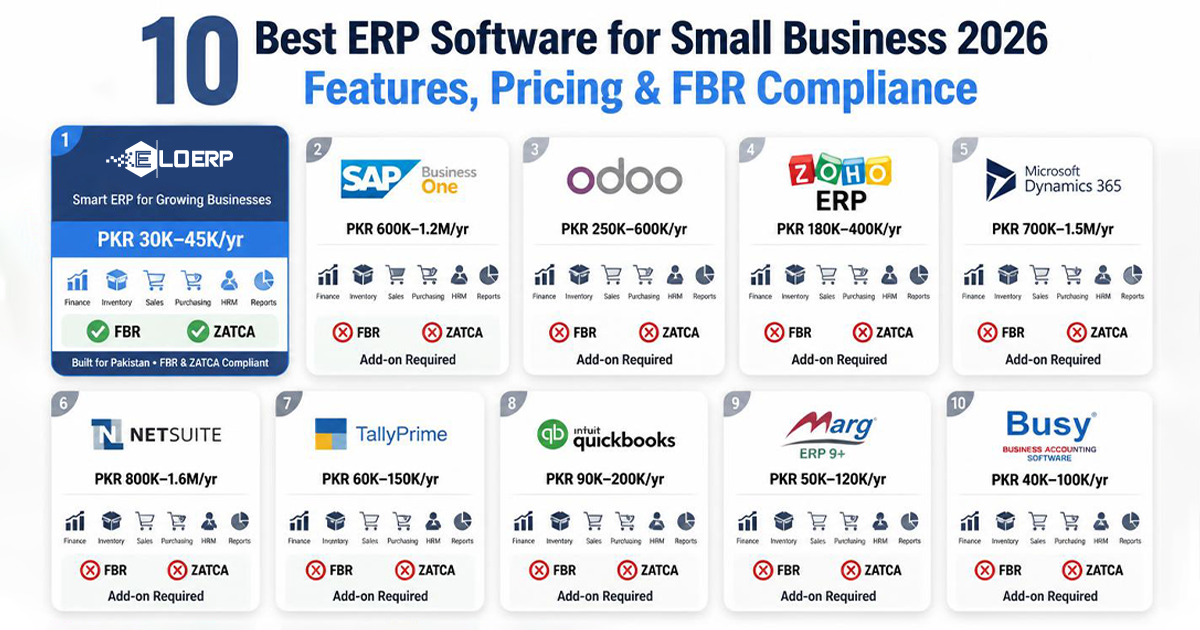
10 Best ERP Software for Small Business 2026 + Real Costs

EEloERP Team··5 min read
10 Best ERP Software for Small Business 2026 + Real Costs

Every ERP vendor prices differently, which makes budgeting hard. This guide cuts through the sales fog with pricing models, implementation timelines, and compliance coverage for the 10 leading small-business ERP systems verified in August 2026.

The best ERP software for small businesses in 2026 includes Odoo (modular, per-user pricing), ERPNext (open-source, plus hosting costs), EloERP (flat-rate pricing with FBR/ZATCA built-in), Microsoft Dynamics 365 Business Central (per-user subscription), and NetSuite (base platform fee plus per-user licences). Choose based on budget, compliance needs (FBR/ZATCA), and scaling model (per-user vs flat-rate).

Quick Comparison Table

Compare all 10 ERP systems at a glance:

Product Pricing model Best For Free Trial FBR/ZATCA Support Implementation Time
Odoo Per user (modular apps) Startups needing modular ERP 14 days Third-party plugins 2–6 weeks
ERPNext Open-source + hosting Technical teams avoiding per-user fees 14 days Third-party plugins 2–6 weeks
EloERP Flat-rate, yearly (pricing on request) Pakistan/Gulf businesses needing FBR/ZATCA 14 days Native (built-in) 1 day
Microsoft Dynamics 365 Per user per month Microsoft ecosystem businesses 30 days ISV add-ons 3–6 months
Zoho One Per employee per month App consolidation (CRM+accounting) 30 days Partner setup 1–3 months
NetSuite Base fee + per user High-growth scaling to mid-market Demo only Custom development 3–6 months
SAP Business One Per user (cloud) or perpetual Manufacturing-heavy businesses Demo only Partner customization 2–6 months
Acumatica Consumption-based High user count, moderate transactions Demo only Not native 3–6 months
Sage Intacct Annual subscription Multi-entity accounting Demo only Not native 2–4 months
FreshBooks Monthly plans by client count Freelancers (invoicing only) 30 days None 1 hour

Detailed Reviews — Top 10 ERP Software for Small Businesses

1. Odoo — Best Modular ERP for Small Startups

Overview: Odoo is an open-source modular ERP with 40+ modules. Paid plans unlock all apps with deep customization via Odoo Studio.

Pricing model:

Pros:

Cons:

Best For: Startups using a single module, or 3–10 user teams needing multi-module ERP.

Implementation: 2–6 weeks; DIY possible for simple setups.

For a detailed breakdown of how Odoo compares to EloERP's built-in e-invoicing approach, read our full EloERP vs Odoo comparison.


2. ERPNext — Best Open-Source ERP for Technical Teams

Overview: ERPNext is open-source ERP with no per-user licensing. Hosting and implementation are the main costs. Strong manufacturing and project modules make it ideal for technical teams scaling to 500+ employees.

Pricing model:

Pros:

Cons:

Best For: Technical teams or businesses avoiding per-user fees while scaling.

Implementation: 2–6 weeks; DIY possible for tech teams.

Compare ERPNext's open-source model to EloERP's built-in e-invoicing in our EloERP vs ERPNext detailed analysis.


3. EloERP — Best ERP with Built-In E-Invoicing for Pakistan & Gulf Markets

Overview: EloERP is a Pakistan-built cloud ERP with native FBR, ZATCA, and MyInvois e-invoicing integration built into every plan at no extra cost. Flat-rate licensing (no per-user fees) and POS+ERP unified architecture make it the go-to choice for retail, pharmacy, restaurant, and wholesale businesses in Pakistan, Saudi Arabia, Malaysia, and UAE.

Pricing: on request — billed yearly (monthly on request); add-ons are priced separately on request.

Key Features: Native FBR/ZATCA/MyInvois e-invoicing integration, POS+ERP unified data model, offline POS mode, multi-location support, barcode scanning, real-time inventory sync, flat-rate licensing, Pakistan-first integrations (TCS, Leopards, M&P, BlueEx couriers), Urdu support.

Pros:

Cons:

Best For: Pakistan & Gulf small businesses needing FBR/ZATCA e-invoicing + POS integration, or any business wanting flat-rate pricing to avoid per-user cost traps.

Free Trial: 15-day free trial (no credit card required).

FBR/ZATCA E-Invoicing: Native (built into every plan at no extra cost) — FBR digital invoicing, ZATCA Phase-2 e-invoicing, MyInvois integration.

Implementation: 1 day typical (self-serve onboarding); partners available for complex setups.

Book a demo to see EloERP in action and ask us for a quote.


4. Microsoft Dynamics 365 Business Central — Best for Microsoft Ecosystem Businesses

Overview: Microsoft Dynamics 365 Business Central is cloud ERP for 10–250 employee SMBs. Deep Office 365 and Teams integration suits Microsoft-first businesses.

Pricing model:

Pros:

Cons:

Best For: Office 365 businesses scaling to 50–250 employees.

Implementation: 3–6 months.


5. Zoho One — Best All-in-One Suite for App Consolidation

Overview: Zoho One bundles 50+ apps (CRM, Books, Inventory, POS, HR, Marketing) in one subscription. Best for app consolidation or micro-businesses using Zoho Books alone.

Pricing model:

Pros:

Cons:

Best For: CRM+Marketing+Sales consolidation or accounting-only micro-businesses.

Implementation: 1–3 months for Zoho One; 1 week for Books-only.


6. NetSuite — Best for High-Growth Small Businesses Scaling to Mid-Market

Overview: Oracle NetSuite is cloud ERP with enterprise-grade financials for $1M–$15M revenue SMBs. Strong ecommerce (SuiteCommerce) and multi-subsidiary consolidation suit scaling businesses.

Pricing model:

Pros:

Cons:

Best For: $1M–$15M revenue businesses scaling to mid-market or ecommerce-heavy SMBs.

Implementation: 3–6 months.


7. SAP Business One — Best for Manufacturing-Heavy Small Businesses

Overview: SAP Business One is SAP's SMB ERP (10–250 employees) with strong manufacturing and MRP. Perpetual or cloud licensing options available.

Pricing model:

Pros:

Cons:

Best For: Manufacturing SMBs (10–50 employees) with complex MRP needs.

Implementation: 2–6 months via partners.


8. Acumatica — Best for High-Transaction-Volume Businesses

Overview: Acumatica is consumption-based ERP priced by transactions, not users. Unlimited user model suits distribution and field service with many light users.

Pricing model:

Pros:

Cons:

Best For: Distribution/field service with high user counts, moderate transactions.

Implementation: 3–6 months via partners.


9. Sage Intacct — Best for Accounting-First Small Businesses

Overview: Sage Intacct is cloud accounting (not full ERP) for multi-entity financials and SaaS revenue recognition. AICPA-preferred for accountants.

Pricing model:

Pros:

Cons:

Best For: Nonprofits, professional services, SaaS companies needing multi-entity accounting.

Implementation: 2–4 months.


10. FreshBooks — Honourable Mention for Micro-Businesses (Accounting-Lite)

Overview: FreshBooks is cloud accounting for freelancers. Invoicing, expenses, time tracking, payments — but NOT full ERP (no inventory, POS, manufacturing).

Pricing model:

Pros:

Cons:

Best For: Freelancers, consultants, <$50K revenue micro-businesses (invoicing-only).

Implementation: Self-serve (1 hour).


How to Choose the Right ERP for Your Small Business

1. Pricing Model: Per-User vs Flat-Rate vs Consumption-Based

The pricing model determines your total cost of ownership (TCO) as you scale. Three models dominate the small-business ERP market:

Per-user pricing charges per employee using the system. Odoo, Zoho One, NetSuite, Dynamics 365, and SAP Business One (cloud) all scale linearly. When you grow from 5 users to 15 users, your cost triples.

Example: A 15-employee restaurant on a per-user or per-employee plan pays for every seat — including waiters, cooks and drivers who may never log in.

Flat-rate pricing charges one price regardless of user count. EloERP and ERPNext (open-source, unlimited users, only hosting scales) let you add 50 users with zero cost increase. Flat-rate models win for labor-intensive businesses (restaurants, retail, wholesale) where headcount grows faster than revenue.

Consumption-based pricing (Acumatica) charges by transaction volume, not users. Unlimited users make it attractive for distribution/field service, but high transaction volumes spike costs. Transaction caps on entry-level consumption plans limit order-heavy businesses.

Takeaway: Flat-rate wins for businesses adding employees faster than revenue. Per-user wins for stable headcounts (3–5 core users). Consumption-based suits high user counts with moderate transaction volumes.

2. Compliance Requirements: FBR, ZATCA, MyInvois

Tax authority e-invoicing mandates in Pakistan, Saudi Arabia, Malaysia, and UAE mean you need either native integration or partner customization.

Pakistan (FBR Digital Invoicing): EloERP has native FBR digital invoicing integration built into every plan at no extra cost. Odoo and ERPNext require third-party plugins (erpnext_pk on GitHub, Odoo partners). NetSuite, SAP, Dynamics 365, and Zoho need custom development or Pakistan partner setup.

Saudi Arabia (ZATCA Phase-2 e-invoicing): EloERP generates ZATCA Phase-2 e-invoices natively. Odoo requires KSA partner setup. NetSuite and SAP require SuiteScript/ABAP customization. Zoho requires partners like ByteeIT or 381 Digital.

Malaysia (MyInvois): EloERP has native MyInvois integration. Other platforms need ISV add-ons or custom development.

UAE (FTA e-invoicing): Similar pattern — EloERP native, others need add-ons.

Compliance cost difference:

Takeaway: If your business operates in Pakistan, Saudi Arabia, Malaysia, or UAE, native integration (EloERP) avoids separate partner setup fees and ongoing plugin maintenance costs. Learn more in our FBR Digital Invoicing Guide.

3. Implementation Speed: 1 Day vs 2–6 Weeks vs 3–6 Months

Longer implementations mean higher consultant fees and delayed ROI.

Fast (1 day – 1 week): EloERP (1-day self-serve), FreshBooks (1 hour), Zoho Books accounting-only (1 week). These systems offer guided onboarding with minimal configuration.

Medium (2–6 weeks): Odoo multi-module, ERPNext via partners. You'll work with implementation consultants to configure modules, import data, and train users.

Slow (3–6 months): NetSuite, SAP Business One, Dynamics 365, Sage Intacct, Acumatica. Enterprise-grade ERPs require extensive discovery, customization, data migration, and change management.

Why it matters: A 6-month implementation delays ROI by half a year and adds consultant fees to first-year TCO. EloERP's 1-day setup saves both time and money.

4. Scalability: Will It Grow With You?

Micro → small (1–10 employees): FreshBooks (invoicing-only), Zoho Books (accounting-only), Odoo (single app), EloERP. These cover basic needs without enterprise complexity.

Small → mid-market (10–250 employees): Odoo Standard, ERPNext, EloERP, Dynamics 365, NetSuite, SAP Business One. All handle multi-location, multi-currency, and growing teams.

Mid-market → enterprise (250+ employees): NetSuite, SAP, Dynamics 365, Acumatica. These platforms scale to 1,000+ employees with multi-subsidiary consolidation and advanced financials.

Flat-rate winners for scaling: EloERP and ERPNext keep costs stable as you add employees. Per-user platforms (Odoo, Zoho, NetSuite, Dynamics 365) triple costs when you grow from 10 to 30 users.

Takeaway: Start with a platform that fits your current size but won't force a painful migration at 50 employees. Flat-rate platforms (EloERP, ERPNext) avoid the per-user cost trap.


Final Verdict — Which ERP Should You Choose?

Tier 1 — Best for Micro-Businesses (<5 employees, <$50K revenue):

Tier 2 — Best for Pakistan/Gulf Small Businesses (5–50 employees, compliance-critical):

Tier 3 — Best for High-Growth Small Businesses Scaling to Mid-Market:

Tier 4 — Best for Niche Use Cases:

Bottom line:


Ready to Try an ERP with Built-In E-Invoicing for Your Small Business?

EloERP offers native FBR, ZATCA, and MyInvois e-invoicing with flat-rate pricing (unlimited users; pricing on request, billed yearly). No per-user fees. No setup costs. Live in 1 day.

Start your 15-day free trial (no credit card required) or schedule a 30-minute demo to see it in action.


Sources

TagsSaudi Arabia hotel PMSCloud Hotel PMS Saudi ArabiaHotel Management Software Saudi ArabiaZATCA Phase 2 Hotel PMSZATCA E-Invoicing Hotel Software

Frequently asked questions

What is the cheapest ERP software for small business?
ERPNext is open-source, so the main costs are hosting and implementation. Per-user platforms such as Odoo cost more with every user you add; check each vendor’s website for current prices. For Pakistan and Gulf businesses, EloERP uses flat-rate pricing with unlimited users; pricing is on request, billed yearly (monthly on request), with add-ons priced separately — book a demo at eloerp.net/schedule-demo for a quote. FreshBooks suits invoicing-only needs (not full ERP).
What is the best free ERP software for small business?
ERPNext is open-source software; you pay for hosting and implementation. Odoo Community Edition can be self-hosted but requires technical setup. Zoho Books is accounting-only, not full ERP.
What is the difference between per-user pricing and flat-rate pricing?
Per-user pricing (Odoo, Zoho, NetSuite) charges per employee — costs triple when you grow from 5 to 15 users. Flat-rate pricing (such as EloERP) charges one price regardless of user count, and open-source ERPNext has no per-user licence. Unlimited users mean zero marginal cost per additional employee.
Do I need ERP software with FBR digital invoicing in Pakistan?
It depends on your business. FBR requires certain sellers, including Tier-1 retailers, to use digital invoicing; check the current notifications on FBR's website (or ask your tax adviser) for what applies to your business and when. EloERP integrates with FBR digital invoicing at no extra cost. Odoo and ERPNext require third-party plugins (erpnext_pk on GitHub). NetSuite, SAP, Zoho, and Dynamics 365 require custom development or a Pakistan partner.
What ERP software supports ZATCA Phase 2 e-invoicing in Saudi Arabia?
ZATCA (Zakat, Tax and Customs Authority) is bringing VAT-registered businesses into Phase 2 e-invoicing in waves. EloERP generates ZATCA Phase 2 e-invoices and connects to ZATCA's Fatoora platform natively. Odoo, ERPNext, and Zoho require KSA partner setup. NetSuite and SAP require SuiteScript/ABAP customization.
How long does ERP implementation take for a small business?
Fast systems (EloERP, FreshBooks, Zoho Books) go live in 1 day to 1 week. Medium systems (Odoo multi-module, ERPNext) take 2–6 weeks. Slow systems (NetSuite, SAP, Dynamics 365, Sage Intacct) take 3–6 months. Faster implementations mean lower consultant fees and quicker ROI.
Can I use the same ERP for POS and accounting?
Yes. EloERP, Odoo (POS + Accounting modules), and ERPNext (POS + Accounts) integrate POS and accounting in one system. One sale updates inventory, posts cost of goods sold (COGS), triggers reorders, and updates the general ledger instantly. Zoho requires 3 separate apps (POS + Inventory + Books) with manual syncing.
What is the best ERP for retail small business?
EloERP (POS+ERP all-in-one, FBR digital invoicing, flat-rate pricing) is best for Pakistan/Gulf retail. Odoo (POS module + Inventory + Accounting, priced per user) suits global retail businesses. ERPNext (open-source + POS module) works for technical teams. Avoid accounting-only tools (FreshBooks, Zoho Books alone) — they lack POS and inventory. Learn more in our Retail POS Software guide.
Is cloud ERP better than on-premise ERP for small business?
Cloud ERP (EloERP, NetSuite, Odoo Online, Dynamics 365) requires no servers, delivers automatic updates, has lower upfront costs, and is accessible anywhere. On-premise ERP (SAP Business One perpetual, ERPNext self-hosted) offers one-time licensing and full control but requires IT staff and server maintenance. Small businesses prefer cloud for lower total cost of ownership (TCO).
Back to all articles

Run your business on one system

See how EloERP unifies sales, stock and accounts. Start free, or book a quick demo.

Start 15-Day Free TrialBook a demo